Fundamentals
You can use the Oracle Cloud Infrastructure (also called "IaaS" - Infrastructure as a Service) to deploy JD Edwards EnterpriseOne using the JD Edwards EnterpriseOne One-Click Provisioning Server. This server features a web-based JD Edwards Provisioning Console interface that enables the provisioning of a fully functional suite of interconnected servers within Oracle Cloud Infrastructure. The required core servers are the Database Server (either as an Oracle Cloud Infrastructure Compute instance, as an Oracle Cloud Infrastructure database service, or as an Oracle Autonomous Database), the Enterprise Server, the HTML Web Server, and the Application Interface Service (AIS) Server. The One-Click Provisioning Server includes the JD Edwards Server Manager Console (SMC). One-Click Provisioning will also deploy the required Deployment Server into a Microsoft Windows environment.
All servers running in the Oracle Cloud Infrastructure are virtual machines (VMs) that are functionally equivalent to their non-VM physical on-premises machine counterparts.
For all servers you should use the highest version available that is specified in the Oracle Certifications for JD Edwards EnterpriseOne for One-Click Provisioning.
The following servers can be deployed by One-Click Provisioning:
- One or more Database Servers either in Compute or as an Oracle Cloud Infrastructure database service
- One or more Enterprise Servers
- One or more Standard JAS Servers (as standalone instances within WebLogic, not clustered)
- One or more Dedicated HTML Servers (as standalone instances within WebLogic, not clustered)
- One or more AIS Servers (as standalone instances within WebLogic, not clustered)
Prior to deploying the web components using One-Click, users must separately install their own licensed version of WebLogic Server. This learning path includes the prerequisites for WebLogic setup for use with JD Edwards EnterpriseOne.
One-Click provisioning can only deploy this machine into a Microsoft Windows Server:
- A single Deployment Server
Standard JAS and Dedicated HTML for AIS Servers
Beginning with One-Click Provisioning based on JD Edwards Tools Release 9.2.5, the JD Edwards EnterpriseOne One-Click architecture for HTML and AIS Servers introduces the concept of Standard JAS and Dedicated HTML for AIS Servers.
Using Quick Start Mode, users are required to select a single HTML Server that is dedicated to a specific AIS Server.
Using Advanced Mode, in addition to configuring additional Dedicated HTML and AIS server pairs, users can add a Standard JAS Server that is not dedicated to an AIS Server. A Standard JAS Server functions as a traditional HTML Server handling all non-AIS requests. To scale by pathcode, multiple pairs of HTML and AIS servers can be configured. Likewise, multiple Standard JAS Servers can be configured for use with or without load balancers. Using one or more Standard JAS Servers is recommended for Production environments.
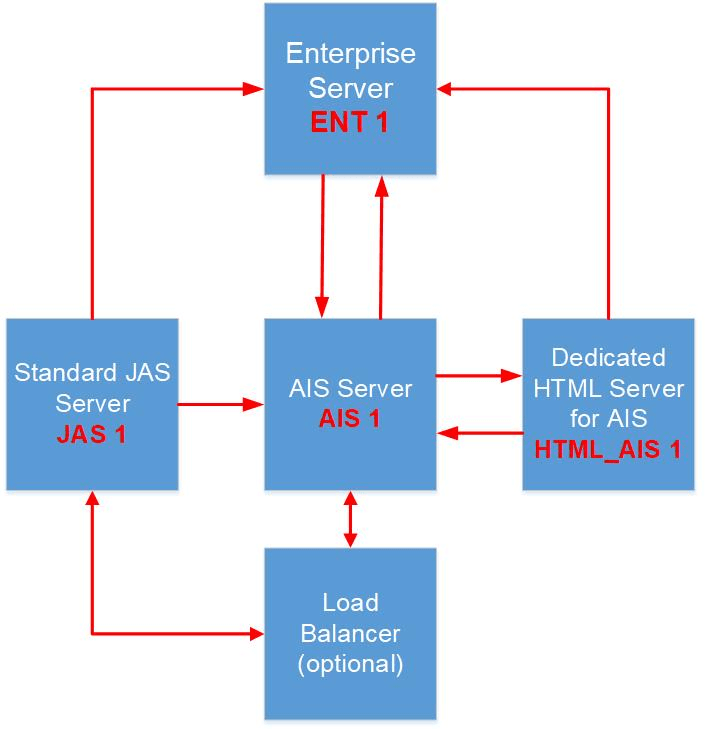
- Standard JAS ServerImportant: The Standard JAS Server can only be deployed using the Advanced Mode.
Referencing the architecture diagram, the Standard JAS Server is JAS 1 and has these characteristics:
- Can be load balanced (using LBaaS or other)
- Configured for one-way communication to a specific Enterprise Server (ENT 1)
- Configured for one-way communication to an AIS Server (AIS 1)
- Not paired with an AIS Server to perform AIS runtime
- Not configured to communicate with the Dedicated HTML Server for AIS (HTML_AIS 1)
- AIS Server
Referencing the the pod architecture diagram, the AIS Server is AIS 1 and has these characteristics:
-
Can be load balanced (using LBaaS or other)
-
Paired with a Dedicated HTML Server for AIS (HTML_AIS 1)
-
Configured for two-way communication with both an Enterprise Server (ENT 1) and, for AIS runtime, to the Dedicated HTML Server for AIS (HTML_AIS 1)
-
- Dedicated HTML Server for AISImportant: The Quick Start mode can only deploy a single Dedicated HTML Server for AIS. You must use the Advanced Mode to deploy a Standard HTML Server.
Referencing the the pod architecture diagram, the Dedicated HTML Server for AIS is HTML_AIS 1 and has these characteristics:
-
Cannot be load balanced (using LBaaS or other)
-
Paired to a specific AIS Server (AIS 1)
-
Configured for one-way communication with an Enterprise Server (ENT 1)
-
Configured for two-way communication with a specific AIS Server (AIS 1) for AIS runtime.
-
Standalone Deployment Server
You can use Advanced Mode to install a Standalone Deployment Server, which is usually defined as part of the required workflow during Quick Start mode. Using this optional flow you can provision Deployment Server by itself without having to orchestrate any other server. However, you must ensure that you know the exact host name of the core JD Edwards EnterpriseOne servers that are, or will be, in the same environment as the Standalone Deployment Server. These core servers include the Database Server, Enterprise Server, HTML Server, and AIS Server. It is not necessary that of any of these core JD Edwards EnterpriseOne servers exists at the time of orchestrating the Standalone Deployment Server. At any time prior or subsequent to the deployment of a Standalone Deployment Server, you can orchestrate the core JD Edwards EnterpriseOne servers. After you have deployed a Standalone Deployment Server, you must ensure that you perform the procedures in the OBE of this Learning Path entitled: Performing Post Installation for the Standalone Deployment Server.
Server Manager Console Centralized Configuration
As part of One-Click Provisioning, Centralized Configuration in the Server Manager Console is enabled automatically. One-Click adds the server group specific INI settings when provisioning individual servers. Post provisioning, the administrator is responsible for applying the group changes on the Centralized Configuration enabled environments.