Obtaining and Using Archive Files for One-Click Provisioning
This section shows you how to obtain and use archive files for One-Click Provisioning for JD Edwards EnterpriseOne.
Prerequisites
- You must have created a VM or a server for the Provisioning Server.
- The Linux instance for the Provisioning Server must be allocated with storage volume space, the amount of which is specified in the Before You Begin section at the beginning of this Learning Path.
- You must have performed the functions described in the module of this Learning Path entitled: All Servers Common Setup.
Obtain, Unzip, Assemble, and Extract the Provisioning Server Archive Files
Due to file size limitations for files available from the Oracle Software Delivery Cloud (also called OSDC or E-Delivery), the requisite archive cannot be posted as a single entity. Instead you must download a series of files that have been split into allowable sizes and then assemble them into a single archive, and then extract the contents of that archive using the following procedure.
- Download the files for JD Edwards EnterpriseOne One-Click Provisioning from the Oracle Software Delivery Cloud using All Categories and JD Edwards One-Click Provisioning as the search criteria. From the displayed list, choose the combination of JD Edwards EnterpriseOne applications and tools releases and proceed to add the items to your cart.
- Click Selected Software and then use the drop-down menu for JD Edwards One-Click Provisioning to choose Linux.
- To continue, review and agree to the license agreement.
A list of available files is shown.
-
Download the items in your cart. These items have part numbers in the form of
VXXXXXX.zipand may not be in sequential order. -
From your download location, unzip all files, which will extract the DiskPart files that need to be reassembled, a rebuild script, and a checksum file.
-
Upload all the unzipped files to any directory on the Provisioning Server.
Note: At this point it is recommended that, space permitting, you make a copy of these files in case you need to reuse them without re-downloading and re-uploading. -
Ensure the rebuild.sh script has the proper permissions to execute by using this command:
chmod 775 rebuild.sh -
Execute the rebuild script with this command:
sudo ./rebuild.shThe script performs these operations:
Step 1 - Checks to ensure sufficient space is available on /u01 to complete the extraction
Step 2 - Combines the unzipped pieces of the archive file into a single file
Step 3 - Uses the checksum utility to verify the recombined file size
Step 4 - Moves the JD Edwards packages to the proper location, which is /u01
Note: The extraction and rebuild process can take quite some time, perhaps as long as 10 to 20 minutes.
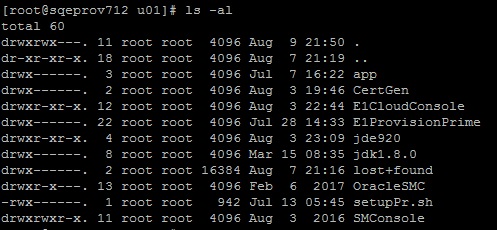
/u01 should contain the following
components: