Updating the Release Master
If you have upgraded the Deployment Server to be 64-bit and enabled all pathcodes to be 64-bit, the Release Master (P00945) should indicate the release is 64-bit.
Tools Release 9.2.6 and beyond presents the ability to have a 64-bit only system. The
Release Master application is used to indicate a 64-bit only system. When you have all
the pathcodes, the Enterprise system, and the client foundation converted to 64-bit, and
enabled 64-bit in the Release Master, the package will only contain include64
and source64. The package will build the
dlls with a 64-bit settings. The client installation will have
bin64, obj64, lib64,
source64,and include64 files. The server will
deploy the bin64 directory. In Busbuild, you will be able to compile,
link, and build in 64-bit only. After the 64-bit release is enabled, you cannot revert
to 32-bit.
If you update all pathcodes to 64-bit and have enabled the Release flag for 64-bit, the package will only extract and build the 64-bit artifacts, resulting in the following:
- When assembling the package, you can only select 64-bit foundations.
- During the retrieval of the .c and .h files on the Enterprise Server, package build
will only extract the 64-bit files,
include64andsource64. - The business functions build process on the Enterprise Server will build the 64-bit
artifacts for the 64-bit dlls or
.soorpgmfiles. - The process to copy the include file and the source file to the Development Client
will only transfer the
checkin\include64file and thecheckin\source64file to the Development Client. - The client Busbuild will only build and compile the 64-bit artifacts to create the
bin64,lib64, andobj64files. - Only the 64-bit directories will be compressed. These directories are
include64,source64,bin64,obj64, andlib64.
Once you update the Release Master to 64-bit, you cannot revert back to 32-bit.
Beginning with Tools Release 9.2.6.x, when the Release 64-bit Flag is turned on in
Release Master P00945, you should only build a 64-bit package to deploy to the
Development Client. This Development Client must not have either the
\include or \source folder under the path
code. The ER compare uses the local include64 and
source64 code to compare. Therefore, you should not change
these JDE.INI settings:
[SVR]
SourcePath=source
HeaderPath=include
Updating the Release Master
To update the Release Master:
- Sign in to the Development Client on any standard environment.
- Enter P00945 in the Fast Path to access the Work with Release Master form.
- Select the release you want to update.
- Select Enable 64-bit from the Row menu items.
-
Select the option Enable 64-bit flag in Release Master.
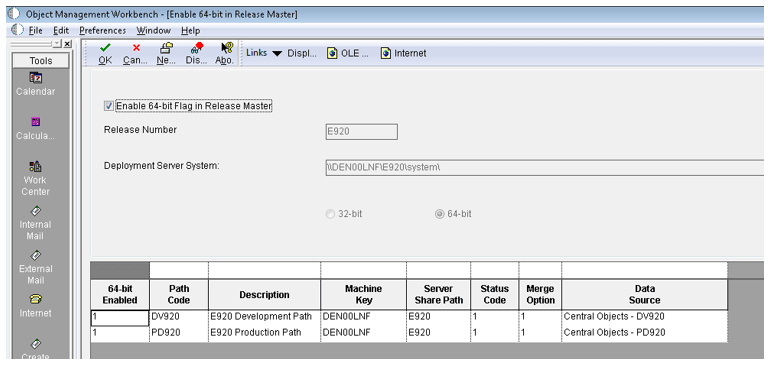
- Click the OK button.
- Click the OK button on the Confirm 64-bit Enabled dialog box.