Installing Business Function ESUs
A number of JD Edwards EnterpriseOne business functions require modification to be successfully processed on both a 32-bit system and a 64-bit system. To obtain the required updates to these functions, perform these actions:
- Get code current by taking all the currently available ESUs.
- Apply ESUs identified with a new Change Assistant query.
Applications Update UN3 includes all the original updates that were required for JD Edwards EnterpriseOne to run 64-bit.
Running New 64-bit Business Function Change Assistant Profile
Change Assistant can be run from any Microsoft Windows workstation or server, but it is best utilized when run from the JD Edwards EnterpriseOne Deployment Server.
- Launch Change Assistant.
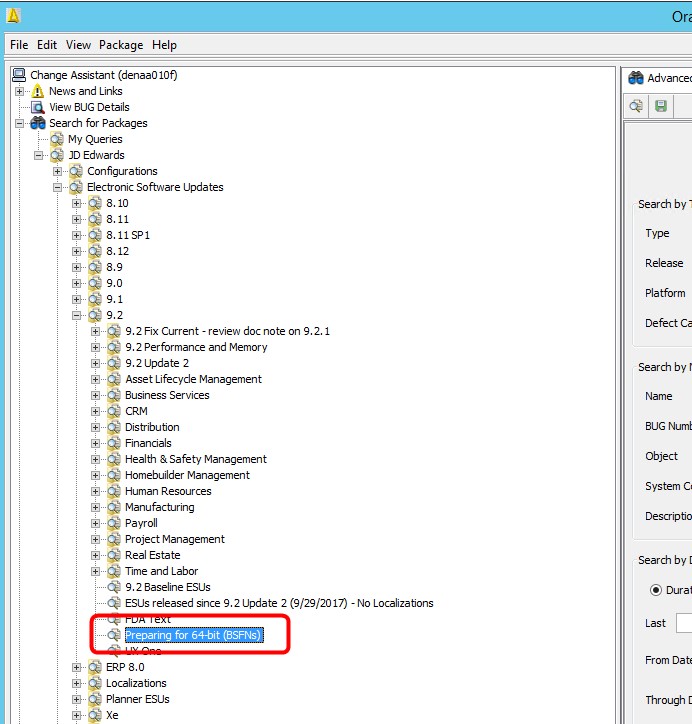
- Expand the Search for Packages node.
- Navigate to JD Edwards Electronic Software Updates 9.2 and select the profile,
Preparing for 64-bit (BSFNs).
-
Click the Search button.
Note: Change Assistant only displays the first 20 records retrieved.
- Click the >> button in the upper-right side of the page to display all records.
- Verify that all the ESUs were selected. If not, click the check mark above the grid to automatically select all the displayed ESUs.
- To apply the ESUs to a target path code, click the Download button and select Download To and Deploy, <Folder to Download To>.
- If Solution Explorer is not already running, you will be prompted to sign in to JD Edwards EnterpriseOne. Enter valid Planner credentials and click OK.
-
Select the environments to which you want to apply the ESUs. Optionally, select if the ESUs will:
- Run in attended or unattended mode.
- Create a backup of existing objects prior to updating the objects in each ESU package.
- Create an OMW and package definition for each ESU package.
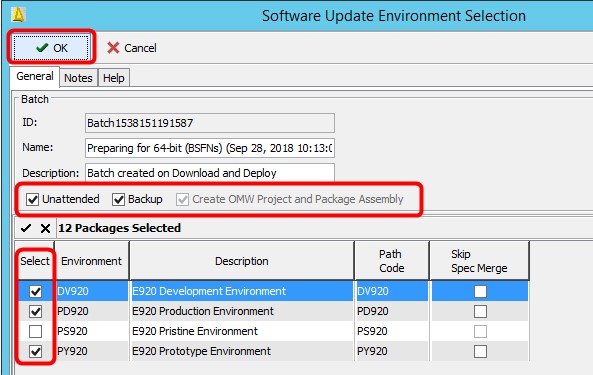
- Click the OK button to begin the batch process to install the ESU packages.
- Review the generated PDFs for success.
- When all the ESU packages are installed, close Change Assistant.