Introduction
This Oracle by Example (OBE) describes how to set up the JD Edwards EnterpriseOne Sustainability Framework system to record and report for Scope 3 - Waste generated in operations. In this OBE, you will configure determinants, define an activity type and an activity source, and create a ledger entry to track sustainability.
Background
Organizations are increasingly required to track and report embodied greenhouse gas emissions from the life cycle of waste generated in operations, as part of Scope 3, Category 5. The JD Edwards EnterpriseOne Sustainability Framework provides foundational components and activity ledgers to record these details.
Scenario
An electronics manufacturer operates a facility that generates hazardous waste, including spent batteries, as part of its operations. Additionally, significant agricultural product waste is managed at certain locations. The company tracks these waste streams for sustainability reporting under Scope 3, Category 5. Let us set up the components of the Sustainability Foundation:
Prerequisites
- Access to Oracle JD Edwards EnterpriseOne with Sustainability Framework enabled (system code 20S active).
- Appropriate roles and permissions to update Sustainability Foundation configurations.
- Next Numbers configured for activity documents and batches.
- Availability of supplier and Business Unit master data.
1: Setting Up Determinants
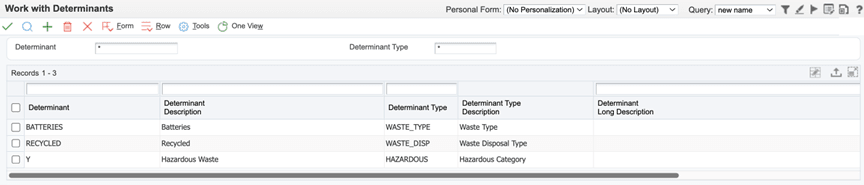
Create determinants to track the types of waste (for example, hazardous batteries):
- Sign in to the EnterpriseOne web client.
- From the EnterpriseOne Menus, select Sustainability Framework Setup (G20S41), and then select Determinants (P20S05).
- On the Work with Determinants form, click Add to open the Determinants Revision form (W20S05C).
- For each row, enter values in the following fields for the
respective column:
Field Value Determinant BATTERIESDeterminant Description Batteries
Determinant Type WASTE_TYPE
Determinant RECYCLED
Determinant Description Recycled
Determinant Type WASTE_DISP
Determinant Y
Determinant Description Hazardous Waste
Determinant Type HAZARDOUS
- Click OK to save the determinants.
2: Mapping Determinant Type
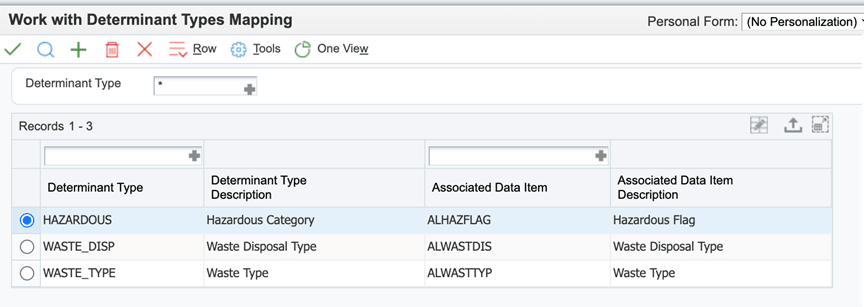
To store determinants in the Activity Ledger table, map the determinant types to their corresponding columns.
- From the EnterpriseOne Menus, select Sustainability Framework Setup (G20S41), and then select Determinant Types Mapping (P20S09).
- On the Work with Determinant Types Mapping form, click Add to open the Determinant Types Mapping Revision form (W20S09B).
- Enter the following mappings in the grid for the two determinant types:
- Click OK to save the changes.
| Field | Value |
|---|---|
| Determinant Type | HAZARDOUS |
| Associated Data Item | ALHAZFLAG |
| Determinant Type | WASTE_DISP |
| Associated Data Item | ALWASTDIS |
| Determinant Type | WASTE_TYPE |
| Associated Data Item | ALWASTTYP |
3: Defining Activity Type for Waste Generated in Operations
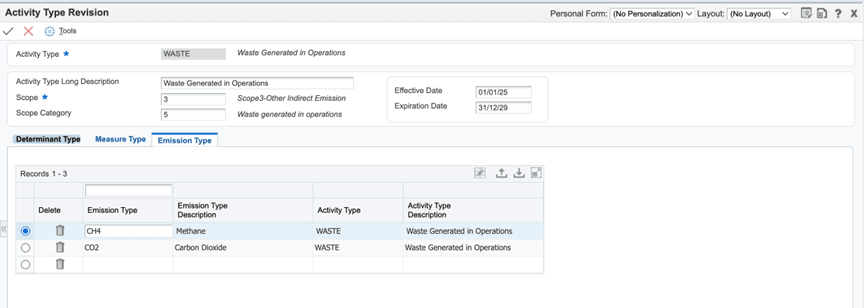
- From the EnterpriseOne Menus, select Sustainability Framework Setup (G20S41), and then select Activity Types (P20S01).
- On the Work with Activity Types form, click Add to open the Activity Type Revision form (W20S01D).
- Enter the following values:
- Activity Type:
WASTE - Activity Type Long Description:
Waste Generated in Operations - Scope:
3 - Scope Category:
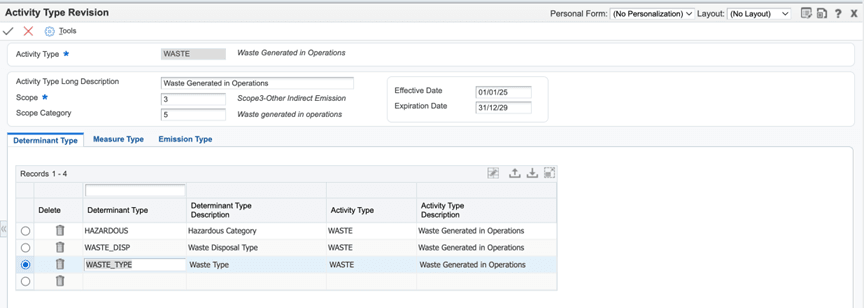
5 - On the Determinant Types tab, create three rows, one each for
determinant types :
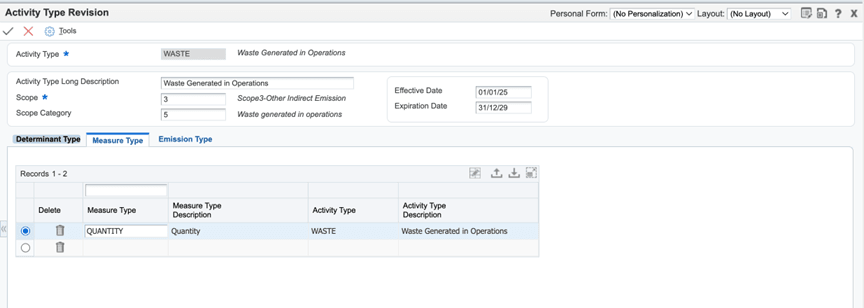
WASTE_TYPE,WASTE_DISPandHAZARDOUS. - Enter measure type
QUANTITYin the Measure Type field in the detail grid on the Measure Type tab. - (Optional) Enter the emission types for the Waste activity
type in the Emission Type field on the Emission Types tab:
CH4,CO2. - Click OK to save the changes.
4: Defining Activity Source
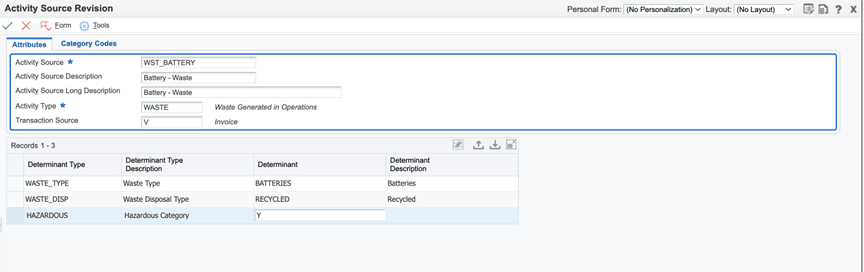
To uniquely represent the source of waste generated in operational activities and its relevant characteristics, thereby enabling accurate emission factor selection, we will designate WST_BATTERY as the activity source.
- From the EnterpriseOne Menus, select Sustainability Framework Setup (G20S41), and then select Activity Source (P20S07).
- On the Work with Activity Types form, click Add to open the Activity Source Revision form (W20S07C).
- Enter the following values:
- Activity Source:
WST_BATTERY - Activity Source Description:
Battery - Waste - Activity Type:
WASTE - Transaction Source:
V(to specify the source of voucher or invoice) - Determinant:
BATTERIES,RECYCLED, andY(in the three rows) - Click OK to save the changes.
5: Entering the Sustainability Activity Record in Activity Ledger (P20S11)
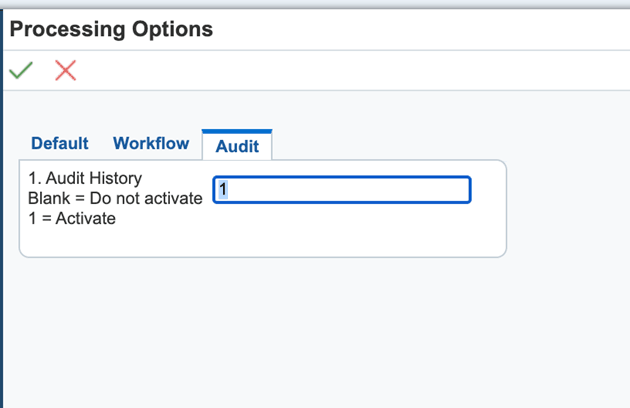
Set up processing options for Sustainability Framework MBF (P20S12):
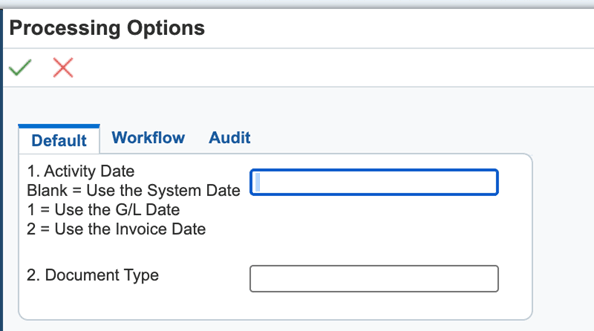
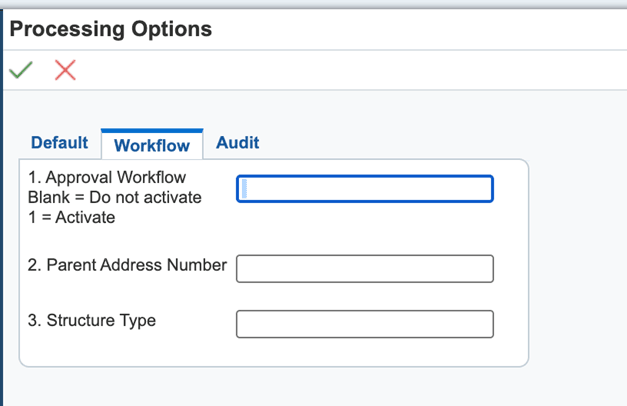
- From the EnterpriseOne Menus, enter
IVin the Fast Path, and then enterP20S12in the Interactive Application field. Open Sustainability Framework MBF and select Processing Options from the Row menu. - Enter processing options on each tab as required:
- Default tab: Set relevant defaults for sustainability processing.
- Workflow tab: Configure workflow options (if applicable).
- Audit tab: Enter 1 to enable auditing if required by compliance or reporting, else leave it blank.
Set up processing options for Activity Ledger (P20S11):
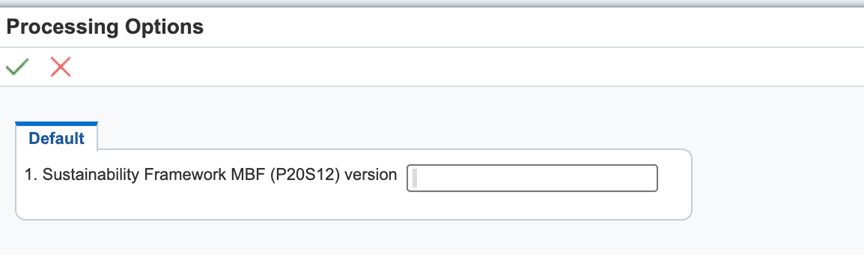
- From the EnterpriseOne Menus, select Sustainability Framework Processing (G20S10), and then right-click Standard Voucher Entry (P20S11IZJDE0001) and select Processing Options.
- Select the Default tab, and then enter value for Version processing option. You can leave it blank for the system to consider ZJDE0001.
Enter Sustainability Activity Record in Activity Ledger (P20S11)
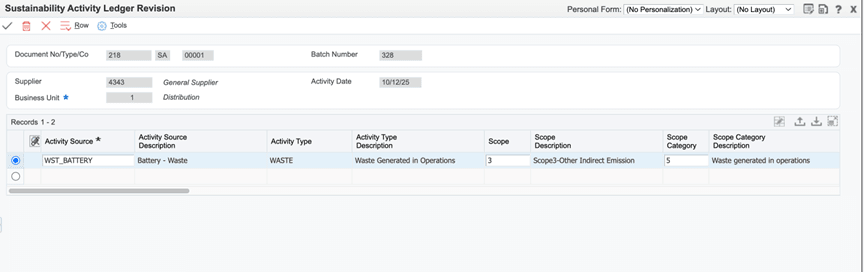
- From the EnterpriseOne Menus, select Sustainability Framework Processing (G20S10), and then select Sustainability Activity Ledger (P20S11).
- On the Sustainability Activity Ledger form, click Add to open the Sustainability Activity Ledger Revision form.
- Enter the following values in the header and detail sections:
- Supplier:
4343 - Business Unit:
1 - Activity Date:
System Date - Activity Source:
WST_BATTERY - Resource Quantity:
500 - Resource UoM:
EA - Transaction Amount:
2000
- Remark:
December-Waste - Click OK to save record.
Conclusion
In this OBE, you learned how to create the setup to track Scope 3 - Waste generated in operations in JD Edwards EnterpriseOne, improving accuracy and compliance in sustainability and emissions reporting.
Related Links
Capturing Scope 3 - Waste Generated in Operations in JD Edwards EnterpriseOne
G49842-03
January 2026
Copyright © 2026, Oracle and/or its affiliates.