Setting Up a Local Unit, Course, or GPA Limit Requirement
Local limit requirements work to limit the number of units or courses that can be counted toward a specific requirement group, requirement, or requirement line. With the use of more advanced derived lists, local limits can also apply to a dynamically generated group of targets (such as all courses used by a particular plan). Unlike their global course limit requirement counterpart, local course limit requirements have a specific target to which they apply, even if that target is dynamically generated from a derived list.
Here's how to set up a simple local course limit requirement:
-
Create an academic course list that includes the course or courses that you want to limit. For example, Psychology 499 (to represent a special course for independent research that is repeatable, but that can count towards graduation up to a maximum of 8 units.)
-
Locate an existing All Stats academic requirement Line Item that requires or includes as options these same courses. For example, the Psychology Major requirement.
-
For the same requirement mentioned in step 2, add another line item with a Line Type of Unit, Course, or GPA Limit.
-
On the Line Item Parms page, for the Unit, Course, or GPA Limit line, specify a Maximum Units Allowed value of 8, and a Maximum Courses Allowed value of 999. The system will obey the lower of the two limit numbers (in this case, 8 units).
-
Access the Line Item Detail page for the limit line, and attach the course list you created in step 1.
-
To target the course limit to a requirement, intersect the course list for the limit line with a derived list that specifies the target in greater detail. For example, if the requirement has multiple requirement lines, and you want the maximum 8 units of Psychology 499 requirement to apply only to one of many lines in the requirement:
-
On the Line Item Detail page, insert a second Line Detail Type of DLST. Select a List Include Mode of I — Intersection With. Select a List Recall Mode of Used by Requirement, and specify the requirement and line number that you specifically want to limit.
-
Save the requirement.
-
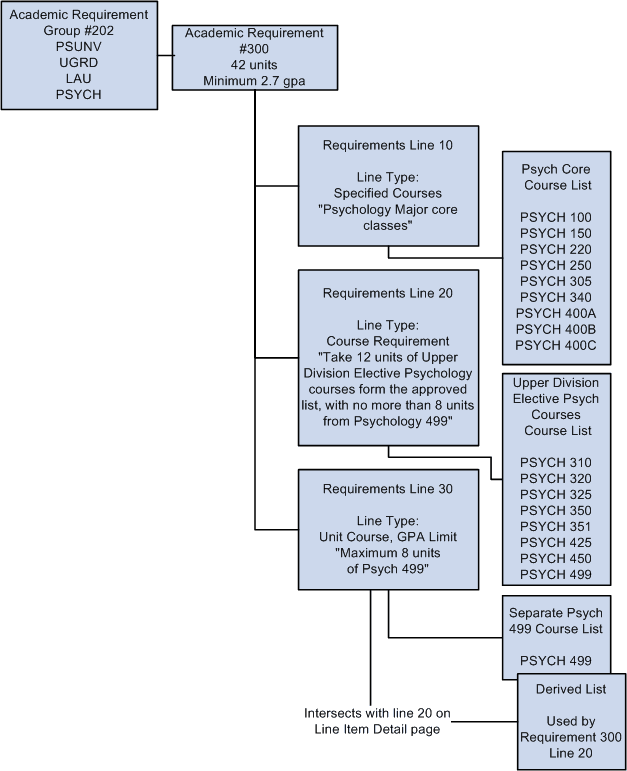
The following diagram displays an overview of how to set up a local unit, course, or GPA limit requirement:
The diagram illustrates how to set up a local unit, course, or GPA limit requirement.