Accessing File Field Values
To reference an incoming File Field value, you need to obtain two key values associated with that specific field. These key values are Segment Number and the Sort Order Number.
To obtain the required keys, follow these steps:
Step 1: Identify the File Fields you wish to access.
In this example, we want to access the incoming Home Phone Area Code and the Home Phone.
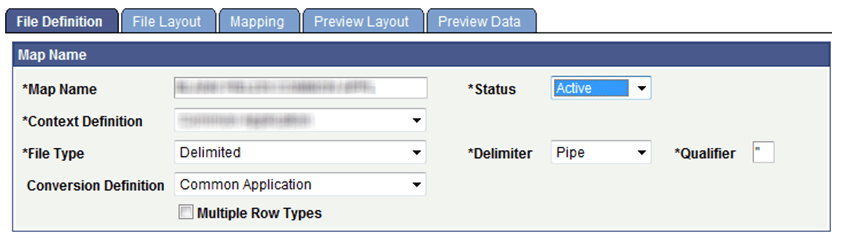
Step 2: Identify the Segment Number. This value is derived based upon the File Definition. If the File Definition does not contain Multiple Row Types (that is, you have not selected the Multiple Row Type check box), then the Segment Number will always be a value of 1 (one).
This example illustrates the fields and controls on the File Definition page - Multiple Row Types is not selected. You can find definitions for the fields and controls later on this page.
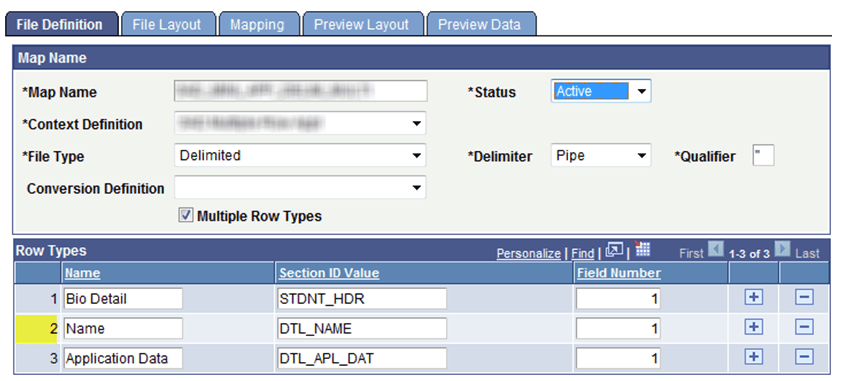
In this example, a Segment Number of 2 (two) would be used if fields contained within DTL_NAME are to be referenced:
This example illustrates the fields and controls on the File Definition page - Multiple Row Types is selected. You can find definitions for the fields and controls later on this page.
Step 3: Obtain the Sort Order Number(s). The Sort Order Number can be found on the File Layout page:
This example illustrates the fields and controls on the File Layout - Location tab. You can find definitions for the fields and controls later on this page.
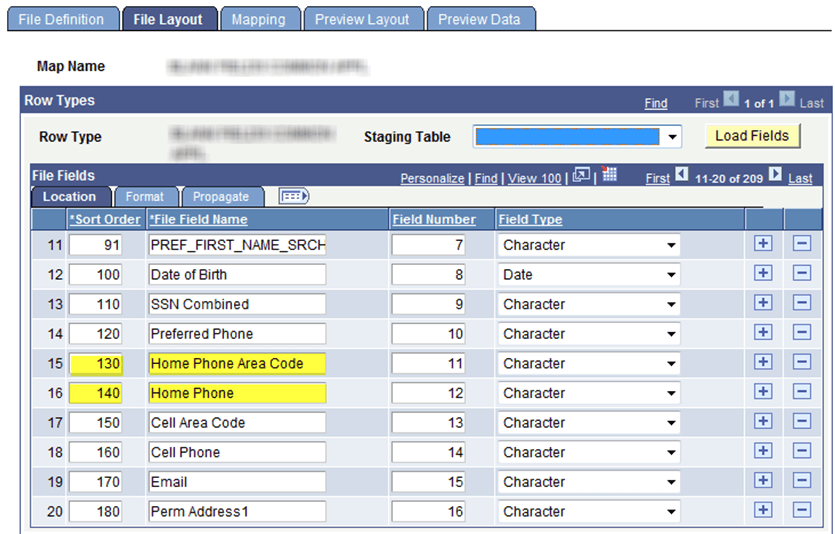
In the graphic we see that Home Phone Area Code has a Sort Order Number of 130, and the Home Phone Sort Order Number is 140.
Step 4: Write these values down to be referenced within your application class.
The following application class code illustrates how to reference data elements that reside at the incoming File Field level.
Note:
In the following code, only the code formatted in bold can be changed by the developer. Rest of the code is required to successfully run or reference staging field values.
import SCC_FILE_PARSER:MODEL:Results:ResultsField;
import SCC_FILE_PARSER:UTIL:FieldCalculationAbstract;
import SCC_FILE_PARSER:MODEL:Results:ResultsFileFields;
import SCC_FILE_PARSER:MODEL:Results:ResultsCollection;
/**
* class BuildHomePhone
*
* @version 1.0
* @author Your Institution
*
* Module: Your Application
* Description: Your Description
*/
/**
* This Application Class is designed to read two values, Home Phone Area Code
* and Home Phone from the incoming File Fields. They will then be concatenated
* into one single field and passed back to the mapped field containing the
* Calculated mapping action/reference to this Application Class.
*/
class BuildHomePhone extends SCC_FILE_PARSER:UTIL:FieldCalculationAbstract
/* public methods */
method BuildHomePhone();
method calculateValue(&ResultsFieldIn As SCC_FILE_PARSER:MODEL:Results:ResultsField,
&ResultsCollectionIn As SCC_FILE_PARSER:MODEL:Results:ResultsCollection) Returns any;
private
instance string &FileFldValueOut;
instance string &FieldValueString01, &FieldValueString02;
instance SCC_FILE_PARSER:MODEL:Results:ResultsField &ResultsField;
instance SCC_FILE_PARSER:MODEL:Results:ResultsCollection &ResultsCollection;
instance SCC_FILE_PARSER:MODEL:Results:ResultsFileFields &FileFldValueField;
end-class;
/**
* Instantiate the App. Class.
*/
method BuildHomePhone
%Super = create SCC_FILE_PARSER:UTIL:FieldCalculationAbstract();
end-method;
/**
* This method is the main driver that passes back the derived value.
*/
method calculateValue
/+ &ResultsFieldIn as SCC_FILE_PARSER:MODEL:Results:ResultsField, +/
/+ &ResultsCollectionIn as SCC_FILE_PARSER:MODEL:Results:ResultsCollection +/
/+ Returns Any +/
/+ Extends/implements SCC_FILE_PARSER:UTIL:FieldCalculationAbstract.CalculateValue +/
Local integer &filesegout, &fldnumout;
&FileFldValueField = &ResultsCollectionIn.RFF;
/**
* Assign the appropriate value for the Segment Number to be passed to
* the Method FetchFileFieldValue.
*/
&filesegout = 1; /* File Segment Number will always be 1 for non-multiple row types. */
/**
* Assign the appropriate value for the File Field value to be passed to
* the Method FetchFileFieldValue.
*/
/* Home Phone Area Code */
&fldnumout = 130;
&FieldValueString01 = &FileFldValueField.FetchFileFieldValue(&filesegout, &fldnumout);
/* Home Phone */
&fldnumout = 140;
&FieldValueString02 = &FileFldValueField.FetchFileFieldValue(&filesegout, &fldnumout);
/**
* Test that we have values to build and pass back.
*/
If (&FieldValueString01 <> " " And
&FieldValueString02 <> " ") Then
/* Build the home phone number */
&FileFldValueOut = &FieldValueString01 | " " | &FieldValueString02;
Else
&FileFldValueOut = " ";
End-If;
Return &FileFldValueOut;
end-method;