Constituent Transaction Management and New User Registration
You can configure your login page to request additional personal information such as first name, last name, email address and so on when a user creates a new user ID. To store this information in the production tables, an EMPLID is required. If the user does not have an EMPLID at the time of registration, New User Registration uses the Constituent Transaction Management (CTM) framework to store the personal information in the CTM constituent staging tables. During this process, the system enters the information using a temporary ID (SCC_TEMP_ID), and uses the CTM transaction code NEW_USER_REGISTRATION that is delivered with your system. If New User Registration is followed by a subsequent CTM online transaction (and that CTM transaction is set up to be partitioned by constituent), the system can gather additional personal information, create or assign an EMPLID, then promote the staged constituent data to the respective production tables.
The following diagrams show where CTM takes place as part of the New User Registration flow:
This example illustrates the fields and controls on the Create Account Page for New Users. You can find definitions for the fields and controls later on this page.
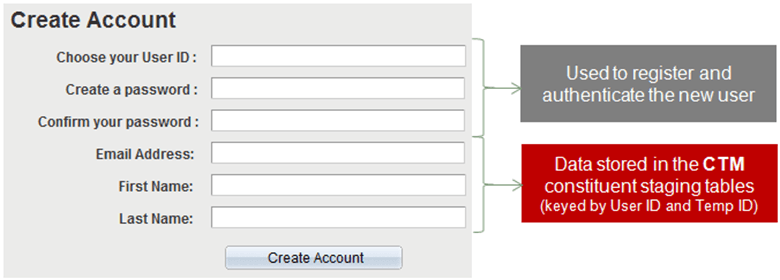
This example illustrates the fields and controls on the Login Page for Existing Users. You can find definitions for the fields and controls later on this page.

When New User Registration consumes CTM, the system does not trigger the process to create EMPLIDs. This prevents non-serious individuals from creating user records for themselves in your system and populating your database with dummy names or with users that never pursue any other actions with your institution. To prevent this, CTM triggers Search/Match only when the guest performs a subsequent transaction such as an online application. Only then is the constituent data considered valid.
Note:
CTM is not involved when an existing user signs into your system through New User Registration. This is because at the time of authentication the returning user is typically only asked to enter a user ID and a password.
The self-service online transaction that you integrate with New User Registration does not need to be a CTM transaction. A self-service online transaction is usually configured for CTM when the data provided by the self-service user needs to be staged before it is moved to the production tables, or when an EMPLID needs to be associated with the self-service user. Using CTM allows for no user interruption to assign an EMPLID. If the integrated self-service online transaction does not require an EMPLID to be assigned or no data to be staged, it can still be integrated with New User Registration.