Defining 3C Groups
This section discusses how to:
-
Define a 3C update/inquiry group.
-
Define a communication 3C group.
Pages Used to Define 3C Groups
| Page Name | Definition Name | Navigation | Usage |
|---|---|---|---|
|
3C Update/Inquiry Group Table |
GRP_3C_TABLE |
|
Define a group of users who have similar needs and interests. |
|
Communication 3C Groups |
COMM_GRP_3C_TABLE |
|
Associate one or more 3C update/inquiry groups with a communication category. |
Defining a 3C Update/Inquiry Group
Access the 3C Update/Inquiry Group Table page ().
This example illustrates the fields and controls on the 3C Update/Inquiry Group Table page. You can find definitions for the fields and controls later on this page.
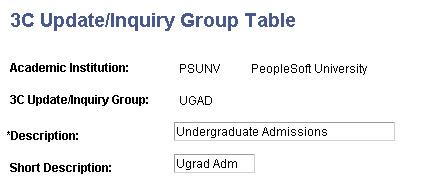
Define a group of users who have similar needs and interests. You can then associate one or more 3C Update/Inquiry Groups with a communication category to create a Communication 3C Group.
Security Administrators give users security access based on 3C update/inquiry groups.
Defining a Communication 3C Group
Access the Communication 3C Groups page ().
This example illustrates the fields and controls on the Communication 3C Groups page. You can find definitions for the fields and controls later on this page.
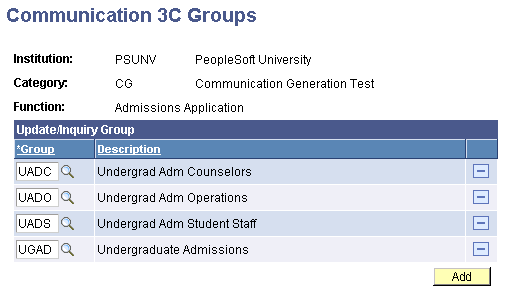
Update/Inquiry Group
| Field or Control | Description |
|---|---|
|
Group |
Enter each group that should have access to this communication category. Available group codes are from the 3C Groups page. |
|
Description |
The system displays the long description, from the 3C Groups page, of the group that you select. |