Defining Transaction Purge Process Criteria
Access the Transaction Purge Process page.
This example illustrates the fields and controls on the Transaction Purge Process page. You can find definitions for the fields and controls later on this page.
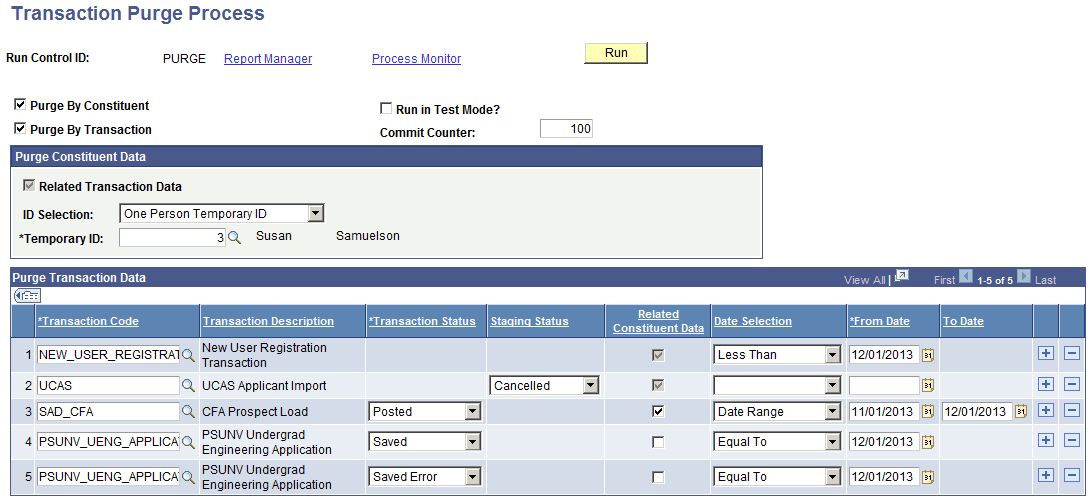
After you define the Transaction Purge Process criteria, click Save to save the scope of the run control component, and then click Run to invoke the application engine process SCC_SL_PURGE.
| Field or Control | Description |
|---|---|
|
Purge By Constituent |
Select to toggle the Purge By Constituent group box, which enables you to purge a single constituent, or use Population Selection to process a set of constituents. |
|
Purge By Transaction |
Select to toggle the Purge Transaction Data group box, which enables you to select multiple transactions along with their associated criteria, or purge specific transactions. |
|
Run in Test Mode |
Select to run the purge process and see the results (that is, the number of temporary staging IDs to be processed) in the Purge log table without updating or deleting any of the data from the staging tables. If you do not select this check box, tables are updated. Note: The Commit Counter is available only when Run in Test Mode is not selected. |
|
Commit Counter |
When the transaction purge process is not run in Test Mode, this value denotes the number of temporary IDs that are processed, which when surpassed, will invoke a SQL COMMIT command. Once the COMMIT has been processed, the counter is reset and processing will continue with the remaining IDs. The default value is set to 100 temporary IDs. You can override this value to reflect your site’s system requirements. If you are unsure what this value should be, contact your database administrator (DBA) who can then advise what the commit level should be. |
Purge Constituent Data
| Field or Control | Description |
|---|---|
|
Related Transaction Data |
By default, this check box is always disabled to ensure referential integrity. This means that when any constituent is deleted, all transaction codes associated with the constituent are also deleted. |
|
ID Selection |
Select:
|
Population Selection
Population selection is a method for selecting the IDs to process for a specific transaction. The Population Selection group box is a standard group box that appears on run control pages when the Population Selection process is available or required for the transaction. Selection tools are available based on the selection tools that your institution selected in the setup of the Population Selection process for the application process and on your user security. Fields in the group box appear based on the selection tool that you select. The fields act the same from within the group box no matter what run control page you are on or what transaction you are processing. If your institution uses a specific selection tool (PS Query or external file) to identify IDs for a specific transaction, you must use it.
When you create your own queries, make sure the first record is the bind record SCC_SL_PURG_BND. This record has been added to the QUERY_TREE_CC Access Group of CTM PURGE. The required fields are:
-
SCC_TEMP_ID - Temp Constituent ID
-
SCC_TRANSAC_CD - Transaction Code
-
SCC_STG_STATUS - Staging Status
-
SCC_STG_STS_DT - Staging Status Date
Purge Transaction Data
| Field or Control | Description |
|---|---|
|
Transaction Code |
The values that are available are comprised of the list of Transaction Codes to which you have access via the Transaction Security component. See Setting Up CTM, Setting Up CTM Transaction Security. |
|
Transaction Status |
Select a status. The status serves as another criterion by which transactions are selected. This field does not appear for transactions such as NEW_USER_REGISTRATION where the transaction is set up as a New User Registration transaction. |
|
Staging Status |
This field appears only for transactions that are defined as using only constituent data, such as the United Kingdom's University and Colleges Admissions Service (UCAS). This field serves as another criterion by which transactions are selected. |
|
Related Constituent Data |
Select to delete the constituent data associated with the temporary ID. The associated constituent data is deleted only if no other transaction codes are tied to the temporary ID. Otherwise, the request to delete constituent data is ignored and a diagnostic message does not appear. For transactions that are defined to store only constituent data, the Related Constituent Data check box is automatically selected and grayed out. This lets you know that the transaction consists of only constituent data and for the transaction to be purged the related constituent data must be deleted. |
|
Date Selection |
This field provides logical operators with which to evaluate dates. When you select a logical operator and specify dates, it acts as another criterion by which transactions are selected. Select:
|