(Optional—only for online transactions) Step 11: Creating a Setup Component for a CTM Consumer
In the Transaction Setup component you create a Transaction Code and associate the data update rule value and the Search/Match parameters you want to use when the transaction is performed. Now, for your CTM consumer, depending on the values entered by a self-service user while performing the transaction, you may want to use different data update rules and Search/Match settings. For instance, the AAWS Online Application may allow online users to apply to an institution PSUNV and to an academic career UGRD. Now a different online user may apply to institution ORACL and to an academic career GRAD. Because the different institutions or the different academic careers business processes may differ, you may need to use different data update rule codes or different Search/Match parameters to process these two transactions. This is achieved by setting two different transaction codes and using a setup component that will interpret, based on the data entered by the self-service user, which transaction code to use. Notice that this is possible because the same staging records, production records, application classes and user interface are used to perform the two transactions. Only the values entered vary.
Therefore, depending on the nature of the CTM consumer you are creating, you may, like for AAWS Online Application, need to create multiple transaction codes for the same transaction. You do so if you want to use a specific data update rule code or Search/Match parameters based on the values entered by the self-service user while performing the transaction. A setup component for the CTM consumer will therefore need to be created to identify what fields and values should define which Transaction Code to use. The transaction codes will use the same staging and production records, the same application classes, the same entities, and the same staging component. Only the data update rule or the Search/Match parameters (defined for the Transaction Code) could be different based on the data entered by the self-service user.
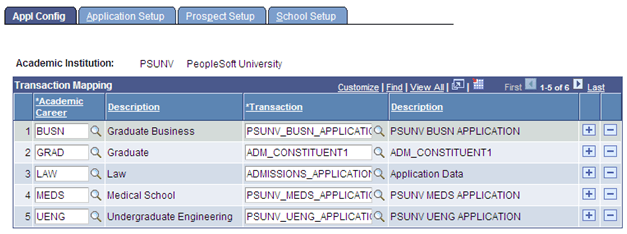
An example of a setup component for a CTM consumer is delivered with the AAWS admission transaction: Application Configuration component (SAD_ADM_APL_CONFIG). Typical to admissions, their business processes function differently from one institution to another and from one academic career to another. While the staging and the production tables are the same, the behavior to update them and to process the transaction varies depending on the institution and the academic career values entered by the self-service user.
The following shows the extended transaction setup component delivered with the AAWS admissions online application transaction. To access this component, select
This example illustrates the fields and controls on the Example of an extended transaction setup component – Application Configuration component. You can find definitions for the fields and controls later on this page.
When a self-service user or an administrator uses the institution-created user interface to perform an online transaction, logic should be in place inside the user interface to interrogate the extended transaction setup component to determine which Transaction Code to use based on the values entered by the user.
For example, a transaction code PSUNV_UGRD_EXAMPLE is created with a data update rule value DO_NOT_UPDATE_RULE and a second transaction code ORACL_GRAD_EXAMPLE with a different data update rule value DEFAULT_UPDATE_RULE. The extended transaction setup component should specify that for institution PSUNV and academic career UGRD, the transaction code to use is PSUNV_UGRD_EXAMPLE. And for institution ORACL and academic career GRAD to use transaction code ORACL_GRAD_EXAMPLE.
Note:
The Application Configuration component supports only AAWS.