(Optional) Step 5: Creating a Transaction Staging Component
Delivered with CTM is the Constituent Staging component. The component enables an administrative user to review, update, and correct errors related to the staged constituent data entered for a CTM transaction. The component also enables the administrative user to process the transaction for which the constituent data was entered. But different consumers of CTM will probably also have transaction-specific data in addition to constituent data in a CTM transaction. In such a scenario, you can optionally create a component, similar to the Constituent Staging component, which an administrative user can use to review, update, and correct errors related to the staged transaction-specific data. The transaction staging component will complement the Constituent Staging component. Both must use the Temporary ID field (SCC_TEMP_ID) as high level key. The transaction staging component name you create and the menu navigation where you place it can be entered in the Transaction Setup component (in the Transaction Data Launch View group box). This will set a hyperlink on the Constituent Staging component allowing the user to easily navigate to the appropriate transaction staging component for the selected Temporary ID. To create your own transaction staging component and connect it with the delivered Constituent Staging component, we have delivered three subpages that can be inserted directly into the component you create in Application Designer.
Note:
Each functionality that consumes CTM will probably require its own transaction staging component to display the transaction data specific to the functionality. Creation considerations:
-
At the top of the first page of your transaction staging component, add the following three delivered subpages:
-
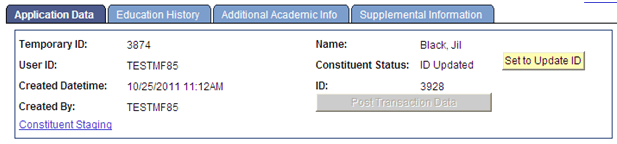
SCC_STG_HEADER_SBP: Used inside any transaction staging components (that is, this subpage can be used for all transactions). Contains all the generic fields pertinent to a CTM transaction, for instance, Temporary ID, User ID, Name, Constituent Status, and so on. The subpage also contains the fields for manually processing the transaction. For instance, the Run Search/Match/Post, Post Transaction Data, and Set to Update ID buttons. Finally, it contains the logic to assure proper component behavior based on the Constituent Status and the Transaction Status. The following is an example of the SCC_STG_HEADER_SBP subpage when used in a transaction staging component:
This example illustrates the fields and controls on the Example of the SCC_STG_HEADER_SBP subpage. You can find definitions for the fields and controls later on this page.
-
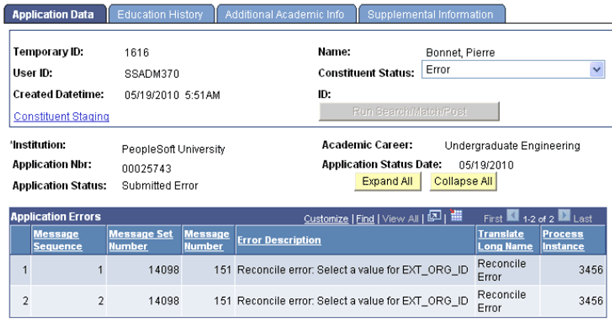
SCC_MESSAGELOG_SBP: Contains the grid for the errors that are found when CTM processes the transaction. The following is an example of the SCC_MESSAGELOG_SBP subpage when used in a transaction staging component:
This example illustrates the fields and controls on the Example of the SCC_MESSAGELOG_SBP subpage. You can find definitions for the fields and controls later on this page.
-
SCC_TRANSAC_SBP: Contains the transaction generic information and offers the possibility to unpost a posted transaction. The following is an example of the SCC_TRANSAC_SBP subpage when used in a transaction staging component:
This example illustrates the fields and controls on the Example of the SCC_TRANSAC_SBP subpage . You can find definitions for the fields and controls later on this page.

-
-
Below the subpages, add the fields that you had included in the transaction staging records. Based on the quantity of data to display, use as many tabs as you need. Each tab should include the SCC_STG_HEADER_SBP subpage as header.
-
Create the component search record to include the desired access security. Consider using a view that will return the Temporary IDs of only the transactions for which the component is built. For instance, your institution might be using CTM for AAWS admissions transaction as well as for a new CTM consumer. Because these two CTM consumers use different transaction staging records, you will be using two different transaction staging components. The search record for your new transaction staging component could limit the Temporary IDs that have rows in one or more staging records (staging records that you created for your new CTM consumer). This way, your users will not see the Temporary IDs that performed the AAWS transactions. Also, consider securing the search record. For instance, the delivered search record to access the Constituent Staging component does not restrict the returned Temporary IDs. However, the delivered search record to access the Application Transactions staging component (SAD_APPL_STG) limits the returned Temporary IDs based on Application Center security tied to the User ID that accesses the staging component. The Application Transactions staging component is delivered with AAWS.
-
Once you create the component, component PeopleCode must be added to have the logic contained in the three subpages working properly. To do so, a generic application class (SCC_SL_TRANSACTION:UTIL:StageReviewBase) is delivered. It contains properties and methods that process data, change user interface details of fields residing in the three sub-pages. The application class must be extended and methods in it should be overridden according to functional requirement.
For example, to construct its transaction staging component (Application Transactions component), AAWS admission transaction uses the application class SAD_ADM_APPL:Components:SAD_APPL_STG. This application class extends the SCC_SL_TRANSACTION:UTIL:StageReviewBase application class. The StageReviewBase class contains Recruiting and Admissions specific logic.
Note:
SCC_SL_TRANSACTION:UTIL:StageReviewBase contains a method called constituentStatusChangeEvent(). This method is invoked every time the SCC_STG_STATUS property is changed. This method is intended to be overridden by the subclass to add transaction specific logic.
Note:
The SCC_SL_TRANSACTION:UTIL:StageReviewBase contains the SCC_RERUN_PUSH_BTN_FieldChange(); and SCC_CONST_STS_UPD_FieldChange(); methods. These two methods should be defined in the subclass and invoked from component record field PeopleCode events of the records fields <component>.SCC_SL_DERIVED.SCC_RERUN_PUSH_BTN.FieldChange and <component>.SCC_SL_DERIVED.SCC_CONST_STS_UPD.FieldChange. This is necessary to ensure that the push buttons on the header subpage works. Explanation to various other methods and properties of StageReviewBase class is given inside the application class itself. These methods/properties may or may not be overridden based on functional requirements.
Note:
The SCC_SL_TRANSACTION:UTIL:StageReviewBase contains a method called method processtrandtls to populate the subpage SCC_TRANSAC_SBP. This method populates the fields of the subpage related to the transaction from the transaction staging record. This method should be called during the time of building transaction staging component and also every time the transaction staging record undergoes data changes during transaction processing.
Note:
The SCC_SL_TRANSACTION:UTIL:StageReviewBase contains a method called SCC_TRANSTG_WRK_SCC_STS_UNPOST_Fieldchange. If you wish to provide the ability to unpost a transaction, extend this method in your Transaction App class with the required business logic/ business process to unpost a transaction. The delivered method SCC_TRANSTG_WRK_SCC_STS_UNPOST_Fieldchange would flip the transaction status field SCC_TRANS_STS of the staging record and set the value to "Submit". It would also appropriately change the values in UI as the status changes. To enable this, the method has to be invoked from the Fieldchange event of the SCC_STS_UNPOST field of your Transaction staging component PeopleCode.
-
Register the new component under the menu you choose and grant administrative users access to it.
Note:
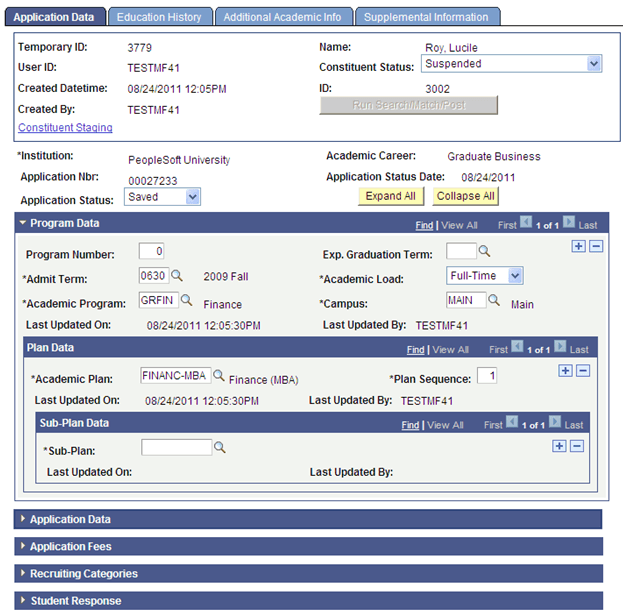
For an example of how this is done, use the Application Transactions staging component (Student Admissions, Application Transaction Mgmt, Application Transactions) delivered with AAWS and admission transactions functionality. This is the Application Transactions staging component:
This example illustrates the fields and controls on the Example of a transaction staging component integrated with CTM. You can find definitions for the fields and controls later on this page.
Note:
In the above example, AAWS Application Transactions component only uses the described first two subpages. It does not use SCC_TRANSAC_SBP. Instead the transaction uses its own logic.
See Recruiting and Admissions: Reviewing and Editing Staged Admission Application Transactions.