Rules Engine Manager and Entity Registry
This section discusses the relationship between the Rules Engine and the Entity Registry.
Entity Registry
When building Rules you need access to the data in your system. For Query Manager and Equation Engine, data access is based on granting the user access to specific records in the system.
However, data access for the Rules Engine is controlled through the Entity Registry. An Entity is an object that provides access (view, create, update) to data in a record. The properties on the Entity represent the fields in the actual records.
By design, an Entity is the primary point of access to the underlying records. This avoids potential inconsistencies of having the same logic in multiple places and helps in making relevant code reusable and maintenance easier. This becomes relevant when the same data is accessed or updated in multiple ways: a user-interface, web services, or the Rules Engine.
Entity relationships are represented in a tree-like hierarchy, making the underlying data structure logical for functional users to understand. When building a Rule that needs to access specific system data, you first choose which Base Entity you want to with.
For more information about Entity Registry:
See Setting Up Entity Registry.
Note:
Although the Rules Engine can be used with any Entity Registry delivered with the system, it is the Entity Registries created for data records from the Program Enrollment Academic Item Registry (AIR) and Academic Progress Tracker (APT) features that are optimized for Rules Engine use.
These Entities are used throughout this document as examples of how Entity-based data can be used in the Rules Engine.
For more information about AIR and APT, see:
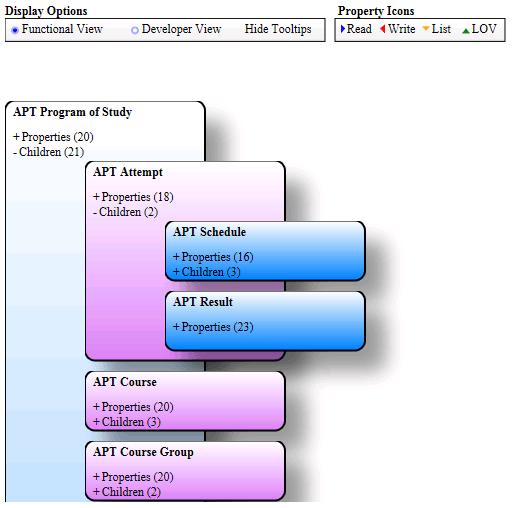
Here is a example that shows part of the APT Entity Registry Hierarchy:
This example illustrates the fields and controls on the Academic Progress Tracker Program of Study Entity Registry Hierarchy example. You can find definitions for the fields and controls later on this page.
Here is an example that shows the entities APT Year, APT Study Period, and APT Semester. The properties of APT Semester are expanded and shown:
This example illustrates the fields and controls on the Academic Progress Tracker Program, other children of the APT Program of Study example. You can find definitions for the fields and controls later on this page.
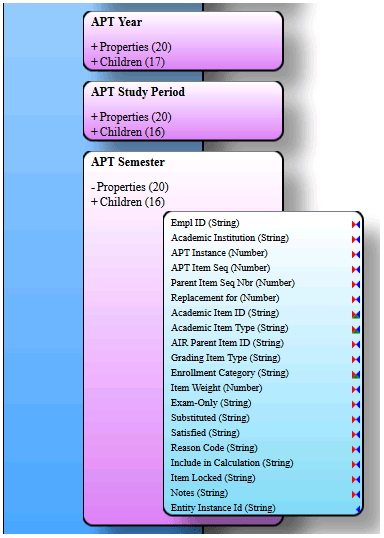
In the example above, the APT Year, APT Study Period, and APT Semester entities have been generated from non-system Academic Item Types Year, Study Period, and Semester. AIR and APT structures are unique in that they can be specified using institution specific objects. The Entity Registry reflects this.
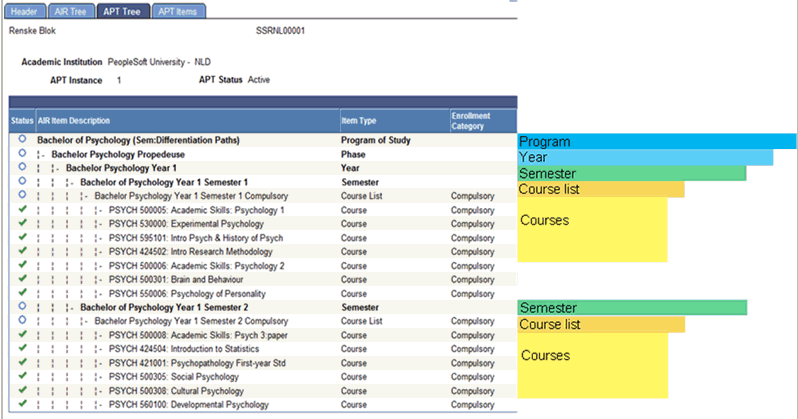
The hierarchical relationships between Program of Study, APT year and APT semester are reflected in the APT hierarchy tree and are very similar to how the Curriculum structure reflects in a student's APT:
This example illustrates the fields and controls on the Example of the Academic Progress Tracker Tree. You can find definitions for the fields and controls later on this page.
The results from the student’s APT are reflected in a similar fashion in the Entity Registry Structure:
This example illustrates the fields and controls on the Academic Progress Tracker Course Entity Registry Hierarchy example. You can find definitions for the fields and controls later on this page.
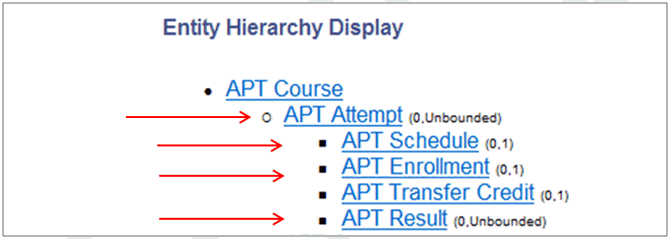
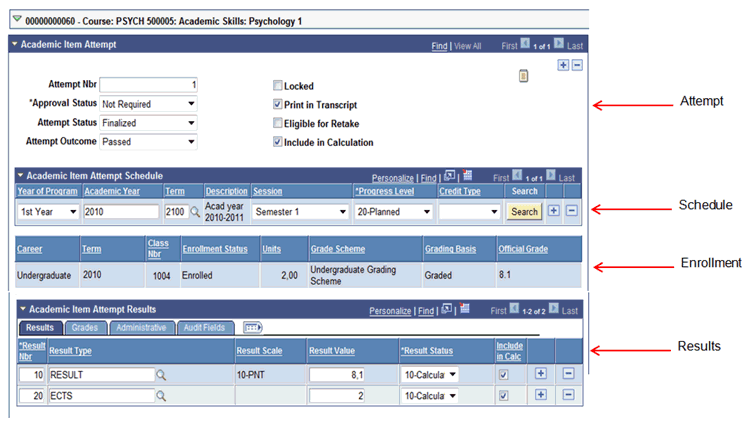
This example illustrates the fields and controls on the Example of Academic Item Attempt. You can find definitions for the fields and controls later on this page.
Entity Properties
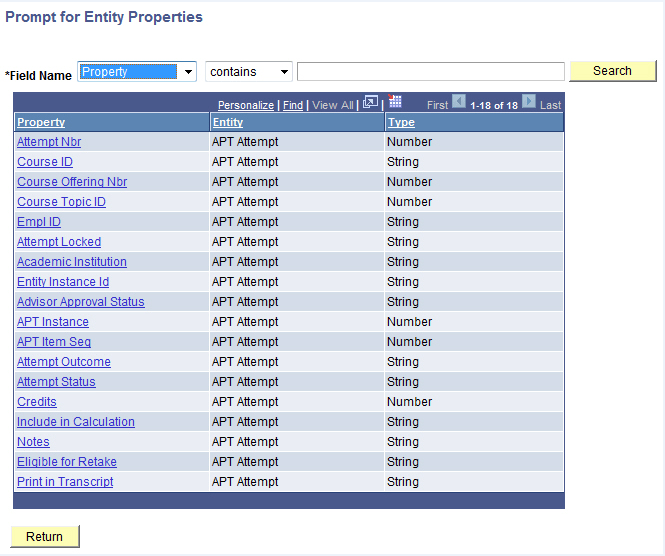
Table fields are represented as properties in the Entity Registry. The Rules Engine uses properties to retrieve or update information.
This example illustrates the fields and controls on the Example of Entity Properties for Academic Item Attempt. You can find definitions for the fields and controls later on this page.
Entity Profiles
Entity Profiles are used to grant or restrict access to specific Entities and/or Entity properties. For example, you want to allow a specific user to create Rules which retrieve information from APT like the Grade Result Value for a Course, but do not want to allow the ability for this same Rule to retrieve any administrative notes that have been added by the supervisor. Through setup of specific Entity Profiles, you can restrict access to the property that represents the Result Notes.
Security for access to specific Entities via the Rules Engine Manager is enforced by associating specific Entity Profiles with Rules Engine Entity Categories.