Setting Up Committee Types and Roles
To set up committee types and roles, use the Committee Type/Role component (COMMITTEE_SETUP).
This section discusses how to define a committee type and assign member roles.
Page Used to Set Up Types and Roles
| Page Name | Definition Name | Navigation | Usage |
|---|---|---|---|
|
Committee Type/Role |
COMMITTEE_TABLE |
|
Define a committee type and assign member roles. |
Defining a Committee Type and Assigning Member Roles
Access the Committee Type/Role page ().
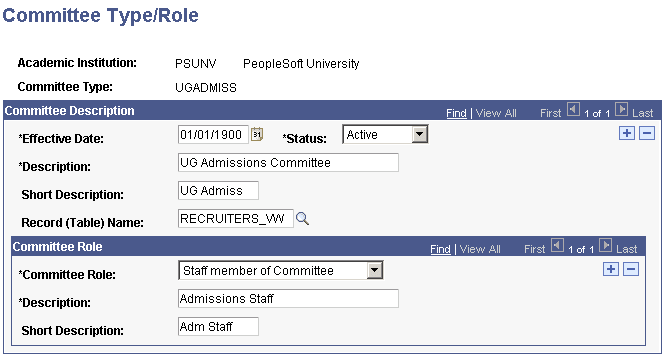
This example illustrates the fields and controls on the Committee Type/Role page. You can find definitions for the fields and controls later on this page.
Committee Description
| Field or Control | Description |
|---|---|
|
Record (Table) Name |
Enter the name of the record that contains the types of individuals to make available for assignment to this committee. The selected record provides the prompt list of possible members on the Committee page. For example, if you create an Undergraduate Interviews committee, and you select the RECRUITERS_VW, each time that you create a committee of the Undergraduate Interviews type, you are prompted to select members from the list of recruiters in your system. |
Committee Role
| Field or Control | Description |
|---|---|
|
Committee Role |
Select the role (for example, chair, co-chair, member, student member, and so on) that should always be part of this committee type. You can add as many roles as necessary. Values for this field are delivered with your system as translate values. You can modify these translate values. |