Setting Up Relations to the Institution
To set up relations to the institution, use the Legacy Table component (LEGACY_TABLE).
This section discusses how to define or review legacy affiliation types that are used to identify relations to the institution.
Page Used to Set Up Relations to the Institution
| Page Name | Definition Name | Navigation | Usage |
|---|---|---|---|
|
Legacy Table |
INST_AFFIL_TABLE |
|
Define the types of legacy affiliations that individuals can have with your institution. |
Defining Legacy Affiliation Types
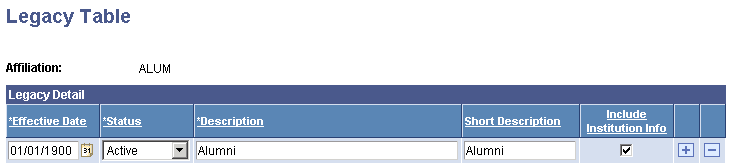
Access the Legacy Table page ().
This example illustrates the fields and controls on the Legacy Table page. You can find definitions for the fields and controls later on this page.
| Field or Control | Description |
|---|---|
|
Include Institution Info |
Select this check box to include the academic information relevant to the specified legacy relationship when this affiliation is selected for the related individual on the Legacy Information page in the Relationship component. For example, if you want to know the institution that a related individual with this affiliation attended, and the academic program in which he or she was enrolled, select the Include Institution Info check box to ensure that the institution and academic program fields will be available on the Legacy Information page. |
Related Topics