Understanding New User Registration
New User Registration is a framework that enables a user to sign in to the Campus Solutions system in order to complete a specific online self-service transaction. For example, on your institution’s portal you could indicate the steps a future applicant should perform in order to apply online. In this case the specific online self-service transaction is the online application. You can provide a link to transfer the user to your Campus Solutions database where the future applicant first needs to sign in. Going through New User Registration, the user can either create a user ID and password, or use an existing user ID to sign in to your system. New User Registration assigns the newly created user profile with generic security roles that are required to access your system. When the user profile is created or when the user uses an existing user ID, New User Registration assigns security roles to the user profile that are specific to the online transaction to which the New User Registration framework is integrated. Once the user is authenticated, New User Registration immediately redirects the user to a predefined target page that is related to that specific online transaction.
In a nutshell, New User Registration offers user validation, user registration, system authentication, generic and specific (just-in-time) security provisioning, and easy navigation access by transferring the newly authenticated user to a predefined target page specific to the online self-service transaction the user elected to perform.
Consider this example. If you use Admission Applications Web Services (AAWS) and deployed an online application self-service component, an online applicant first uses New User Registration to register for a user ID (or first get authenticated if the applicant already has a user ID) and then perform the online application transaction, such as submitting an application. In this case, after being successfully authenticated to your system, the system provisions the applicant’s user profile with the role security specific to access your online application page and then immediately redirects the applicant to this online application page. Another example is, if you are using the Delegated Access feature, a person who received delegated access (a proxy) could first use New User Registration to access your system by either creating a user ID or reusing an existing user ID. Once successfully authenticated through New User Registration, the system could provision the proxy’s user profile with a security role needed to access the Delegated Access initial page (the Proxy Terms and Conditions page).
New User Registration provides web service operations that you can use on your user interface to:
-
Create a user account (user ID) (SCC_USERREG_CREATEACCT)
-
Authenticate a user (SCC_USERREG_AUTHENTICATE)
-
Retrieve a user ID (SCC_USERREG_GET_USERID)
-
Reset a password (SCC_USERREG_GET_PASSWORD and SCC_USERREG_GET_PSWD_HINT)
-
Check if authenticated users have the proper security role (authorization) (SCC_CHECK_AUTH)
Also, New User Registration is a consumer of the Constituent Transaction Management (CTM) framework (delivered CTM transaction code is NEW_USER_REGISTRATION). This allows staging of any constituent information that is entered at the time of registering a new user ID. For example, when creating a user ID you may want to ask users to enter their name, email address, and so on. If the online transaction integrated with New User Registration is defined as a CTM transaction, it can reuse or display the constituent data that was entered at registration time in the self-service transaction pages (that is, if the CTM transaction is partitioned by constituent).
Your system is provided with two sample login pages: New User Registration login sample page and New User Registration Tester page. Both are visually similar and allow a user to create a user ID or use an existing user ID to access your system. The New User Registration login sample page is fully integrated with all the New User Registration framework security objects. It is an example of how your own custom login page can be integrated and deployed with New User Registration. For example, it can reside outside of your firewall and be set as a Kiosk. The New User Registration Tester page can be used by your developers to test and evaluate the New User Registration framework objects. The Tester page contains the same functionality included in the New User Registration login sample page, but is meant to be used inside the same database. This page should be used only for testing purposes and should not be deployed in a production environment.
The following diagram shows the workflow for a new user and a returning user when New User Registration framework is deployed:
New User Registration User Flows
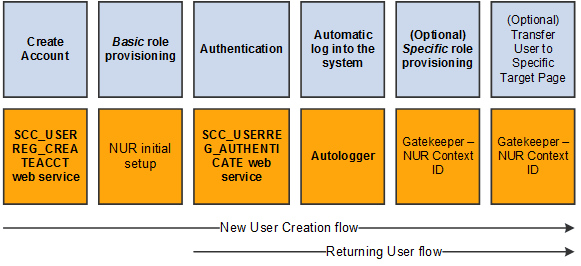
The first row of boxes indicates the steps in the workflow for a new or returning user. The second row indicates what needs to be set up so that the user can perform the step.