Managing Emergency Contacts Using PeopleSoft Fluid User Interface
This section discusses how to configure the settings for emergency contacts as well as adding or updating emergency contact information.
Pages Used to Manage Emergency Contacts Using PeopleSoft Fluid User Interface
| Page Name | Navigation | Definition Name | Usage |
|---|---|---|---|
|
Emergency Contacts Configuration |
|
SCC_EC_CONFIG_FL |
Configure the fields that appear on the fluid Add and Edit Contact pages. |
|
Add Contact |
|
SCC_EMERG_CNT_SCF |
Add emergency contact information. If an emergency contact is required, you'll be able to add an email address, designate the person as missing person contact as well as add comments. |
|
Edit Contact |
Select the contact you want to update. |
SCC_EMERG_CNT_SCF |
Update emergency contact information. If an emergency contact is required, you won't be able to delete a contact if it's the only contact record for the person. |
Configuring Emergency Contact Settings for PeopleSoft Fluid User Interface
Access the Emergency Contacts Configuration page ().
This example illustrates the fields and controls on the Emergency Contacts Configuration page.
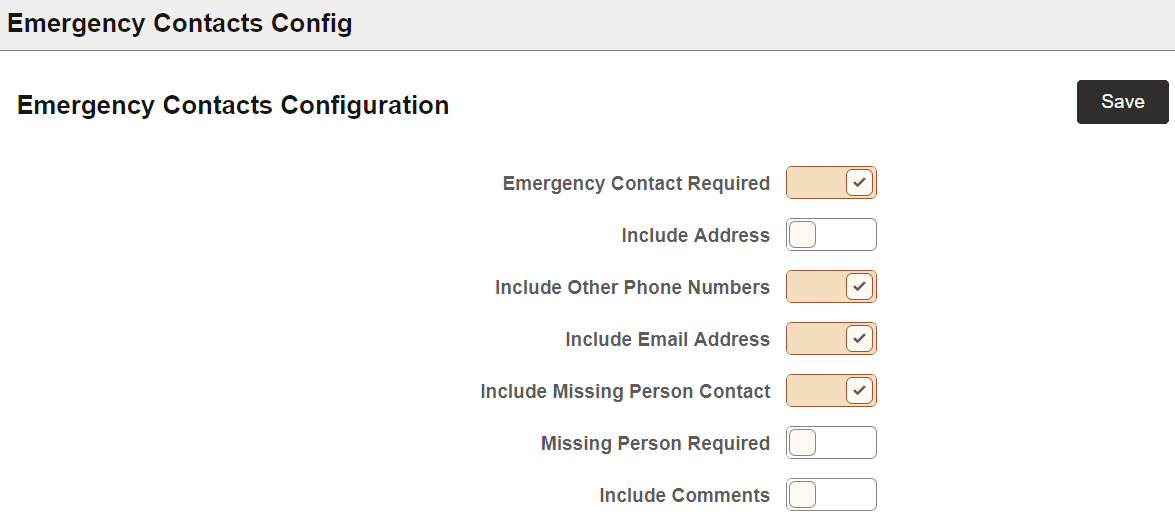
The options on this page enable you to display various fields on the fluid Add Contact and Edit Contact pages. For example, if you select the option Emergency Contact Required, it becomes enabled and users will have to provide an emergency contact.
If you want to require users to add a contact for situations when they cannot be reached or have gone missing, you first need to enable Include Missing Person Contact and then enable Missing Person Required.
Messaging for Emergency Contacts
When users access the Fluid Emergency Contacts page from their profiles, the message text "No Contacts Defined." comes from the message catalog entry 14060,31. But if you enter text in the description for the same message catalog entry, the description is displayed on the page instead of the message text. This lets institutions write messages longer than the 100 characters that's allowed on the message text. They can then say why emergency contacts are required and what the user should do if they don't have a contact.
Related Topics