Setting Up Self-Service Options
This section discusses how to define business unit labels that are used in classic and fluid user interfaces.
Page Used to Set Up Self-Service Options
| Page Name | Definition Name | Navigation | Usage |
|---|---|---|---|
|
SF Self Service Options |
SS_SF_OPTIONS |
|
Define business unit labels. The values that you enter here are used in the View By drop-down list boxes and in grids on self-service pages. |
Defining Business Unit Labels
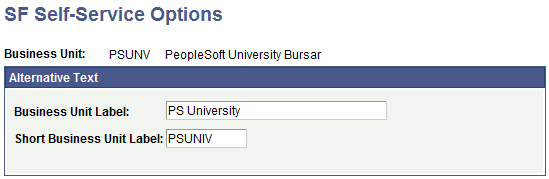
Access the SF Self Service Options page ().
This example illustrates the fields and controls on the SF Self Service Options page. You can find definitions for the fields and controls later on this page.
| Field or Control | Description |
|---|---|
|
Business Unit Label |
Enter the label that appears on all self-service pages that reference the business unit: table headings, filters, column headings, and so on. |
|
Short Business Unit Label |
SSF_FINANCIALS web service uses the value in this field. The value is captured through the BUSINESS_UNIT_LOVDescrShort element of the XML. See Student Financials: Using the SSF_EPAYMENT_TRANS Web Service |