Business Units, Tablesets, and Record Groups
When you create and then save a business unit, a new tableset ID with the same name as the business unit is created. The system automatically assigns that tableset ID to each record group for the new business unit.
Note:
PeopleSoft suggests that you create tableset IDs and business unit names that are five characters long. A performance degradation occurs if the tableset IDs or business units have fewer than five characters.
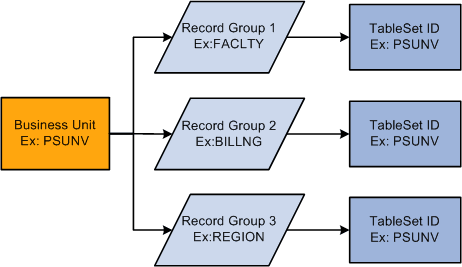
This diagram illustrates the relationship between business unit, record group, and tableset ID:
This example shows how data can pass from a business unit through three record groups and into tableset IDs.
Tableset IDs are the labels that the system uses to identify tablesets. You can have as many tableset IDs as you like, but the more you have, the more complex tableset sharing becomes. You always have the same number of tableset IDs as tablesets.
WARNING:
You must define at least one complete set of these tables—a tableset—for the Campus Solutions system to function.
Note:
You must create at least one tableset ID, even if you are not taking advantage of tableset sharing. Some institutions need only one tableset ID and one business unit.
When you set up the control tables in the system, you'll notice that the tableset ID, or additional primary key, enables the sharing of control table information across business units. If you prefer, you can create a unique set of tables for each new business unit. Either way, tablesets form the building blocks of the system. You populate the individual tables in the tableset according to your particular business rules.
You can also rearrange tablesets by updating tableset assignments for a business unit in the Utilities - TableSet Controls component. A tableset is a group of control table rows identified by the same tableset ID.
You are not required to share all tables in a tableset. With Campus Solutions, you can share any combination of tables with any number of business units, according to your needs. Use the pages in the component to identify, for each business unit, which data is shared and how it is shared.
Tableset sharing can be extremely easy for an organization to design. In fact, it is almost entirely set up by the time you have finished creating the business units.
When defining tableset IDs for Contributor Relations, you must manually create a setID in the tableset ID record, if one does not already exist that matches the Contributor Relations business unit.