Keyword Syntax
The maximum number of lines in an equation is 10,000.
Note:
A truth value has an arithmetic value of zero for FALSE, and any other value is TRUE.
Logical Operators
Logical operators AND, OR, and NOT are used within an IF statement.
Syntax
<Condition1> <Logical Operator> <Condition2>
Syntax
NOT <Condition>
Relational Operators
Relational operators: <, <=, =, >=, >, <>
Relational operators compare two expressions and yield a truth value. Use parentheses to group expressions and to enhance readability.
Syntax
<Expression1> <Relational Operator> <Expression2>
Arithmetic Operators
Arithmetic operators: +, -, *, /
Arithmetic operators apply to two expressions and yield an arithmetic result. Use parentheses to group expressions and to enhance readability.
Syntax
<Expression1> <Arithmetic Operator> <Expression2>
If rounding or truncation to an integer is necessary, then a call must be made to an external subroutine or equation (for example, the "ROUND" equation) that handles the task.
ASSIGN
Keywords: ASSIGN and END ASSIGN
The ASSIGN statement enables you to assign a value to either a local or a global variable. Every ASSIGN statement must be concluded with an END ASSIGN keyword.
Syntax
ASSIGN <Local or Global> <Variable Name> <Expression> END ASSIGN
Note:
Local variables exist and can be referenced only within the context of the current equation, but global variables exist for the duration of the Equation Engine run. A global variable set in one equation can be referenced within a called equation and vice versa.
CALL
Keywords: CALL, CALL PARMS, and END CALL PARMS
The CALL statement enables an equation to call another equation, a callable SQL, or an external subroutine.
Syntax
This table lists examples of syntax for the keywords CALL, CALL PARMS, and END CALL PARMS:
| Equation Keyword | Operand Type | Operand |
|---|---|---|
|
CALL |
<routine type> |
<routine name> |
|
CALL PARMS |
||
|
LOCAL |
<variable name>}... |
|
|
END CALL PARMS |
The CALL PARMS statement applies only to calling other equations or calling SQL. The types of routines are defined as equations, external subroutines, and SQL. You do not pass call parameters to external subroutines. To pass parameters to and from external subroutines, you must use global variables.
To use the Application Engine, you must call the Equation Engine from the Application Engine because the COBOL call to Application Engine is not supported.
For equation calls, the list of local variable names in the parameter list and their values are copied as separate local variables into the called equation. Local variables changed within the called equation are not changed upon the return to the calling equation. To pass a value back to a calling equation, the value must be returned by means of a global variable. Any returned global variable name should begin with the called equation name. If only one value is returned, the name should be <equation name>_RESULT. If you are returning a set of values, you can set the values into a global stem to encapsulate the result.
Equations can call themselves recursively; however, the maximum depth of equation call nesting is set at 1,000 calls. If your design requirements exceed the set amount, you must use a loop.
For SQL calls, the SQLID must exist in the Equation SQL setup table.
Access the Equation Callable SQL page ().
The security for SQL calls is controlled through the operator alias type of EQS.
Note:
You can use CALL SQL for updates, inserts, deletes, or small row retrieval selects (<1000), but use FIND statements instead of calling SQL with selects whenever possible.
CALL parameter order
The call parameter requires this order when calling a SQL:
Return code,
SQL row count,
Bind variable 1,
Bind variable 2,
.
Bind variable n,
Select variable 1,
Select variable 2,
.
Select variable n,
This is an example of a Call SQL Setup:
This example illustrates the fields and controls on the Equation Callable SQL page. You can find definitions for the fields and controls later on this page.
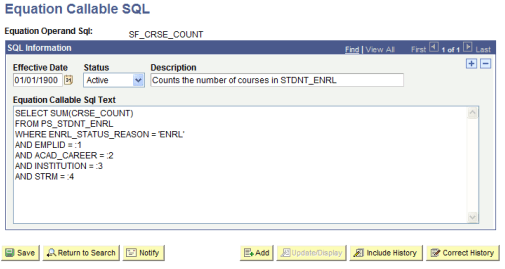
All of the call parameters for SQL must be local variables. Global variables are not permitted. The select variables, if any, are updated by the call and are passed back to the calling equation, which differs from the effect of calling another equation and passing the local variables. If an equation modifies a passed local variable, that change is not reflected upon return to the calling program. However, when you call an SQL, the return code, SQL row count, and all of the select variables are modified by the call upon return from that called SQL.
Select variables are mapped to call parameters after the bind variables are mapped. The select variables must be stems to handle multiple rows of output (for example, EMPLID.1, EMPLID.2, and so on). Remember that a stem variable ends with a period and behaves similarly to an array.
DELETE
Keywords: DELETE, CHOOSE, WHERE, and END DELETE
Syntax
The following table shows examples of syntax for the keywords DELETE, CHOOSE, WHERE, and END DELETE:
| Equation Keyword | Operand Type | Operand |
|---|---|---|
|
DELETE |
TABLE |
<table name> |
|
<statement block> |
||
|
[CHOOSE |
EQUATION |
<equation name>] |
|
WHERE |
<where expression> |
|
|
END DELETE |
This statement deletes rows from the specified table, limited to the <where expression> evaluating to true (if it is supplied), and also limited to the choose equation (if it is supplied) returning a true value for each row.
<table name> is the name of a table to which the user has Equation Engine (EE) write authority.
<statement block> is any set of equation statements, except not DELETE, INSERT, nor UPDATE. Typically, if any statements exist , they are ASSIGN statements setting global variables that will be used within the CHOOSE equation, if it is specified.
<where expression> is passed to the database when you select which rows to delete. The database returns the resultant rowset to the delete statement. If no where clause is specified, then all rows in the table are processed. The where clause may mention table-fields from the table operand of the delete keyword as well as any other table to which the user has EE read authority. The other tables, if mentioned, do not get rows delete, but rather may be used to limit which rows will be deleted by joining to the table in which rows are being deleted.
CHOOSE clause is optional and if specified will cause EE to call the choose equation once for each row in the rowset to be processed. Typically, any necessary global variables needed by the choose equation to do its function were set within the aforementioned <statement block>. After calling the choose equation, the choose clause will first look to see if there is a global variable with the same name as the choose equation name. If there is, then it will inspect it for a value of the number zero, which it will interpret as a false condition. Any other value is a true condition. If a true condition is returned, then the row is selected for processing. If it does not find the global variable with the same name as the choose equation name, then it will look for the global variable named A_SELECT. If a value is set for A_SELECT, it can have one the following values, which will indicate a true condition: T, TRUE, t, true, Y, YES, y, or yes. Any other value is considered to be a false condition.
EXISTS
Keyword: EXISTS
The EXISTS statement tests to determine whether a variable exists or whether any rows were returned when the EXISTS statement is applied against a table. It cannot be used to validate field names.
Syntax
This table shows example syntax for the keyword EXISTS:
| Equation Keyword | Operand Type | Operand |
|---|---|---|
|
EXISTS |
<object type> |
<object name> |
<object type> is a local variable, global variable, or table name.
It returns a truth value and is typically used within an IF statement. It is commonly used to validate variables or tables prior to its usage to avoid runtime errors. If the variable has not been initialized, then the calling program must set default values to variables.
Example:
If you establish an equation (COMPUTE_ANGLE) that will be called by other equations, it requires the following parameters to be passed:
-
XROW
-
YROW
-
DISTANCE
The COMPUTE_ANGLE tests to make sure XROW, YROW, and DISTANCE exist. If they do not, then variables can be set to default values or you can return a message to the calling equation.
When referencing table fields, the EXISTS statement determines whether a row has been selected for a given table name using either an implicit or explicit FIND statement.
FIND
Keywords: FIND FIRST, FIND NEXT, and END FIND
The FIND FIRST keyword positions the equation in the first row of the specified table for the given key values and key relational operators. The FIND NEXT keyword moves to the next row within that previously specified set of key values and key relational operators. If you need to process multiple rows of data within a single call to an equation, you should use a FIND FIRST followed by a LOOP statement that contains a FIND NEXT near the end of the statement. Test the find success variable to determine when to exit the loop.
Note:
An implicit FIND is performed when a field of a table is referenced and no FIND FIRST was previously issued. In the implicit FIND, all relational operators are considered equal. The key values are obtained from the global variables defined within the equation and from where the global variable names match the key field names of the table.
Syntax
This table shows examples of syntax for the keywords FIND FIRST, END FIND, and FIND NEXT:
| Equation Keyword | Operand Type | Operand |
|---|---|---|
|
FIND FIRST |
<local or global> |
<find success variable> |
|
TABLE |
<table name> |
|
|
{<find condition> |
<field name>} |
|
|
END FIND |
||
|
N/A |
N/A |
N/A |
|
FIND NEXT |
<local or global> |
<find success variable> |
|
TABLE |
<table name> |
|
|
END FIND |
The find success variable can be a local or global variable containing a truth value that indicates whether a row was found.
The find condition operators (EQUAL, GREATER-THAN, and GREATER-THAN-OR-EQUAL-TO) compare the assign variable against the table. The variables must have the same names as the fields of the table.
Every FIND statement must end with an END FIND keyword.
Example of Find Setup
This table shows example syntax for the keyword FIND FIRST:
| Equation Keyword | Operand Type | Operand |
|---|---|---|
|
FIND FIRST |
LOCAL |
FOUND_STUDENT |
|
TABLE |
STDNT_FA_TERM |
|
|
KEYED LOCAL EQUAL |
EMPLID |
|
|
KEYED LOCAL EQUAL |
INSTITUTION |
|
|
KEYED LOCAL EQUAL |
STRM |
|
|
END FIND |
An alternative to looping through successive FIND NEXT statements is to issue a single CALL SQL statement, where the called SQL is a select statement. The values returned are placed into local stem variables, of which there is an upper limit of one thousand. If you exceed the limit, the equation engine will halt with a runtime error. For a large number of returned rows, it is best to process them with successive FIND NEXT statements and handle the data one row at a time. If you need to do changes en masse, you can call SQL to update temporary tables and avoid row-by- row processing, this technique is preferred.
HALT
Keyword: HALT
The HALT statement stops the execution run of all equations. The Equation Engine immediately returns control to its calling program; control is not returned to a calling equation. This keyword is typically used in the event of a catastrophic error. For example, a test is performed to determine whether a row exists for an emplID. If it does not, you issue a customized message to stop the equations.
IF
Keywords: IF, THEN, ELSE IF, ELSE, and END IF
The IF statement executes different statements depending on truth values within its conditions. Each IF statement block must conclude with an END IF keyword.
Syntax
IF
<condition-1>
THEN
<statement block-1>
[ELSE IF
<condition-n>
THEN
<statement block-n>] …
[ELSE
<statement block-n+1>]
END IF
This example illustrates the fields and controls on the Equation Editor page, if and End If Example. You can find definitions for the fields and controls later on this page.
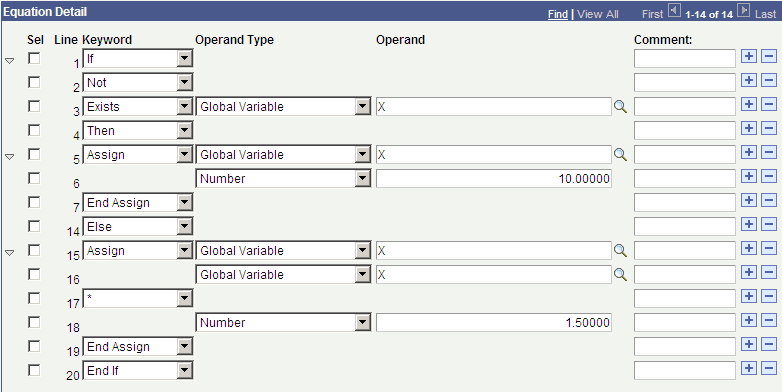
The ELSE IF and ELSE expressions are optional. The ELSE IF expression enables you to create a case control structure so a single END IF can be used instead of nesting IF's. You can have zero, one, or several "ELSEIF … THEN …" constructs within a single IF statement.
Nested IF statements are allowed within the equation. A statement block can contain any other statements, including an IF statement.
INSERT
Keywords: INSERT, INTO, FROM, CHOOSE, WHERE, and END INSERT
Syntax
This table shows examples of syntax for the keywords INSERT, INTO, FROM CHOOSE, WHERE and END INSERT:
| Equation Keyword | Operand Type | Operand |
|---|---|---|
|
INSERT |
TABLE |
<table name> |
|
[<statement block>] |
||
|
<INTO |
FIELD |
<field name> |
|
FROM |
<expression> |
>... |
|
[CHOOSE |
EQUATION |
<equation name>] |
|
WHERE |
<where expression> |
|
|
END INSERT |
This statement inserts rows into the specified table, limited to the <where expression> evaluating to true (if it is supplied), and then also limited to the choose equation (if it is supplied) returning a true value for each row.
<table name> is the name of a table to which the user has Equation Engine (EE) write authority.
See the DELETE statement for details on the <statement block>, CHOOSE, and WHERE clauses.
INTO specifies a field that is to have a value when the row is inserted. Its value is set from the result of the <expression> in the FROM clause. If a field is marked as being 'required' within the Application Designer definition for that record, then that field must have an INTO clause associated with it. If the FROM <expression> specifies a global stem, in the format of <recname>.<fieldname>.<anyname>, then the <anyname> qualified is assumed to be an index into the global stem with the name <recname>.<fieldname>, and the ending limit of that index will be assumed to be the <recname>.!COUNT global value. (See alternate insert syntax.)
Alternate Syntax
This table shows examples of syntax for the keywords INSERT, CHOOSE, WHERE, and END DELETE:
| Equation Keyword | Operand Type | Operand |
|---|---|---|
|
INSERT |
GLOBAL |
<recname>. |
|
[<statement block>] |
||
|
[CHOOSE |
EQUATION |
<equation name>] |
|
WHERE |
<where expression> |
|
|
END DELETE |
This statement acts like the INSERT statement, except that the recname is followed by a dot, which makes the target of the insert a global stem. The value of <recname>.!COUNT will contain the number of rows in the global stem. If X is a global number holding a row number, then <recname>.<fieldname>.X will contain the value of the field <fieldname> in the table <recname> at row number X.
LOOP
Keywords: LOOP, EXIT LOOP, and END LOOP
The LOOP statement permits a block of statements to be run repetitively. Each LOOP statement block must end with an END LOOP statement.
Syntax
LOOP
<statement block>
END LOOP
Every loop block should include an EXIT LOOP keyword to stop the loop when the desired condition is reached. A RETURN or HALT statement can also be substituted, though it is discouraged because it makes your equations more difficult to maintain.
MESSAGE
Keywords: MESSAGE and END MESSAGE
The MESSAGE statement writes a message to the message log file (PS_MESSAGE_LOG) under the current process instance. It can contain up to 10 values, each of which can be a constant string, constant number, local or global variable, or table-field.
Syntax
This table shows an example of syntax for the keyword MESSAGE:
| Equation Keyword | Operand Type | Operand |
|---|---|---|
|
MESSAGE |
||
|
{<data type> |
<data value>} |
|
|
END MESSAGE |
<data type> : STRING, DATE, NUMBER, LOCAL, GLOBAL, or TABLE xxx FIELD yyy
Note:
Writing a message triggers a commit to be performed.
RESTORE
Keyword: RESTORE
Syntax
This table shows example syntax for the keyword RESTORE:
| Equation Keyword | Operand Type | Operand |
|---|---|---|
|
RESTORE |
STRING |
<equation global space |
|
[GLOBAL |
<global variable name>]... |
|
|
END RESTORE |
The RESTORE statement restores the specified global variable names from the previously created equation global space that is specified. If no global variable names are listed, then all global variables are restored, excluding read-only system variables.
RETURN
Keyword: RETURN
The RETURN statement causes the equation currently executing to stop processing, and it returns control to the calling equation. If no calling equation exists, then control returns to the program that called the Equation Engine. HALT and RETURN act the same if the Equation Engine calls only one equation and that equation does not call any others. An implicit RETURN statement is appended to the end of every equation if one was not placed there explicitly. The RETURN statement has no parameters. If you want to pass a parameter back to a calling equation, you must use global variables.
SAVE
Keyword: SAVE
Syntax
This table shows example syntax for the keyword SAVE:
| Equation Keyword | Operand Type | Operand |
|---|---|---|
|
SAVE |
STRING |
<equation global space |
|
[GLOBAL |
<global variable name>]... |
|
|
END SAVE |
The SAVE statement saves the specified global variable names to the specified equation global space. If no global variable names are listed, then all global variables are saved into the global space.
SKIP
Keyword: SKIP
The SKIP statements are used to make a program more readable. It allows you to break up the program statements, and it can simplify your IF logic.
Note:
A SKIP statement does not affect your program.
TRACE
Keyword: TRACE
The TRACE statement causes the equation currently executing to start or stop displaying the type of trace information specified by the operand type.
Syntax
This table shows example syntax for the keyword TRACE:
| Equation Keyword | Operand Type | Operand |
|---|---|---|
|
TRACE |
||
|
{<trace type> |
<trace status>}... |
|
|
END MESSAGE |
<trace type>: SOURCE, PCODE or SQL.
<trace status>: ON or OFF
Tracing SOURCE causes the line numbers of the source equation to appear to the COBOL log file as they are run; intermediate values also appear. Tracing PCODE causes the pseudo-code functions, their parameters, and their line numbers to appear as they are run; intermediate values and function results also appear. Tracing SQL causes the actual SQL that is run to appear; bind variables and values, if any, as well as the return code and row count or dml count for the SQL also appear. Retrieved table and-field values do not appear. To enable more than one trace type at the same time, issue more that one trace statement. Tracing remains in effect globally until disabled. Therefore, a trace enabled in a called equation will continue tracing when control returns to the calling equation, and vice versa.
UPDATE
Keywords: UPDATE, SET, CHOOSE, WHERE, and END UPDATE
Syntax
The table shows example syntax for the keyword UPDATE:
| Equation Keyword | Operand Type | Operand |
|---|---|---|
|
UPDATE |
TABLE |
<table name> |
|
[<statement block>] |
||
|
<SET |
FIELD |
<field name> |
|
<expression> |
>... |
|
|
[CHOOSE |
EQUATION |
<equation name>] |
|
WHERE |
<where expression> |
|
|
END UPDATE |
This statement updates rows in the specified table, limited to the <where expression> evaluating to true. See the DELETE statement for details on the <statement block>, CHOOSE, and WHERE clauses.
SET clause sets the specified <field name> in the <table name> to the value of the <expression>.