Processing the Mass Change
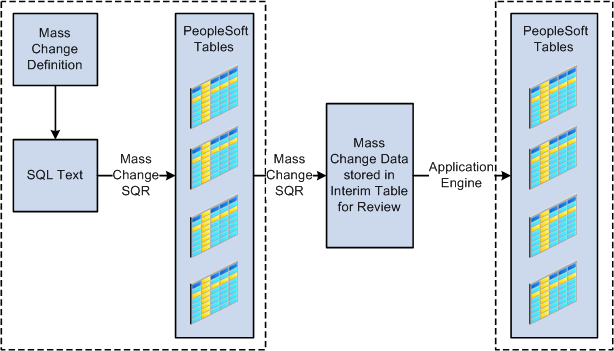
The processing phase comprises these steps:
-
Run the Mass Change SQR to select, change, and transfer the data to temporary tables.
-
(Optional) Review the data for accuracy (recommended).
This PeopleSoft application delivers features that enable you to review the mass change results. You can view the results of mass change definitions using the Mass Change Result page (one of the locations is ). Other Campus Solutions applications also have pages for reviewing mass change results; these pages are described in the documentation for the specific application.
-
Run the appropriate process to load the data from temporary tables into PeopleSoft tables (if applicable).
For example, to insert communications or checklists, you run the 3C Engine process to insert the mass change results into the PeopleSoft tables.
This flowchart illustrates mass change integration:
Example of how mass change moves through PeopleSoft tables using SQL and Application Engine.