Securing and Setting Up the Population Update Process
To secure and set up the Population Update process, use the Population Update Security (SCC_POP_UPD_SRTY) component and the Population Update Setup (SCC_POP_UPD_SETUP) component
This section discusses how to:
-
Assign Population Update user security.
-
Set up the Population Update process.
Pages Used to Secure and Set Up the Population Update Process
| Page Name | Definition Name | Navigation | Usage |
|---|---|---|---|
|
Population Update Security |
SCC_POP_UPD_SRTY |
|
Set user security for accessing records to update using the Population Selection update process. |
|
Population Update Setup |
SCC_POP_UPD_SETUP |
|
Identify records and fields to make available for updating. |
Assigning Population Update User Security
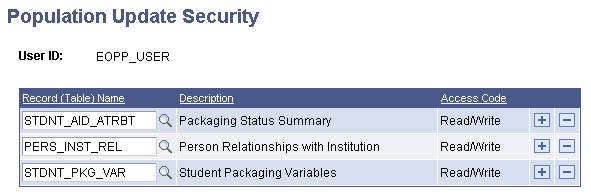
Access the Population Update Security page ().
This example illustrates the fields and controls on the Population Update Security page. You can find definitions for the fields and controls later on this page.
| Field or Control | Description |
|---|---|
|
Record (Table) Name |
Enter each record that you want the user to be able to update for populations selected by the Population Selection process. After you save the page, the user can view and update the records if your institution or department makes them available for updating on the Population Update Setup page. |
Setting Up the Population Update Process
Access the Population Update Setup page ().
This example illustrates the fields and controls on the Population Update Setup page. You can find definitions for the fields and controls later on this page.
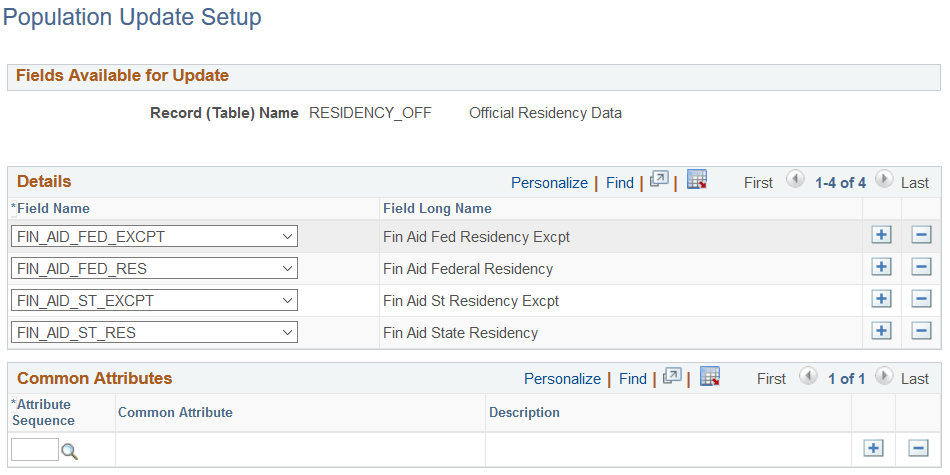
When you select a record and access the Population Update Setup page, the system makes the fields from that record available in the Field Name drop-down lists. Select each field that you want to make available for users to update. Only the records and fields that you select and to which the user has security access will be available on the run control page.
Common Attributes
Use this region to assign attributes to the record. This controls which attributes are available for you to select when you run the update process.