Setting Up Departments
This topic discusses how to define departments.
Note:
If you implement Campus Solutions and a separate instance of PeopleSoft Human Capital Management, read the relevant documentation about CS-HCM Integration to understand the setup, functional, and technical implementation considerations.
See:
Monitoring Integrations Using the Integrity Utility
Information Center: CS-HCM Integration for PeopleSoft Enterprise Campus Solutions in My Oracle Support (ID 2091799.2).
Page Used to Define Departments
| Page Name | Definition Name | Navigation | Usage |
|---|---|---|---|
|
Department Profile |
DEPARTMENT_TBL_GBL |
|
Identify an internal business entity or department. |
One example of how departments are used in Campus Solutions is when you set up service indicator codes. See Campus Community Fundamentals: Setting Up Service Indicator Codes and Reasons.
To set up department security, see Managing Department Security.
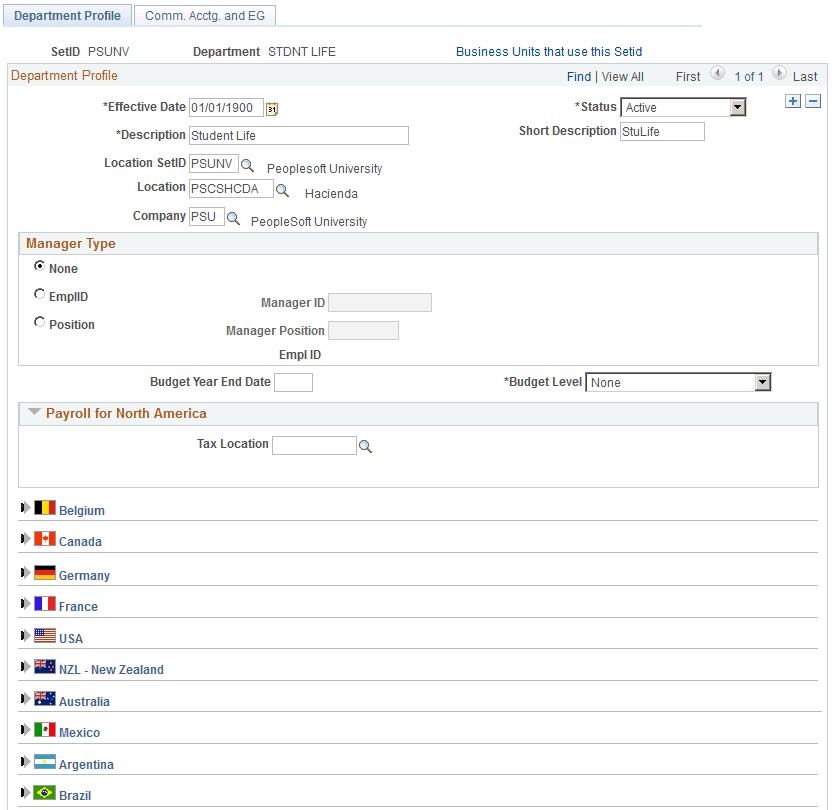
Defining Departments
Access the Department Profile page (
This example illustrates the fields and controls on the Department Profile page. You can find definitions for the fields and controls later on this page.
| Field or Control | Description |
|---|---|
|
Effective Date |
If you add a new department, set its effective date to predate (or be equal to) the effective date of your security tree. |
|
Location Set ID and Location |
To associate a department with a physical location, select the location. Maintain these values in the Locations component. |