Setting Security for Recruiting Centers
To set up recruiting center security, use the Recruiting Center Security component (SCRTY_RECR_CENTER).
This section lists prerequisites and discusses how to assign recruiting center access.
Prerequisites
Before you set security for recruiting centers:
-
Set up academic institutions and recruiting centers.
-
Set up institution security.
-
Set up institution and career security.
Page Used to Set Security for Recruiting Centers
| Page Name | Definition Name | Navigation | Usage |
|---|---|---|---|
|
Recruiting Center Security |
SCRTY_RECR_CENTER |
|
Assign recruiting center access to a specified user ID for an institution. |
Assigning Recruiting Center Access
Access the Recruiting Center Security page ().
This example illustrates the fields and controls on the Recruiting Center Security page. You can find definitions for the fields and controls later on this page.
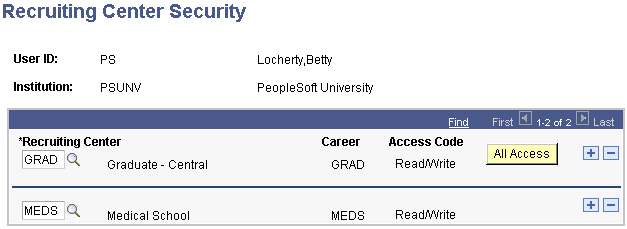
Enter a recruiting center that the combination of user ID and institution can access. The career associated with the recruiting center appears if you added it when you set up the recruiting center.