Understanding the Business Process
In a CS-to-HCM integrated environment, the person record is physically separated, but institutions have the choice to synchronize all person data with HCM or none of it. Some institutions may want to separate not just their data but their business processes to more closely reflect policies of data ownership between student and human resources administration on campus.
CS supports three models of person data integration between CS and HCM: Owner/Subscriber, Subscriber-Only and Distinct Ownership. Institutions can use the tools described in this documentation to configure the integration to reflect their business needs.
Owner-Subscriber
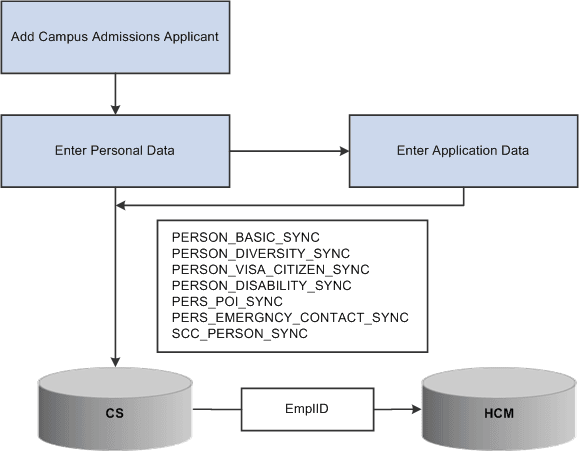
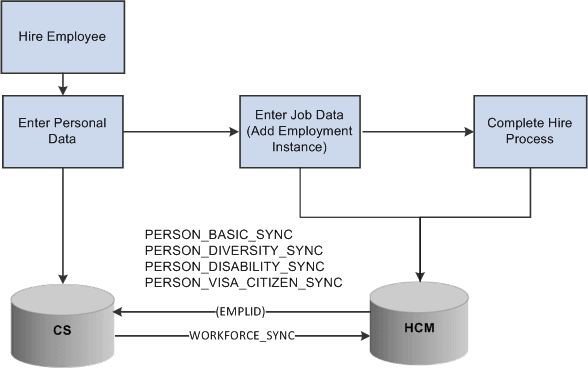
In an owner-subscriber integration model, one system is defined as the system of record and the other system subscribes to its person data messages. All EmplIDs exist and are in sync in both databases. For example, if CS is defined as the owner for adding and updating person data, the HCM system subscribes to the person messages; integration setup feeds person data additions and updates to HCM. The end-user experience can be managed via a portal or related content to navigate a combination of CS and HCM menus and pages.
This workflow depicts the process of adding an Admissions applicant in CS.
This workflow depicts the process of hiring an employee in HCM.
Subscriber Only
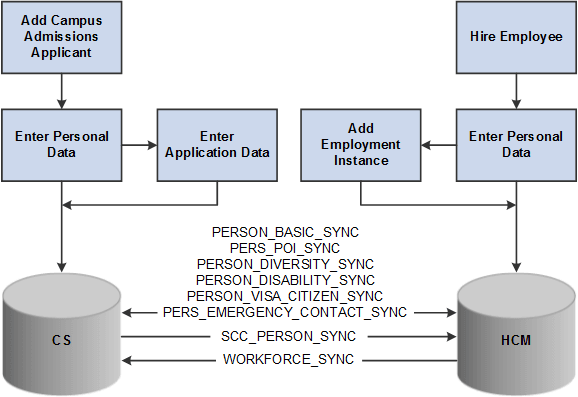
In a subscriber-only integration model, both systems are defined as system of record and integrations are configured to allow both systems to publish and subscribe to person data messages. All EmplIDs are populated to both systems and are kept in sync.
This workflow depicts the process of adding an Admissions applicant or employee in the Subscriber-only model.
Distinct Ownership
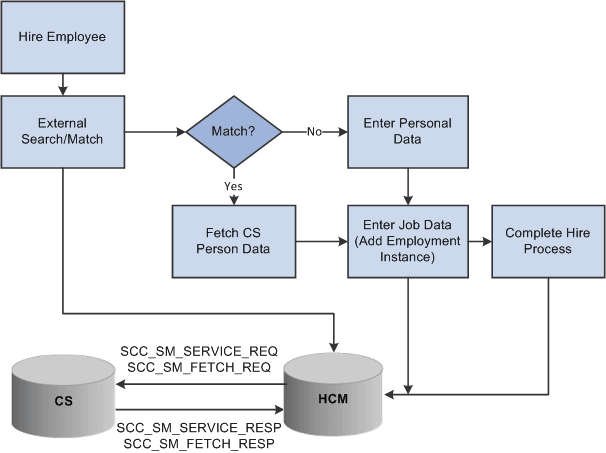
In a distinct ownership integration model, person data is added and updated in the appropriate CS or HCM system (as determined by the business processes of your institution; for example, employees are added and maintained in HCM). External Search/Match then becomes the method used in each system to ensure that users do not create duplicate records on campus. For example, as an employee is added to HCM, External Search/Match determines whether that new employee is already a student in CS with an EmplID and other bio-demo data housed in the CS system. If so, a "fetch" process can pull that EmplID and person data to HCM, ensuring that the individual retains a single unique ID on campus. Thereafter, each system must be manually updated, with no further integration between them.
This workflow depicts the process of adding an employee in HCM using External Search/Match to CS.