Creating Constituent Attachments
This section provides an overview of constituent attachments discusses how to create and view attachments to constituent records.
Understanding Constituent Attachments
When you create an attachment to a person, organization, or prospect level, you are attaching the file to the highest level of the record; this is the most global level at which you can attach a file. However, prospects are slightly different because menu security can be assigned to prospect records, restricting access to prospect attachments.
Page Used to Create Constituent Attachments
| Page Name | Definition Name | Navigation | Usage |
|---|---|---|---|
|
Constituent Attachments |
AV_CNST_ATCH AV_CNST_ATCH_E |
|
Create and view attachments to a person or organization record. |
Creating Attachments
Access the Constituent Attachments page ().
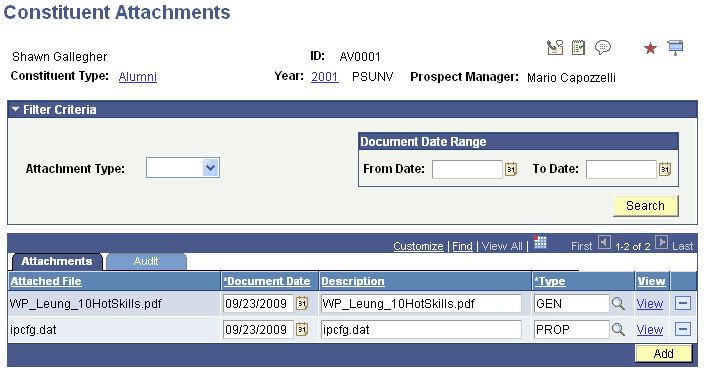
This example illustrates the fields and controls on the Constituent Attachments page, Attachments tab. You can find definitions for the fields and controls later on this page.
| Field or Control | Description |
|---|---|
|
Attachment Type |
Select a value to filter the list of attachments that appear based on type. The values available in this drop-down list are driven by the constituent; the system only displays types that have been assigned to the ID. |
|
Document Date |
The system displays the date that the document was created or last updated. This is not the date that the file was attached. |
|
Type |
Select a value; the system only displays types that have been defined on the Attachment Types page. |
|
View |
Click the link to open the attachment in a new window. |
|
Add |
Click to access standard PeopleTools functionality to browse to a file and upload it. |
This example illustrates the fields and controls on the Constituent Attachments page, Audit tab. You can find definitions for the fields and controls later on this page.
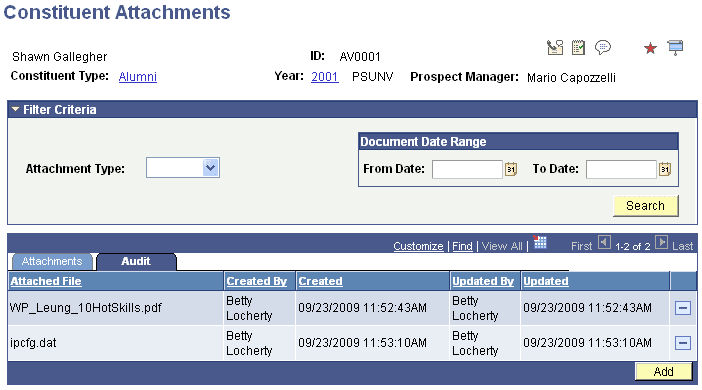
The Audit tab displays all updates to attachments, including user name and date/time. You can also filter attachments by a Document Date Range.
Related Topics