Creating Initiative Attachments
This section discusses how to create attachments for any type of initiative.
Page Used to Create Initiative Attachments
| Page Name | Definition Name | Navigation | Usage |
|---|---|---|---|
|
Attachments |
AV_INTV_CMPGN_ATCH AV_INTV_MEMBR_ATCH AV_INTV_EVNT_ATCH AV_INTV_VOL_ATCH AV_INTV_OTHR_ATCH |
|
Create and view attachments to an initiative. |
Creating Attachments
Access the Attachments page for an initiative (for example, ).
This example illustrates the fields and controls on the Attachments page for initiatives. You can find definitions for the fields and controls later on this page.
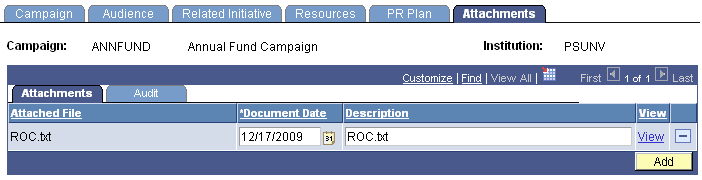
Click the View link to open the attachment in a new window. Click the Add button to upload a new attachment from within the component.