Awarding for a Single Award Period Followed by Both Award Periods
Note:
The following examples are based on Pell Grant awarding functionality for the 2009 and prior aid years.
You can award a student for a single award period, either AAP or NSAP, and later award the student for both award periods. When you award the student for both award periods, all awards—no matter what award period the award's disbursement plan/split code pattern designates—can be changed and are processed as active awards.
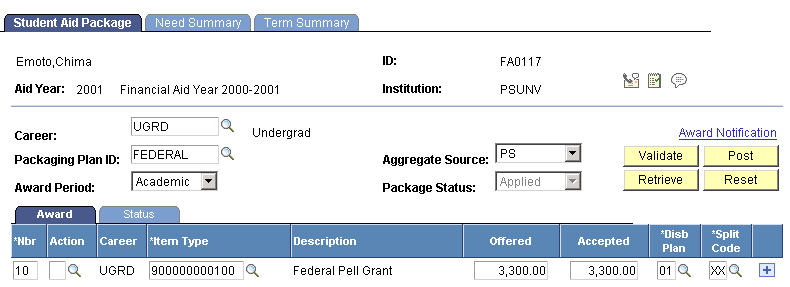
For example, at a semester-based institution with a trailing summer term, you award a student a 3,300.00 USD Pell Grant for the AAP. The disbursement plan is for both semesters in the AAP, and the split code—set up as a custom split—calls for a 1,650.00 USD disbursement in the fall semester and a 1,650.00 USD disbursement in the spring semester. The following screen shot displays this award on the Student Aid Package page:
This example illustrates the Student Aid Package page displaying the student's award for the AAP (Based on Pell Grant awarding functionality for the 2009 and prior aid years.).
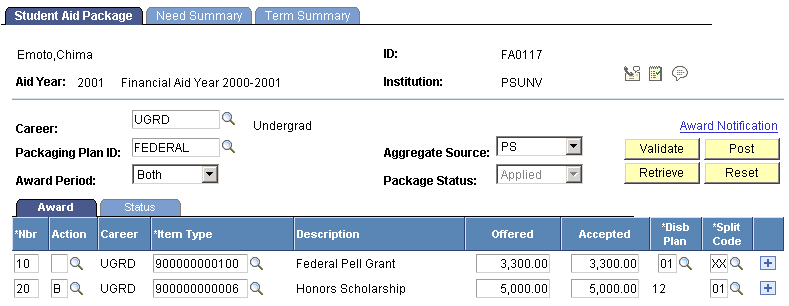
The student is then awarded a 5,000 USD Honors Scholarship that covers the trailing summer term in addition to the academic year, with 40 percent disbursed in fall (AAP), 40 percent disbursed in spring (AAP), and 20 percent disbursed in the trailing summer term (NSAP). Before you manually enter this award, you must select Both as the Award Period because you want to process the student for both the NSAP and the AAP. When you select Both, Packaging determines that the Pell Grant award is active because its disbursement plan/split code pattern designates it for the AAP, which falls within the chosen award period processing mode. Now you can change the Pell Grant award, and Packaging reevaluates it when you validate the new award. Because you are only adding the Honors Scholarship, you do not need to change the Pell Grant. Insert a new row, and add the 5,000.00 USD Honors Scholarship, choosing a disbursement plan that spans both award periods, and a split code that distributes the award 40 percent fall, 40 percent spring, and 20 percent summer. When you validate this award, Packaging evaluates both awards.
WARNING:
If there has been a change in the student's need or eligibility, the existing award is changed unless you have activated disbursement protection for that Financial Aid Item Type. Activating disbursement protection only protects the disbursed portion of the award. The award itself can be reduced to the level of the disbursed amount.
This example illustrates Student Aid Package page with an Award Period value of Both, adding the Honors Scholarship (Based on Pell Grant awarding functionality for the 2009 and prior aid years).