Maintaining Part-Time Student Data
Different Canadian financial aid applications are available for full-time and part-time students. Use the Part-time Application component to enter and maintain data for part-time students. If you have full-time application data in your system for a student, the system populates this data in the fields on the part-time application.
This section lists common elements and discusses how to:
-
Enter student and dependency information.
-
Enter student and spousal financial information.
-
Enter study period information.
Common Elements Used in This Section
| Field or Control | Description |
|---|---|
|
Part-time Student Extension |
Click to access the Student Extensions page where you can override the institutional CNAS options for the student. |
Pages Used to Maintain Part-Time Student Data
| Page Name | Definition Name | Navigation | Usage |
|---|---|---|---|
|
Status/Residency |
INST_PT_STDNT_A |
|
Enter or view student and dependency information. |
|
Student Extensions |
STD_CNAS_PT_EXT |
Click the Part-time Student Extensions link on the Status/Residency page. |
Override institutional level options. |
|
Financial Info |
INST_PT_STDNT_CD |
|
Enter or view student and spousal financial information. |
|
Study Period Info |
INST_PT_STDNT_EF |
|
Enter or view study period information. |
Entering Student and Dependency Information
Access the Status/Residency page ().
This example illustrates the fields and controls on the Status Residency page. You can find definitions for the fields and controls later on this page.
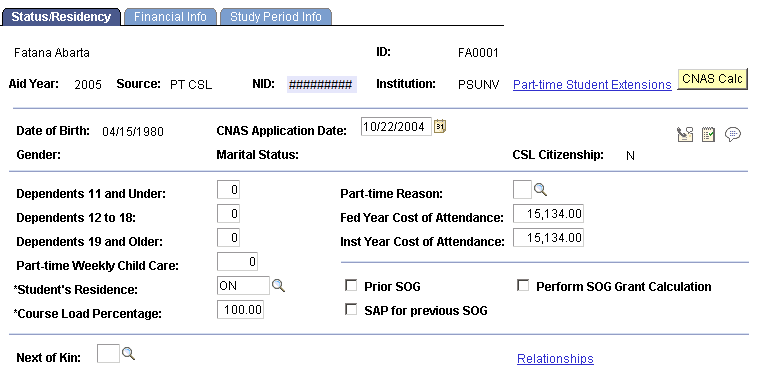
| Field or Control | Description |
|---|---|
|
Date of Birth |
Displays the student's date of birth. |
|
CNAS Application Date (Canadian Need Analysis System application date) |
Displays the date of the CNAS application. |
|
Gender |
Displays the student's gender. |
|
Marital Status |
Displays the student's marital status. |
|
CSL Citizenship (Canada student loan citizenship) |
Indicates whether the student is a citizen. |
|
Dependents 11 and Under |
Enter the number of dependents aged eleven or younger. |
|
Dependents 12 to 18 |
Enter the number of dependents aged twelve to eighteen. |
|
Dependents 19 and Older |
Enter the number of dependents aged nineteen or older. |
|
Part-time Weekly Child Care |
Enter an amount if applicable. |
|
Student's Residence |
Select the province in which the student lives. |
|
Course Load Percentage |
Enter the course load percentage the student is taking. |
|
Part-time Reason |
Select from the following values: 1: Single Parent. 2: Elderly Dependents. 3: Restricted Mature Student. 4: Disabled. 5: Grade Improvement. 6: Excessive Debt. 7: Financial. 8: Course Not Available. 9: Program Almost Complete. 0: Other. |
|
Fed Year Cost of Attendance (federal year cost of attendance) |
Enter an amount for the federal year cost of attendance. |
|
Inst Year Cost of Attendance (institutional year cost of attendance) |
Enter an amount for the institutional year cost of attendance. |
|
Prior SOG (prior special opportunity grant) |
Select if the student has a prior special opportunity grant. |
|
SAP for Previous SOG (student assistance program for previous special opportunity grant) |
Select if the student has a student assistance program for previous special opportunity grant. |
|
Perform SOG Grant Calc (perform special opportunity grant calculation) |
Select to perform a calculation for SOG eligibility. Note: Eligibility for SOG is calculated only if you select the Perform SOG Grant Calc check box. |
|
Next of Kin |
Select a number for the next of kin. You may need to go into the relationship page to add a person before you can select the number for next of kin. |
|
Relationships |
Click this link to access the Relationships page where you can enter a person's relationship to a student in your system. |
Entering Student and Spouse Financial Information
Access the Financial Info page ().
This example illustrates the fields and controls on the Financial Info page. You can find definitions for the fields and controls later on this page.
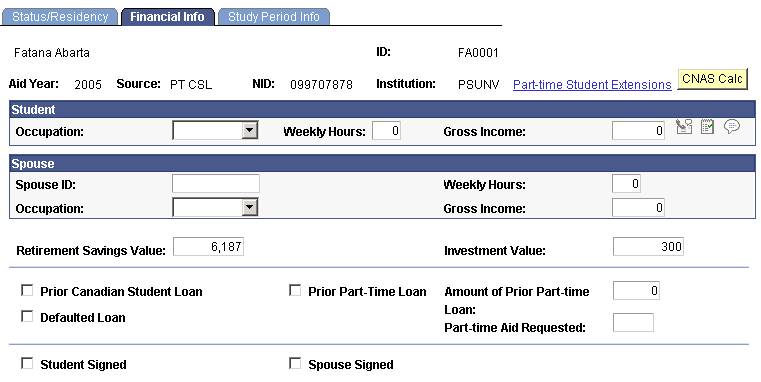
Student
| Field or Control | Description |
|---|---|
|
Occupation |
Select from the following options: Empl FT (employed full-time), Empl PT (employed part-time), FT Std (full-time student), Other, and Unemp (unemployed). |
|
Weekly Hours |
Enter the student's weekly hours worked. |
|
Gross Income |
Enter the student's gross income. |
Spouse
| Field or Control | Description |
|---|---|
|
Spouse ID |
Enter the spouse's unique identification. |
|
Weekly Hours |
Enter the spouse's weekly hours worked. |
|
Occupation |
Select from the following options: Empl FT (employed full-time), Empl PT (employed part-time), FT Std (full-time student), Other, and Unemp (unemployed). |
|
Gross Income |
Enter the spouse's gross income. |
|
Retirement Savings Value |
Enter the value of the student's retirement savings. |
|
Investment Value |
Enter the value of the student's investments. |
|
Prior Canadian Student Loan |
Select if the student has a prior Canadian student loan. |
|
Prior Part-time Loan |
Select if the student has a prior part-time loan. |
|
Amount of Prior Part-time Loan |
Enter the student's prior part-time loan amount. |
|
Defaulted Loan |
Select if the student has defaulted on a loan. |
|
Part-time Aid Requested |
Enter the amount of part-time aid requested. |
|
Student Signed |
Select if the student signed the application. |
|
Spouse Signed |
Select if the student's spouse signed the application. |
Entering Study Period Information
Access the Study Period Info page ().
This example illustrates the fields and controls on the Study Period Info page. You can find definitions for the fields and controls later on this page.
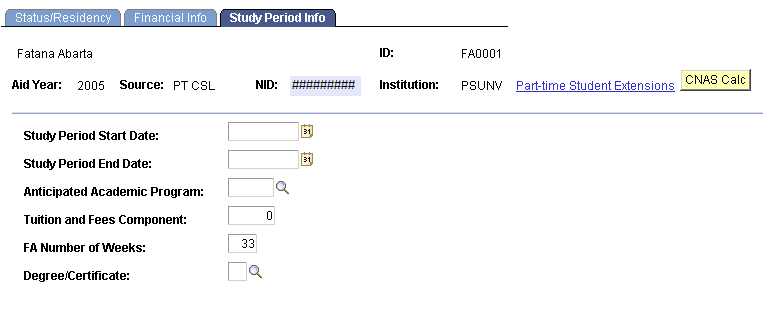
| Field or Control | Description |
|---|---|
|
Study Period Start Date and Study Period End Date |
Enter or view the dates on which the study period begins and ends. |
|
Anticipated Academic Program |
Select an anticipated program for the student. |
|
Tuition and Fees Component |
Enter a tuition and fee amount. |
|
FA Number of Weeks (financial aid number of weeks) |
Enter the number of financial aid weeks. |
|
Degree/Certificate |
Select a degree or certificate for the student. Values are: 1: Diploma 2: Certificate 3: Bachelor's Degree 4: Master's Degree 5: Doctoral Degree |