Processing Sequential Award Periods
During sequential award period processing, make sure that the packaging plan's award period attribute is either A − Academic or N − Non-Standard, and not B − Both. This allows Packaging to employ passive/active mode, and directs Packaging to use the COA, EFC/SAI, and need for the designated award period.
As an example of sequential award period processing, you are processing a student's University Grant award of 150.00 USD for the summer term. Your semester-based institution treats the summer term as a leading summer. The following table gives the student's COA, EFC/SAI, and need for both the NSAP and AAP—all values are in U.S. dollars (USD):
| Need Analysis Element | Non-Standard Award Period | Academic Award Period |
|---|---|---|
|
Cost of Attendance |
3,200.00 |
25,000.00 |
|
Expected Family Contribution |
3,000.00 |
11,000.00 |
|
Need |
200.00 |
14,000.00 |
You first need to assign a disbursement plan that spans both the NSAP—for the leading summer term—and the AAP because the student may subsequently be eligible to receive additional University Grant funding in the AAP. In this case, you can use the same Financial Aid Item Type in both the NSAP and AAP. However, in this first pass, the disbursement split code assigned to the award should have all disbursements scheduled only in the NSAP (leading summer term).
The following table illustrates how you set up the University Grant award for the student where the disbursement plan that covers both award periods has an ID of 10 and the split code that disburses 100 percent of the award in the leading summer term has an ID of 02:
| Seq No | FA Item Type | Disb Plan | Split Code | Disbursements − NSAP (in USD) | Disbursements − AAP (in USD) |
|---|---|---|---|---|---|
|
10 |
University Grant |
10 |
02 |
150.00 (100%) |
0 (0% fall, 0% spring) |
When Packaging processes the student for this University Grant, it takes into account the COA, EFC/SAI, and need for only the designated NSAP. Remember, the disbursement plan/split code pattern coupled with the packaging plan's award period attribute determines the designated award period. Although the disbursement plan spans both award periods, the split code dictates that the award period should be nonstandard. Therefore, Packaging uses the student's COA, EFC/SAI, and need information only for the NSAP when packaging the student.
The student then decides to attend your institution in the fall semester. He or she is eligible for a 1,200.00 USD University Grant during the AAP. You create a second packaging plan with an award period attribute of Academic that contains a packaging rule containing the University Grant Financial Aid Item Type. You assign the same disbursement plan as the summer-only University Grant. However, you must use a split code that distributes the award only in the AAP. For this example, split code ID 01, which distributes the award in two disbursements—50 percent in the fall semester and 50 percent in the spring semester—is used.
The following table illustrates the two University Grant awards for the student:
| Seq No | FA Item Type | Disb Plan | Split Code | Disbursements − NSAP (in USD) | Disbursements − AAP (in USD) |
|---|---|---|---|---|---|
|
10 |
University Grant |
10 |
02 |
150.00 (100%) |
0 (0% fall, 0% spring) |
|
15 |
University Grant |
10 |
01 |
0 (0%) |
600.00 (fall), 600.00 (spring) (50% fall, 50% spring) |
When Packaging runs for the second University Grant under the AAP designated packaging plan, it takes into account only the COA, EFC/SAI, and need for that designated award period. Because the University Grant award contains disbursements targeted only to the AAP—based on its disbursement plan/split code pattern—Packaging uses information only for the AAP when packaging the student. Because the first University Grant award only affects need for the NSAP, Packaging does not consider the first award of 150.00 USD during calculations for the AAP. Remember that this example is based on using a leading summer. If your institution uses a trailing summer, you would define the disbursement plan/split code pattern accordingly.
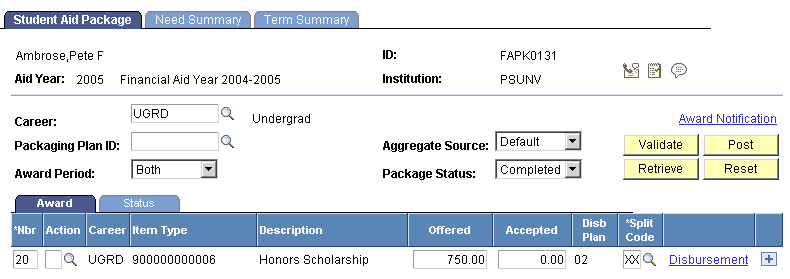
The Award Posting process merges the two instances of the University Grant into a single award because they are generated from the same Financial Aid Item Type and share the same disbursement plan. However, the Award Posting process merges the two discrete splits into one custom split, and displays XX in the Split field to indicate the custom split. The Award Posting process retains the separate disbursements called for by the two University Grant awards, and the Need Summary page reflects these separate disbursements.
The following screen shots illustrate how the Award Posting process handles the two instances of the University Grant. In the first shot, both instances of the Financial Aid Item Type are visible.
The navigation path to the page is
This example illustrates the Student Aid Package page with two instances of Honors Scholarship.
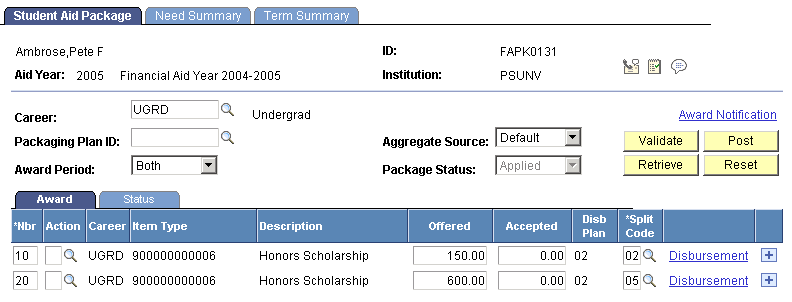
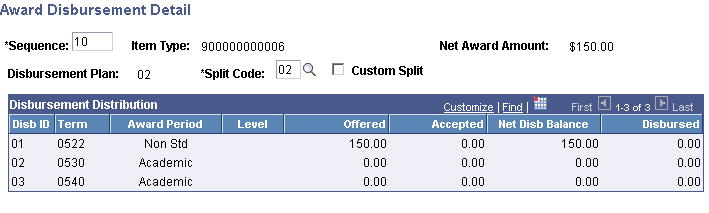
The next two screen shots show the disbursement detail for each instance of the Honor Scholarship.
This example illustrates the Award Disbursement Detail page for the first instance of the Honors Scholarship.
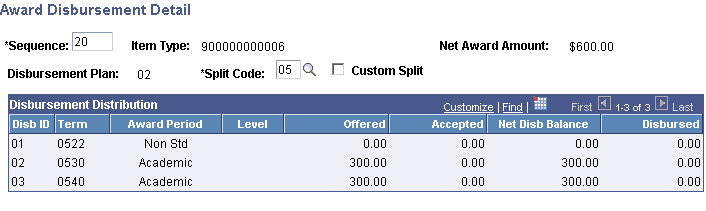
This example illustrates the Award Disbursement Detail page for the second instance of the Honors Scholarship.
The next screen shot shows how the two instances of the University Grant Financial Aid Item Type are combined after posting. Notice that the Split field contains XX, indicating a custom split:
This example illustrates the Student Aid Package page after posting—the two separate instances are combined, with a custom split.
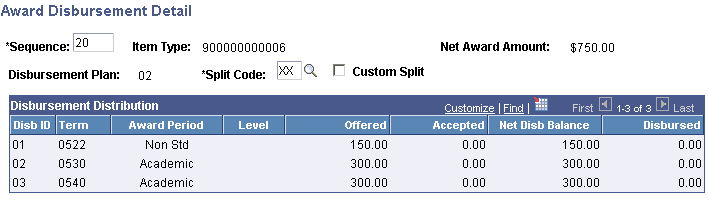
When you look at the disbursement detail for the University Grant, you can see that Packaging has retained the disbursements dictated by the two separate instances of the University Grant
This example illustrates the Award Disbursement Detail page for the combined Honors Scholarship.
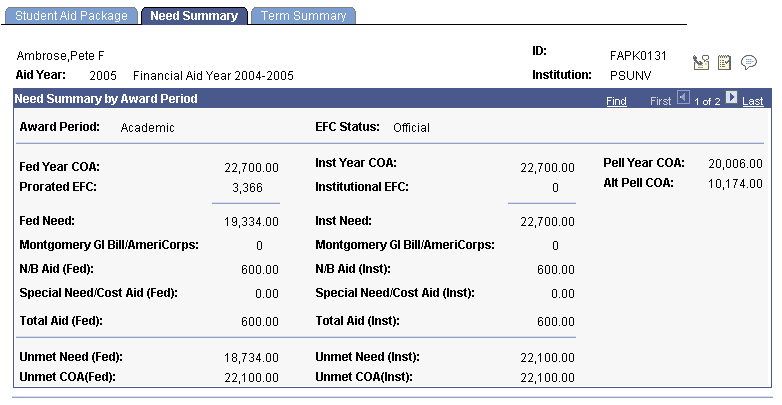
The Need Summary page also retains the separate disbursements:
This example illustrates the Need Summary page displaying AAP information and disbursements.
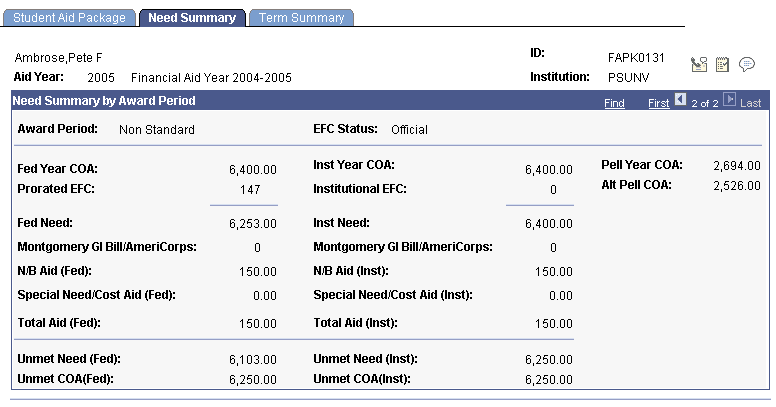
This example illustrates the Need Summary page displaying NSAP information and disbursements.
Important:
The disbursement plan/split code pattern enables Packaging to maintain the integrity of each award and therefore its disbursements by award period. Using this functionality, you can use the same Financial Aid Item Type across award periods.
Loans and Sequential Award Period Processing
The origination requirements of loans affect your ability to use sequential award period processing and passive/active mode.
For non-Direct Loans, like CommonLine or Perkins Loans, regulatory requirements dictate that you cannot assign a disbursement plan/split code pattern with a zero disbursement in any disbursement cycle and, therefore, in any award period. Therefore, you cannot use the usual method for sequential award processing. For example, to award non-Direct Lending loans for sequential AAP and NSAP award periods processing, you must use separate Financial Aid Item Types and disbursement plans: one for the AAP and another for the NSAP.
For Direct Lending loans, you can use the same Financial Aid Item Type for both the AAP and the NSAP. However, you cannot have a zero disbursement in the disbursement cycle of the first term for the Direct Lending loan. This means that you can have a zero disbursement in a trailing summer term, but you cannot have a zero disbursement in a leading summer term.