Reviewing Loan Action Codes for CRC
To set up these codes for CRC, use the Maintain CRC Loan Action Codes component (SFA_CRC_ACTION_CD).
While most of the CommonLine action codes are shared between CL4 and CRC, CRC specific codes exist which must be maintained separately.
This section discusses how to review loan action codes.
Page Used to Review Loan Action Codes
| Page Name | Definition Name | Navigation | Usage |
|---|---|---|---|
|
CRC Loan Action Codes |
SFA_CRC_ACTION_CD |
|
View CRC specific status codes and descriptions. |
Reviewing Loan Action Codes
Access the Loan Action Code Table page ().
This example illustrates the fields and controls on the Loan Action Code Table page. You can find definitions for the fields and controls later on this page.
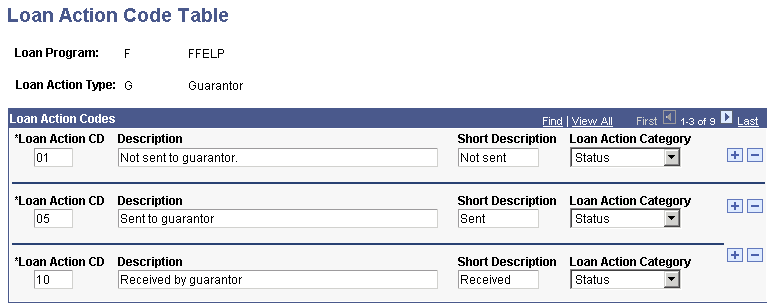
CRC specific status codes are stored in this component. You should not have to add or delete loan action codes, but you can modify the descriptions. Four loan action types are available: Guarantor, Lender, PNote (Promissory Note), and Credit. Loan action codes that are common to both CL 4 and CRC loans are stored in the CL 4 action code table.
| Field or Control | Description |
|---|---|
|
Loan Action Category |
The values are: Accept, Reject, and Status. |