Selecting Equations for the Hold and Release Process for CRC
To set up equations for the hold and release process for CommonLine loans, use the Hold and Release Equations component (LN_CLHR_EQ_NAME).
This section discusses how to select equations for the CommonLine disbursement hold and release process. This process is used for both CommonLine 4 and Common Record CommonLine loans.
Page Used to Set Equations for Hold and Release
| Page Name | Definition Name | Navigation | Usage |
|---|---|---|---|
|
Hold/Release Equations |
LN_HR_EQ_NAME_PNL |
|
Select the equations that you require the hold and release process to execute. |
Selecting Equations for Hold and Release
Access the Hold/Release Equations page ().
This example illustrates the fields and controls on the Hold/Release Equations page. You can find definitions for the fields and controls later on this page.
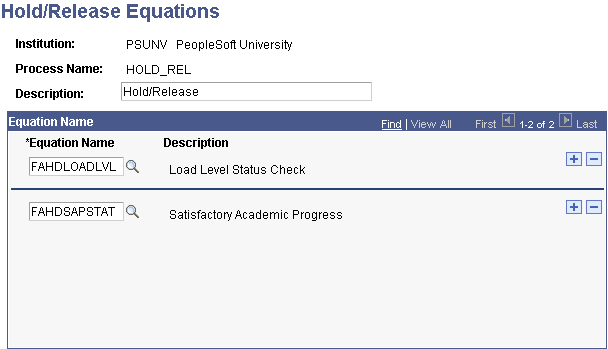
The equations that you select on this page form an equation set unique to the specified process name.
| Field or Control | Description |
|---|---|
|
Description |
Displays the process for which you are selecting equations. |
|
Equation Name |
Select an equation. The list contains all equations created for the selected institution; select only those equations created specifically for hold and release processing. |
If you use the hold and release process at your institution without modifications, create at least one hold/release equation set with the two provided hold and release equations: FAHDLOADLVL (Load Level edit) and FAHDSAPSTAT (Satisfactory Academic Progress check).
Note:
If you create your own equations, follow the naming conventions described in the Equation Engine documentation to prevent the accidental deletion of custom equations during application upgrades.