Viewing Promissory Note Action History and Loan Disbursement Messages
This section discusses how to:
-
View promissory note action history.
-
View loan disbursement messages.
Page Used to View Promissory Note Action History and Loan Disbursement Messages
| Page Name | Definition Name | Navigation | Usage |
|---|---|---|---|
|
Direct Loan PNote Action |
LN_DL_PNOTE_INQ |
|
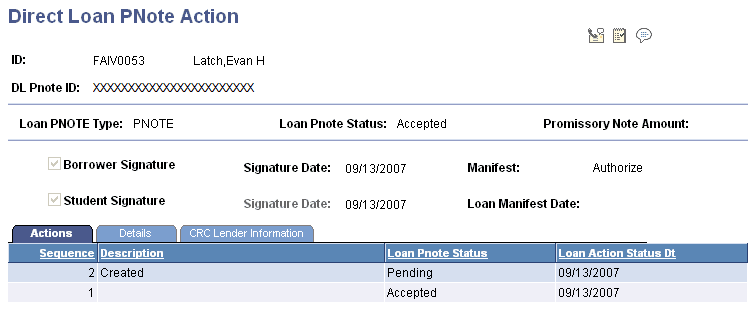
View promissory note action history. This is information the same information as on the Direct Loan PNote page, but this page cannot be updated. You can also review messages pertaining to rejected transactions. |
Viewing Promissory Note Action History
Access the Direct Loan PNote Action page ().
This example illustrates the fields and controls on the Direct Loan PNote Action page. You can find definitions for the fields and controls later on this page.
Actions Tab
Click the Msg (message) link to access the Loan Disbursement Messages page, where you can view messages that explain the problem with the promissory note.
Related Topics
Viewing Loan Disbursement Messages
Access the Loan Disbursement Messages page (click the Msg link on the Direct Loan PNote Action page).
| Field or Control | Description |
|---|---|
|
PNt MsqSq (promissory note message sequence) |
Displays the number generated from the promissory note record activity. Multiple sequences display, with the most recent sequence first. |
|
Msg Code (message code) |
Displays the code that the COD has assigned to this action message. |
|
Msg (message) |
Click this link to view the full text of the message. |
|
Descr (description) |
Displays the description of the action message. |