Viewing System Administration Information
The following tables are view only and can be used by your System Administrator. The fields are defined by field layout and valid values required by the COD Technical Reference. This section discusses how to:
-
View loan action codes.
-
View Direct Lending change fields.
Pages Used to View System Administration Information
| Page Name | Definition Name | Navigation | Usage |
|---|---|---|---|
|
Loan Action Code |
LOAN_ACTNCD_WK00 |
|
View loan action codes and messages and their descriptions. |
|
DL Change Fields |
DL_CHG_XREF |
|
View loan action codes and descriptions related to Change Origination processing. This is a system definition table used for Direct Lending File processing. The Hold/Suspense options, for students and globally, come from this table. |
Viewing Loan Action Codes
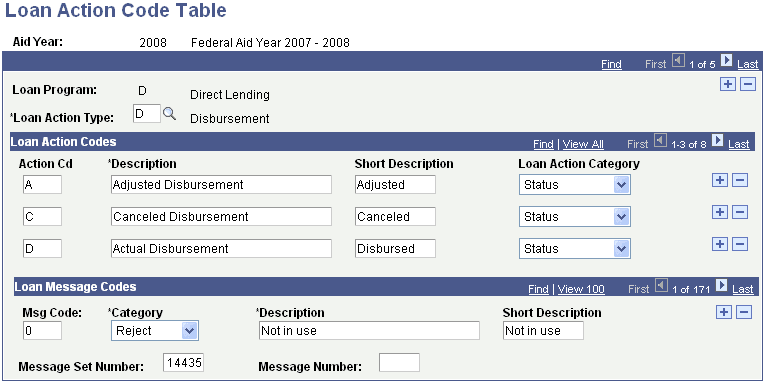
Use the Loan Action Code Table page to view loan action codes and messages and their descriptions. This is a system definition table used for file processing.
Access the Loan Action Code Table page ().
This example illustrates the fields and controls on the Loan Action Code Table page.
Viewing Direct Lending Change Fields
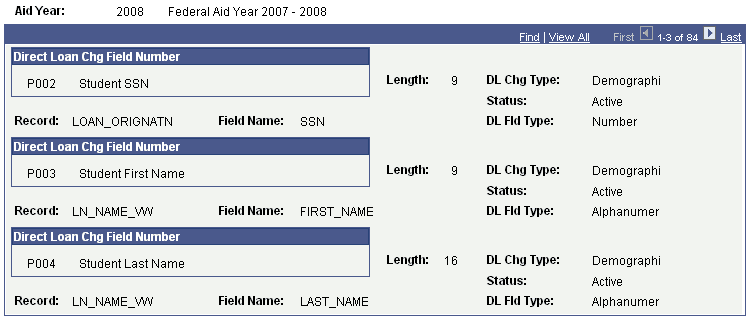
Access the DL Change Field Cross Reference page ().
This example illustrates the fields and controls on the DL Change Fields page. You can find definitions for the fields and controls later on this page.
| Field or Control | Description |
|---|---|
|
Direct Loan Chg Field Number (direct loan change field number) |
Displays field numbers defined by COD Technical Reference. |
|
Length |
Displays the number of characters allowed for the field. |
|
DL Chg Type (direct lending change type) |
Displays the type of change this field represents. Values are Demographic, Financial, and Eligibility. |
|
Status |
Indicates the status of the field in your system. |
|
DL Fld Type (direct lending field type) |
The field type can be Number or Alphanumeric. |
|
Record |
The record/table name for this field in the system. |
|
Field Name |
Displays the name of the change field. |
The change fields are used on two pages:
-
Direct Loan Orig Actions (LN_DL_ORIG_INQ) page (Financial Aid, Loans, Direct Lending Management, View Loan Processing Actions, Direct Loan Orig Actions).
-
DL Student Change Information (LN_DL_EMPL_PARM) page (Financial Aid, Loans, Direct Lending Management, Hold/Suspend Change Data).