1.8.2 Using the User Profiles Management Clean Up Pages
This table describes the User Profiles Management process:
| Field or Control | Description |
|---|---|
|
Usage |
Use the User Profile Clean Up Processes page to delete the temporary tables associated with the USERPROFILE processes. You also use this page to delete the result table, which holds user ID and non-encrypted password information. |
|
Object Name |
MAINT_USRPROF_DATA |
|
Page Name |
User Profile Clean Up Process. |
|
Navigation |
Set Up SACR, Security, Secure Student Administration, Process, User Profiles Mgmt - Clean Up. |
Figure 1-6 User Profile Clean Up Processes page
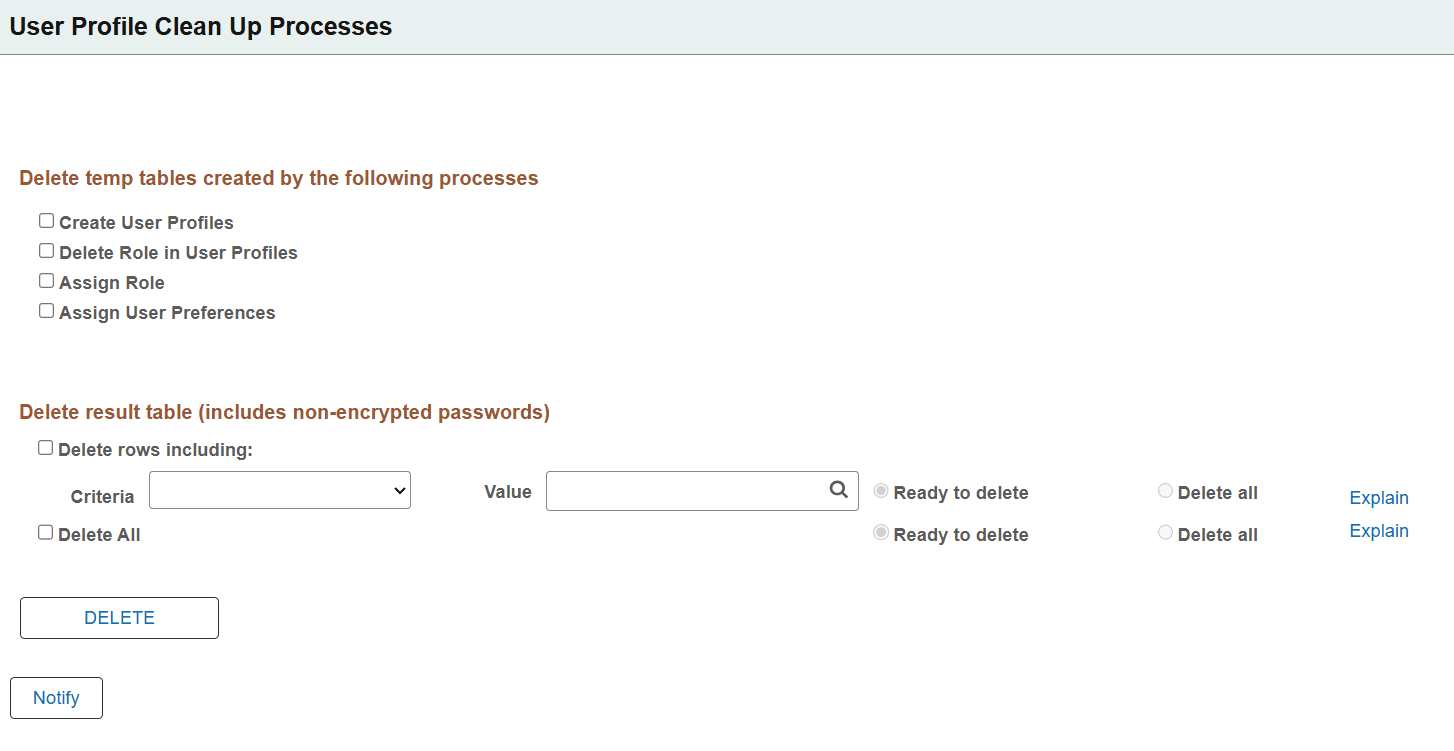
The section Delete temp tables created by the following processes includes the following options:
| Field or Control | Description |
|---|---|
|
Create User Profiles |
Select this check box to delete the temporary table PS_USRPRF_NWID_TMP, which is created by the Create User Profiles process when you run USERPROFILE. |
|
Delete Role in User Profiles |
Select this check box to delete the temporary table PS_USRPRF_DEL_TMP, which is created by the Delete Roles in User Profile process when you run USERPROFILE. |
|
Assign Role |
Select this check box to delete the temporary table PS_USRPRF_ASG_TMP, which is created by the Assign Role process when you run USERPROFILE. |
|
Assign User Preferences |
Select this check box to delete the temporary table PS_ASSN_SETVAL_TMP, which is created by the Assign User Preferences process when you run USERPROFILE. |
Note:
The clean up process does not delete information from the error log record (PS_ERR_LOG_USRPRF). Use your defined SQL tool to delete information from error log record as needed.
Reviewing the section Delete result table (includes non-encrypted passwords):
The fields in the Delete Result Table section of the application page allow you to delete rows of data from the temporary result table (PS_USRPRF_LTR_COMM) that is created if you selected the Create Result Table check box on the User Profile Mass Creation page. This is the only place where the non-encrypted passwords are stored. It is your responsibility to frequently run the cleanup process.
The temporary result table includes a column called Ready To Delete (READY_TO_DEL) that is a Y (yes) or N (no) flag for each user ID. When the User Profiles Management process runs and the Create Result Table option is selected in the setup page (Setup SACR, Security, Secure Campus Solutions, Setup, User Profiles Mass Creation), the User Profiles Management process determines if the flag should be a Y or a N based on the Event ID you selected.
The User Profiles Management process sets the flag to N (meaning not ready to be deleted) when the Assign 3C check box is checked on the User Profile Mass Creation setup page and the Event ID specified includes a letter code set up with the Name SQC equal to CCLTRWOL. This SQC is used by the Letter Generation process to extract the user ID and the password and make the information available to add on a communication. Do not delete rows in this table if the Letter Generation process has not been run yet. After the Letter Generation process is run, the flag changes to Y to indicate that the user ID row is now ready to be deleted.
Note:
Only the Letter Generation process can change the Ready to Delete flag.
The section Delete result table (includes non-encrypted passwords) includes the following options:
| Field or Control | Description |
|---|---|
|
Delete rows including |
Select this check box if you want to delete only selected rows in the result table. If you select this check box, select a criterion and value to be used. |
|
Criteria |
Select a criterion to be used to delete specific rows in the result table. You can select only one of the following criteria.
|
|
Value |
Select the value you want to be used for the criterion that you selected. |
|
Ready to Delete |
Select this option if you want to delete only those rows where the READY_TO_DEL field in the temporary result table is set to Yes. This option prevents you from deleting the rows where the Letter Generation process has not yet been run. |
|
Delete all (radio button/option) |
Select this option to delete rows in the temporary result table where the READY_TO_DEL field is set to Yes or No. If you select this option, you may delete rows for which the Letter Generation process has not run, and you delete the user ID and password information. There is no way to recover this information unless you reset all the passwords manually. |
|
Delete All (check box) |
Select this check box if you want to delete rows in the temporary result table without specifying any criteria. As previously described, you can also select to delete the rows marked as Ready to delete or Delete all. If you select Delete All, you may delete rows for which the Letter Generation process has not run, and you delete the user ID and password information. There is no way to recover this information unless you reset all the passwords manually. |
|
Explain |
Use these links to see the explanation for the selected check box. |
Click the Delete button to delete the selected temp tables and the selected rows in the result table. When you click Delete, you receive a warning message letting you know that you are about to delete data from the system and asking if you want to continue.
Note:
The Ready to Delete and Delete all options work in conjunction with the Delete rows including and Delete All check boxes. For example, if you elect to delete certain rows based on a selected criterion and you select the Delete all option, only the rows selected by the criteria are deleted. Similarly, if you select the Delete All check box and select the Ready to Delete option, only the rows where the READY_TO_DEL field is set to Yes are deleted.
The fields in this area of the application page allow you to delete rows of data from the temporary result table (PS_USRPRF_LTR_COMM) that is created if you selected the Create Result Table check box on the User Profile Mass Creation page. This is the only place where the non-encrypted passwords are stored. It is your responsibility to frequently run the cleanup process.
The temporary result table includes a column called Ready To Delete (READY_TO_DEL) that is a Y (yes) or N (no) flag for each user ID. When the User Profiles Management process runs and the Create Result Table option is selected in the setup page (Setup SACR, Security, Secure Campus Solutions, Setup, User Profiles Mass Creation), the User Profiles Management process determines if the flag should be a Y or a N based on the Event ID you selected.
The User Profiles Management process sets the flag to N (meaning not ready to be deleted) when the Assign 3C check box is checked on the User Profile Mass Creation setup page and the Event ID specified includes a letter code set up with the Name SQC equal to CCLTRWOL. This SQC is used by the Letter Generation process to extract the user ID and the password and make the information available to add on a communication. Do not delete rows in this table if the Letter Generation process has not been run yet. Once the Letter Generation process is run, it changes the flag to Y to indicate the user ID row is now ready to be deleted.