Adding Contracts to Students
This section discusses how to:
-
Match contracts to students.
-
Link contracts to a student.
Pages Used to Add Contracts to Students
| Page Name | Definition Name | Navigation | Usage |
|---|---|---|---|
|
Match Students |
SAD_BPV_MATCH2_NLD |
|
Search for and select students to which to link contracts. |
|
BPV Student Detail |
SAD_BPV_STD1_NLD |
Click the Detail Panel button on the Match Students page. |
Link contracts to students. |
Matching Contracts to Students
Access the Match Students page ().
This example illustrates the fields and controls on the Match Students page. You can find definitions for the fields and controls later on this page.
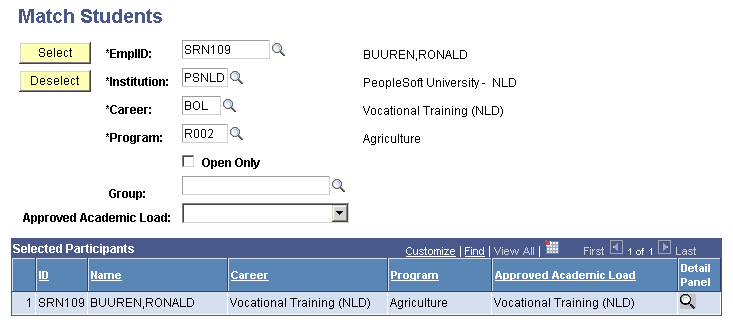
Enter search criteria to retrieve students to which you want to link to contracts. Click the Detail Panel button to link contracts to students.
Linking Contracts to a Student
Access the BPV Student Detail page (click the Detail Panel button on the Match Students page).
This example illustrates the fields and controls on the BPV Student Detail page. You can find definitions for the fields and controls later on this page.
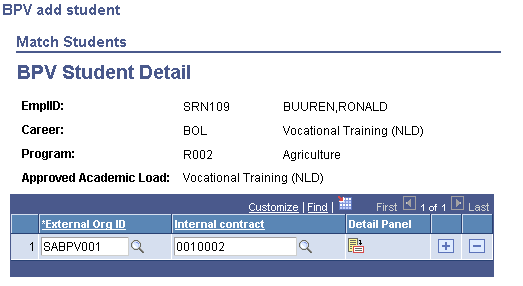
| Field or Control | Description |
|---|---|
|
External Org ID (external organization ID) |
Select the external organization that manages hosts the internship. |
|
Internal contract |
Select the contract that you want to link to this student. |
|
Detail Panel |
Click this button to access the Match Contracts - BPV Vacancy Detail page to view and update contract details. |