Defining External Tests
Important:
Test score load and other processes and components discussed in the Processing External Test Scores documentation are deprecated. It is strongly recommended that you use Prospect/Admissions Data Load (PDL) instead. For more information on PDL, see the Prospect/Admissions Data Load documentation.
To define external tests, use the Test Tables component (SA_TEST_TABLE).
Page Used to Define External Tests
| Page Name | Definition Name | Navigation | Usage |
|---|---|---|---|
|
Test Tables |
SA_TEST_TABLE |
|
Define tests (such as the ACT, GMAT, and GRE) and associate test components with the appropriate tests. You can also associate tests on this page with a particular testing agency, such as American College Testing, College Board, Educational Testing Services, and Law School Admission Services. |
Defining External Tests
Access the Test Tables page ().
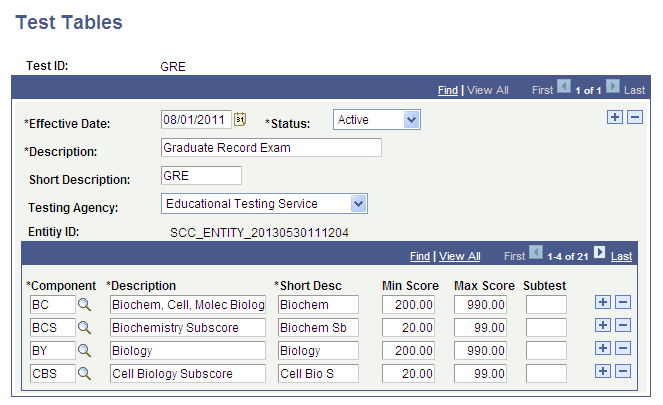
This example illustrates the fields and controls on the Test Tables page. You can find definitions for the fields and controls later on this page.
| Field or Control | Description |
|---|---|
|
Testing Agency |
Select the testing agency that administers this test (if applicable). This field is for informational purposes only. Values for this field are delivered with your system as translate values. You can modify these translate values. The delivered values are American College Testing, College Board, Educational Testing Services, and Law School Admission Services. |
|
Entity ID |
The system populates this field with the entity ID created in the Entity Registry component. See Campus Community Fundamentals: Understanding Entity Registry |
|
Component |
Enter the test components that you want to link to this academic test. The system populates the descriptions based on the code that you select. Define test components on the Test Component Table page. |
|
Min Score/Max Score (minimum score/maximum score) |
Enter a test score range for each component. |
|
Subtest |
Enter the code used for TS130 or TS189 processing of test scores. |