Entering and Updating Evaluator Ratings for an Application
Use the Application Evaluator Rating component to enter rating component values and overall ratings for evaluators. Only use this component if you are evaluating applications based on rating schemes.
This section discusses how to:
-
Enter and update evaluator overall ratings for an application evaluation.
-
Enter and update evaluator ratings of individual rating components.
Pages Used to Enter and Update Evaluator Ratings for an Application
| Page Name | Definition Name | Navigation | Usage |
|---|---|---|---|
|
Application Evaluator Rating |
ADM_RATING1 |
|
Enter evaluator rating information (such as the rating scheme, evaluation status, and the evaluator's overall rating.) |
|
Application Evaluator Detail |
ADM_RATING2 |
|
Enter an evaluator's ratings of the components of a rating scheme. The system then averages and displays these ratings on the Application Evaluator Rating page. |
Entering and Updating Evaluator Overall Ratings for an Application Evaluation
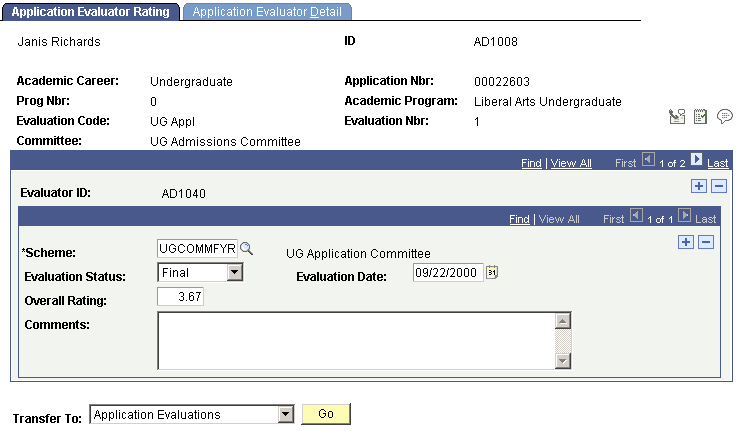
Access the Application Evaluator Rating page ().
This example illustrates the fields and controls on the Application Evaluator Rating page. You can find definitions for the fields and controls later on this page.
| Field or Control | Description |
|---|---|
|
Scheme |
The system populates the rating scheme according to the rating scheme entered on the Application Evaluation page for this evaluation code (for this person). You can add more than one rating scheme for an evaluator. |
|
Evaluation Status |
Select the evaluation status reflecting the current status of this evaluator's evaluation (for this scheme). Evaluation status codes are set up on the Evaluation Status Table page. |
|
Evaluation Date |
The default for the evaluation date is your system date. |
|
Overall Rating |
The system automatically calculates the overall rating by averaging the ratings for each rating component entered for this evaluator (and for this scheme). Ratings for each component (by evaluator) are stored on the Application Evaluator Detail page. You can override this calculation. Additionally, if you choose not to use rating schemes to evaluate applications, you can enter an overall rating manually. |
Entering and Updating Evaluator Ratings of Individual Rating Components
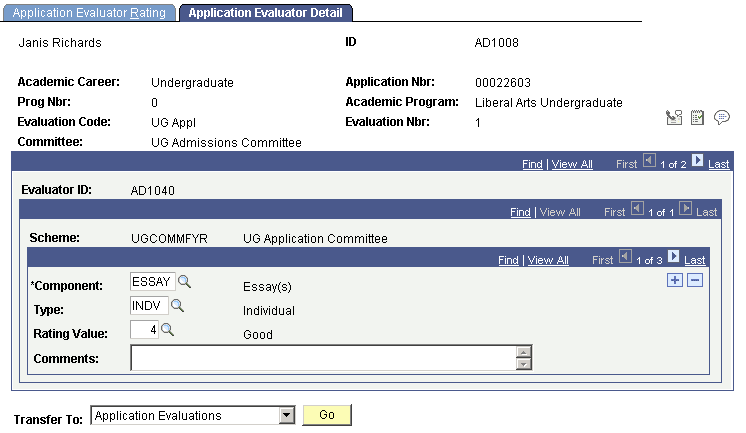
Access the Application Evaluator Detail page ().
This example illustrates the fields and controls on the Application Evaluator Detail page. You can find definitions for the fields and controls later on this page.
| Field or Control | Description |
|---|---|
|
Component and Type |
The rating components and types linked to this rating scheme automatically appear. Edit or add new components and corresponding types. |
|
Rating Value |
Enter a rating value for each component in this rating scheme. If you set up rating values for the rating components for this rating scheme, you can prompt for those values. Define rating values on the Rating Components Table page. When you save this page, the system averages the rating values for each component and populates the overall rating for the rating scheme (for this evaluator) on the Application Evaluator Rating page. You must enter ratings on this page first in order for the system to calculate overall ratings. This is the lowest level of the calculation. |