Generating Admissions Average Cutoff Reports
To set up the average cutoff table, use the Average Cutoff component (AVERAGE_CUTOFF_TBL).
This section discusses how to set up the average cutoff table.
Pages Used to Generate Admissions Average Cutoff Reports
| Page Name | Definition Name | Navigation | Usage |
|---|---|---|---|
|
Average Cutoff Table |
AVG_CUTOFF_TBL |
|
Set up the criteria that you want the system to report. |
|
Average Cutoff Report |
RUNCTL_ADAVGCUT |
|
Run the average cutoff report. |
Setting Up the Average Cutoff Table
Access the Average Cutoff Table page ().
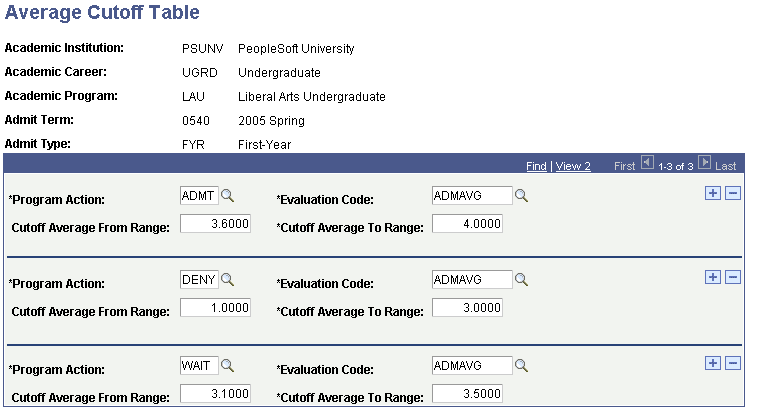
This example illustrates the fields and controls on the Average Cutoff Table page. You can find definitions for the fields and controls later on this page.
| Field or Control | Description |
|---|---|
|
Program Action |
Enter the program action that an applicant should be assigned if his or her average falls within the range that you enter. The report displays the number of applicants whose average falls within this range but are not assigned this program action, as well as those who fall within the range and who are assigned this program action. |
|
Evaluation Code |
Enter the evaluation code for which you want to generate a cutoff report. The system only queries applications that are assigned the evaluation code that you enter here for the program action and average range. |
|
Cutoff Average from Range |
Enter the minimum value an average can be for the system to consider the program action effective for the group of applicants that are assigned the evaluation code that you enter. |
|
Cutoff Average to Range |
Enter the maximum value an average can be for the system to consider the program action effective for the group of applicants that are assigned the evaluation code that you enter. |
In the previous page shot, all applications to the undergraduate liberal arts program for admit term Fall 2001 with the first year admit type, that are assigned the evaluation code ADMAVG and that have an average between 3.6 and 4.0 inclusive appears on the report under the program action of Admit. Those applications with an average between 1.0 and 3.0 inclusive appears on the report under the program action of Deny. Those applications with an average between 3.1 and 3.5 inclusive appears on the report under the program action of Wait.
Related Topics