Preparing for TAC Processing
Before you can process and upload the TAC data loads, you must prepare your system with a variety of setup data, primarily mapping data rules for your institution that coincide with each TAC load that you process.
The following table lists the required setup tasks that must be completed before you import TAC files:
| Task | Required for QTAC | Required for UAC | Required for SATAC | Required for VTAC |
|---|---|---|---|---|
|
1. Set up TAC test IDs. |
Yes |
Yes |
Yes |
Yes |
|
2. Assign user security to TAC test IDs. |
Yes |
Yes |
Yes |
Yes |
|
3. Map TAC test IDs to PeopleSoft test codes. |
Yes |
Yes |
Yes |
Yes |
|
4. Set up TAC program codes. |
Yes |
Yes |
Yes |
Yes |
|
5. Set up TAC program code mapping. |
Yes |
Yes |
Yes |
Yes |
|
6. Set up DEST (DIISRTE) number mapping. |
Yes |
Yes |
No |
No |
|
7. Set up country code mapping. |
Yes |
Yes |
Yes |
Yes |
|
8. Set up state code mapping. |
Yes |
Yes |
Yes |
Yes |
|
9. Set up external organizations associated with the qualifications that you want to load. |
Yes |
Yes |
Yes |
Yes |
|
10. Define TAC subjects. |
Yes |
Yes |
No |
Yes |
|
11. Map year 12 types to external organizations. |
Yes |
No |
No |
No |
|
12. Map TAC external institutions to external organizations. |
No |
No |
No |
Yes |
|
13. Map origin of qualification values to external organizations. |
Yes |
No |
No |
No |
|
14. Map subject codes to external organizations. |
Yes |
Yes |
No |
Yes |
|
15. Set up qualification level mapping. |
Yes |
Yes |
No |
Yes |
|
16. Set up name prefix mapping. |
Yes |
Yes |
Yes |
Yes |
|
17. Add program action reason code for basis of admission mapping. |
Yes |
Yes |
Yes |
Yes |
|
18. Map basis of admission values. |
Yes |
Yes |
Yes |
No |
|
19. Map admit type values. |
No |
No |
Yes |
No |
|
20. Define citizenship mapping rules. |
Yes |
Yes |
Yes |
Yes |
|
21. Set up ethnicity mapping. |
No |
Yes |
No |
Yes |
|
22. Set up DIISRTE Language Code Mapping. |
Yes |
Yes |
No |
Yes |
|
23. Offer Period Mapping |
Yes |
No |
No |
No |
|
24. Honors Category Map |
Yes |
No |
No |
No |
Pages Used to Prepare for TAC Processing
| Page Name | Definition Name | Navigation | Usage |
|---|---|---|---|
|
Test Tables |
SA_TEST_TABLE |
|
Set up TAC test IDs, such as QTAC, VTAC, SATAC, and UAC. |
|
Test ID Security |
SAD_TEST_SCTY |
|
Assign the TAC test IDs that a user can access. The system enforces test ID security in several components throughout the system. |
|
External Test Score Mapping |
SAD_TEST_SETUP |
|
Map TAC test IDs to suspense and candidate data records. Map the TAC test IDs you defined on the Test Table page to the Oracle-delivered test code. The system needs this setup to perform a variety of external test-related functions. The PeopleSoft system delivers the following test codes for use with TAC: QTC, STC, UAC, and VTC. |
|
Program Code Table |
SSR_PRG_CD_TBL |
|
Define the TAC program codes to which the applicants will apply through a TAC or TACs. |
|
Acad Prog AUS |
SSR_ACAD_PROG_AUS |
|
Map TAC program information to academic programs. |
|
DEST Number Map |
SAD_TAC_MAP_DEST |
|
Associate a fact code to a DEST (DIISRTE) reference number for the cases where a fact code relates to DIISRTE Highest Education Attainment information. |
|
Country Map |
SAD_TAC_MAP_CNT |
|
Map TAC country codes to the PeopleSoft equivalent country field. |
|
State Code Map |
SAD_TAC_MAP_ST |
|
Map TAC state codes to the PeopleSoft equivalent state field. |
|
Organization Table |
EXT_ORG_TABLE |
|
Enter external organizations codes into the system for posting applicants' external education data and the last school attended. Education data may include an applicant's qualifications. |
|
School Subject Maintenance |
SCHOOL_SUBJECTS |
|
Define academic subjects for the external organizations. |
|
External Organization Map |
SAD_TAC_MAP_EXT |
|
Map year 12 types, TAC external institutions, origin of qualification values, and subject codes to the external organizations. |
|
Qualification Level Map |
SAD_TAC_MAP_QUAL |
|
Map TAC qualification level codes to PeopleSoft external academic level codes. |
|
Name Prefix Map |
SAD_TAC_MAP_PFX |
|
Map TAC prefixes (MR, MISS, and MS) to general system name prefixes. |
|
Program Action Reason Table |
PROG_RSN_TBL |
|
Add program action reasons for the program action of Admit. The TAC Load process assigns these program action reasons to applicants based on the Basis of Admission mapping. |
|
Basis of Admission Map |
SAD_TAC_MAP_BOA |
|
Map Admit program action reasons to the Basis of Admission codes provided by the TAC. |
|
Admit Type Map |
SAD_TAC_MAP_ADM |
|
Associate admit types with basis of admission values. |
|
Citizenship Map |
SAD_TAC_MAP_CIT |
|
Map TAC citizenship codes to the citizenship statuses set up for the country AUS and residency codes. |
|
Ethnicity Map |
SAD_ETHNICITY_MAP |
|
Map the DIISRTE ethnicity values (Aboriginal or Torres Strait Islander codes related to DIISRTE Element 316) to the corresponding ethnic groups set up for regulatory region AUS. |
|
Language Table |
SSR_LANG_DEST |
|
Map language codes to DIISRTE language codes. |
|
Offer Period Mapping |
SAD_TAC_MAP_OFR |
|
Map the Offering Month and Year provided in the TAC File to an admit term. |
|
Honors Category Map |
SAD_TAC_MAP_HONOUR |
|
Map an honors category to the TAC Honours value provided in the qualification file. |
Setting Up TAC Test IDs
Access the Test Tables page ().
This example illustrates the fields and controls on the Test Tables page.
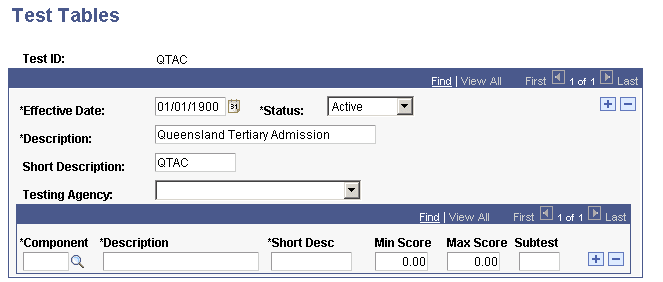
Add a test ID for all applicable TACs.
Assigning TAC Test ID Security
Access the Test ID Security page ().
This example illustrates the fields and controls on the Test ID Security page.
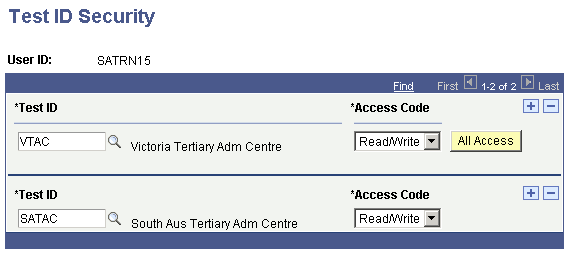
Assign the TAC test IDs that a user can access. The system enforces test ID security in several components throughout the system.
Setting Up TAC Test ID Mapping Rules
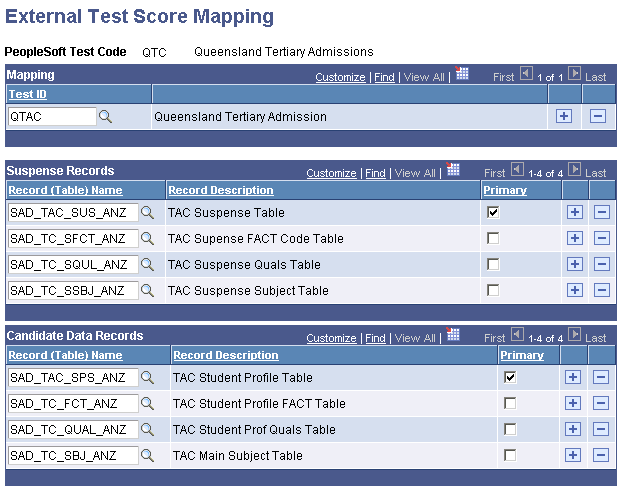
Access the External Test Score Mapping page ().
This example illustrates the fields and controls on the External Test Score Mapping page. You can find definitions for the fields and controls later on this page.
| Field or Control | Description |
|---|---|
|
Test ID |
Enter a TAC test ID for each PeopleSoft TAC test code. The PeopleSoft system delivers the following TAC test codes: QTC, VTC, UAC, and STC |
Note:
On this page, you only have to enter a TAC test ID that corresponds to a PeopleSoft test code. The PeopleSoft system delivers the rest of the page complete. It is important that all TAC test IDs you have defined are mapped to a PeopleSoft test code or you will not be able to load TAC data.
Setting Up TAC Program Codes
Access the Program Code Table page ().
This example illustrates the fields and controls on the Program Code Table page.
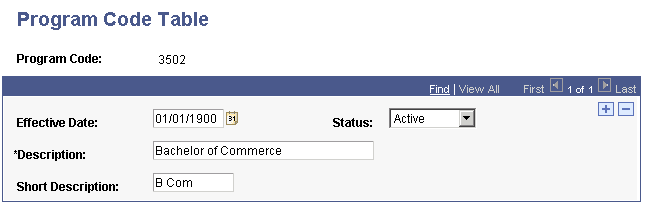
Set up program codes that map to course codes in the TAC input files.
Mapping TAC Program Codes to Academic Programs
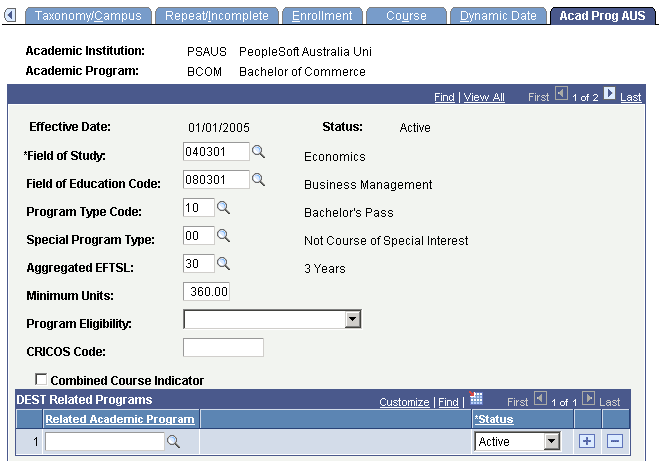
Access the Acad Prog AUS page ().
This example illustrates the fields and controls on the Acad Prog AUS (academic program Australia) page (1 of 2). You can find definitions for the fields and controls later on this page.
This example illustrates the fields and controls on the Acad Prog AUS (academic program Australia) page (2 of 2). You can find definitions for the fields and controls later on this page.
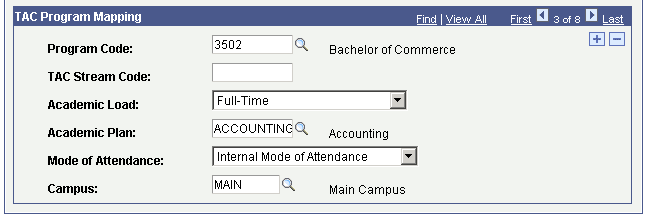
| Field or Control | Description |
|---|---|
|
Program Code |
Associate a TAC program code with an academic program that your institution offers. TAC program codes can be mapped to only one academic program. |
|
TAC Stream Code |
Applicable to only SATAC and VTAC. |
|
Academic Load |
Enter the academic load that the TAC Load process assigns to the admission applications for the program. |
|
Academic Plan |
Enter the academic plan that the TAC Load process assigns to the admission applications for the program. |
|
Mode of Attendance |
Enter the mode of attendance that the TAC Load process assigns to the admission applications for the program. |
|
Campus |
Enter the campus that the TAC Load process assigns to the admission applications for the program. |
Associating FACT Codes with DIISRTE Reference Numbers
Access the DEST Number Map page ().
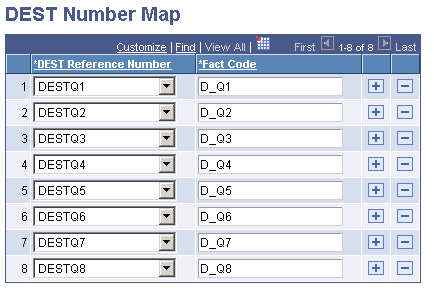
This example illustrates the fields and controls on the DEST Number Map page. You can find definitions for the fields and controls later on this page.
DIISRTE - Department of Industry, Innovation, Science, Research and Tertiary - was previously known as DEEWR and before that, as DEST.
For TACs that provide prior education data as FACT codes, associate a FACT code with the applicable DEST Reference Number. The system uses the DEST Reference Number and Fact Code mapping to report highest education attainment so that DIISRTE can track the applicant's prior educational details. The following table lists the DIISRTE (DEST) reference numbers:
| DIISRTE Reference Number | Description |
|---|---|
|
1 |
Post Graduate Program |
|
2 |
Degree Program |
|
3 |
Sub Degree Program |
|
4 |
VET Sub Degree Program |
|
5 |
VET Award Program |
|
6 |
VET Secondary Program |
|
7 |
School Secondary Program |
|
8 |
Other Program |
You can set up FACT codes that are not associated with the applicant's prior education data. In this case, the DEST Reference Number for these FACT codes must be set to Not DEST. The Not DEST mapping setup is optional, and the system uses this setup for its internal processes.
The TAC Load process posts all FACT codes into suspense records. These codes form a part of the candidate data records after the application is posted, regardless of whether the configuration for these codes is maintained on the DEST Number Map page. The system posts the prior education data into the PeopleSoft database only if you have mapped the DEST numbers on the DEST Number Map page.
Note:
SATAC provides the prior education data in the applicant file, not the FACT file. Therefore, DEST number mapping is optional for SATAC.
To view the student DEST information after you import the TAC data, select
Related Topics
Mapping TAC Country Codes
Access the Country Map page ().
Enter the TAC country code that you want to associate with each PeopleSoft country code. The TAC Load process uses this mapping to load the data listed in the following table:
| Data | Supplied by QTAC | Supplied by UAC | Supplied by SATAC | Supplied by VTAC |
|---|---|---|---|---|
|
Country of Address |
Yes |
Yes |
Yes |
Yes |
|
Country of Birth |
No |
Yes |
Yes |
Yes |
|
Country of Citizenship |
No |
No |
Yes |
No |
Note that for VTAC you must have a row in which TAC Country Code AUSTRALIA maps to Country code AUS. This mapping is required so that the TAC Load process can load the VTAC residential and postal address data that do not have a country value.
Mapping TAC State Codes
Access the State Code Map page ().
Enter the TAC state code that you want to associate with each PeopleSoft state code. The TAC Load process uses this mapping to identify the state values in applicant address data.
Adding Organization Values
Access the Organization Table page ().
This example illustrates the fields and controls on the Organization Table page. You can find definitions for the fields and controls later on this page.
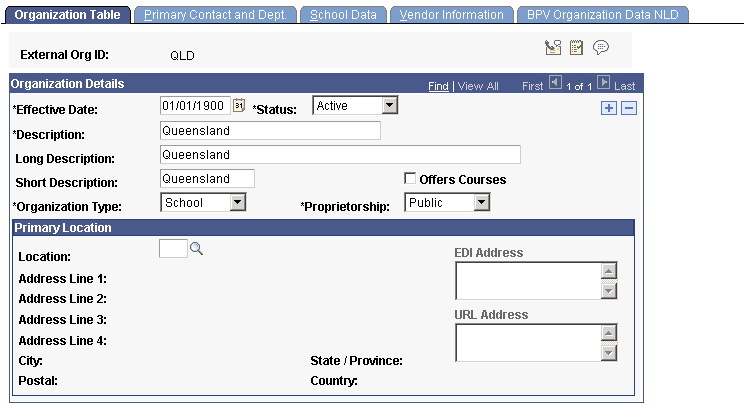
Add external organization codes that represent the applicants' schools. The TAC Load process uses the organization codes to post applicant's external education and last school attended data.
You must add the following organization codes if you want to import VTAC files:
| Organization Code | Description |
|---|---|
|
NON VIC SCH |
Add this organization code for non-Victorian secondary school qualification records in the VTAC offer file. If you add this organization code, the TAC Load process assumes the external organization code as NON VIC SCH for qualifications where the School Code is blank. |
|
EXT INSTITN |
Add this organization code if you do not want to configure an external organization for each institution that may exist in the overseas qualifications data. If the TAC Load process does not find a mapping between the TAC External Institution Name and an external organization on the External Organization Map page and you have added EXT INSTITN as an organization code, the process assumes EXT INSTITN as the organization code for the post-secondary level overseas qualifications. |
Related Topics
Defining TAC Subjects
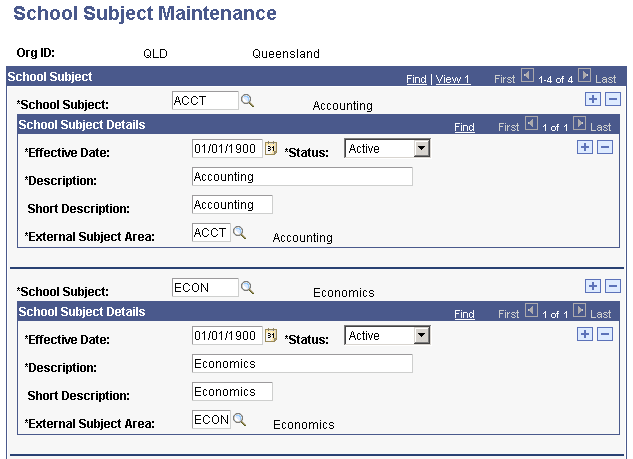
Access the School Subject Maintenance page ().
This example illustrates the fields and controls on the School Subject Maintenance page (1 of 2).
This example illustrates the fields and controls on the School Subject Maintenance page (2 of 2).
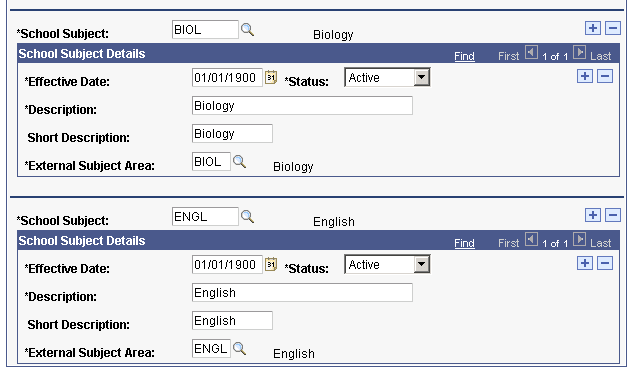
Enter the TAC subject codes and subject code details that you want to associate with each external organization.
Mapping External Organization Values
Access the External Organization Map page ().
This example illustrates the fields and controls on the External Organization Map page. You can find definitions for the fields and controls later on this page.
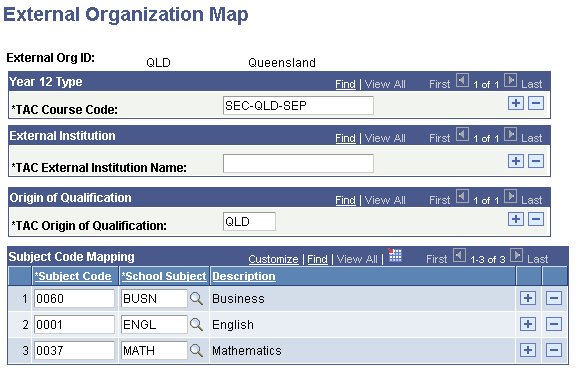
Year 12 Type
Enter the valid year 12 course codes for this organization. This data corresponds to the year 12 type in the applicant subject file for QTAC.
External Institution
Use this field for VTAC when you want to map overseas institution names to a specific external organization ID. VTAC data related to the Overseas Post Secondary Qualifications contain only an overseas institution name; this field allows you to map an overseas institution to an external organization ID.
You must set up an organization ID with a value of EXT INSTITN if you do not want to maintain separate organization IDs for the overseas institutions that may exist in the VTAC overseas qualifications data. If the external institution and external organization ID mapping does not exist, the TAC Load process assigns EXT INSTITN as the external organization ID for the overseas qualifications.
Origin of Qualification
Map origin of qualification values to the external organization. The values that you enter here correspond to the origin of qualification values in the application qualification file for QTAC and UAC.
Subject Code Mapping
Map TAC subject codes to the school subjects of the external organization.
Mapping TAC Qualification Levels
Access the Qualification Level Map page ().
Map TAC qualification level codes to PeopleSoft external academic level codes.
Mapping TAC Prefixes
Access the Name Prefix Map page ().
Enter the TAC name prefix that you want to associate with each PeopleSoft prefix.
VTAC does not provide name prefixes. Therefore, for VTAC, the TAC Run Search/Match Post process automatically inserts a name prefix of Mr if the applicant gender is Male and Ms if the applicant gender is female. The TAC Load process does not log any messages related to name prefix mapping because VTAC does not provide the name prefix in its load file.
Defining a Program Action Reason
Access the Program Action Reason Table page ().
This example illustrates the fields and controls on the Program Action Reason Table page.
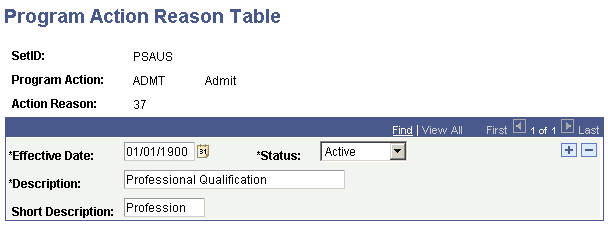
Map program action reason codes to the program action of Admit.
VTAC does not provide a basis of admission. For VTAC, define a program action reason OFFR so that the TAC Load process can assign the program action reason OFFR to the applications with admission offers.
Mapping Basis of Admissions Values
Access the Basis of Admission Map page ().
Map the basis of admission values provided by TAC to the action reasons you defined on the Program Action Reason Table page. The TAC Load process uses this mapping to insert the action reasons into admission applications. Additionally, the PeopleSoft DIISRTE reporting processes use the action reasons to report Element 327 - Basis for Admission to Current Courses.
Related Topics
Mapping TAC Admit Type Values
Access the Admit Type Map page ().
For SATAC, map external basis of admission codes to admit type values.
Mapping TAC Citizenship Codes
Access the Citizenship Map page ().
Define citizenship mapping rules to map TAC citizenship codes to citizenship statuses and PeopleSoft residency codes.
Mapping Ethnicity
Access the Ethnicity Map page ().
The TAC Load process uses this mapping to associate UAC FACT Codes to applicants. UAC FACT Codes provide information about an applicant's Aboriginal and Torres Strait Island origin.
The PeopleSoft DIISRTE reporting processes use the ethnicity codes to report DIISRTE Element 316.
The following table shows the required mapping for UAC.
| Ethnic Group | Ethnicity Code |
|---|---|
|
Aboriginal |
3 |
|
Torres Strait Islander |
4 |
|
Aboriginal and Torres Strait Islander |
5 |
The following table shows the required mapping for VTAC.
| Ethnic Group | Ethnicity Code |
|---|---|
|
Caucasian |
2 |
|
Aboriginal |
3 |
|
Torres Strait Islander |
4 |
|
Aboriginal and Torres Strait Islander |
5 |
The TAC load process uses this VTAC mapping to load the ethnic code from the VTAC Aboriginal and Torres Strait Islander offer file element.
Language Mapping
Access the Language Table page ().
Map Department of Industry, Innovation, Science, Research and Tertiary Education (DIISRTE) language codes to the PeopleSoft language codes. The DIISRTE language codes must be the same as the Language Spoken at Home values in the TAC load file. The TAC Load process uses this mapping to load the PeopleSoft language code in the TAC suspense component (for example, the TAC load process loads RU when it finds 3402 for an applicant in a TAC file). The DIISRTE reporting processes use this mapping to report the DIISRTE language code for element 348 (for example, the DIISRTE reporting processes include 3402 in the extract file when it finds an applicant with a RU value in your database).
Mapping Offer Period
Access the Offer Period Mapping page ().
This example illustrates the fields and controls on the Offer Period Mapping page . You can find definitions for the fields and controls later on this page.
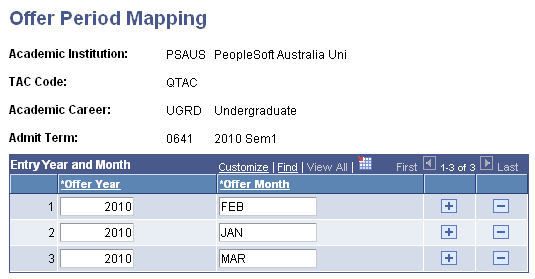
You must have a offer period mapping record for each career and admit term combination.
| Field or Control | Description |
|---|---|
|
Copy from Career |
Copy a offer period mapping record of a career. The system displays the Copy from Career field when you enter the page on an add mode. |
|
Offer Year and Offer Month |
You must enter all the possible offering year and month combinations that may be provided in a TAC file relevant to the career and admit term. When a QTAC File is posted, the TAC Search/Match/Post process will assign the admit term according to the offering year and month mapping for the career applicable to the applicant's program. If there is no mapping for the year and month combination, the admit term on the run control will be assigned. Note: This logic is relevant to only QTAC. For UAC, SATAC and VTAC the system assigns the admit term directly from the TAC load files. |
Mapping Honors Category
Access the Honors Category Map page ().
| Field or Control | Description |
|---|---|
|
TAC Honors Code |
Enter the honors code provided in the TAC Qualifications file. |
|
Honors Category |
Enter the PeopleSoft honors category applicable to the TAC honours code. |
Note:
You should perform this mapping only if you are loading QTAC data.