Setting Up Extracurricular Activities
To set up extracurricular activities, use the Extracurricular Activities component (EXTRA_ACTIVITY_TBL).
This section discusses how to set up extracurricular activities.
Page Used to Set Up Extracurricular Activities
| Page Name | Definition Name | Navigation | Usage |
|---|---|---|---|
|
Extracurricular Activity Table |
EXTRA_ACTIVITY_TBL |
|
Define extracurricular activities for tracking, reporting, and recruiting and admission purposes. |
Setting Up Extracurricular Activities
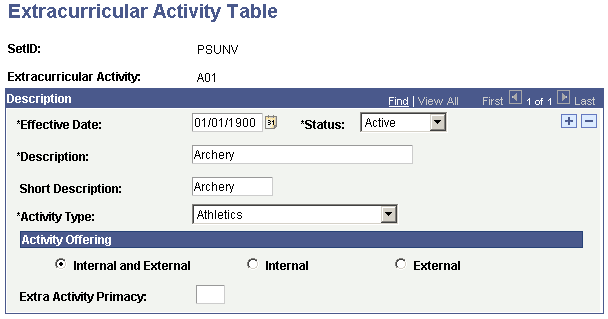
Access the Extracurricular Activity Table page ().
This example illustrates the fields and controls on the Extracurricular Activity Table page. You can find definitions for the fields and controls later on this page.
| Field or Control | Description |
|---|---|
|
Activity Type |
Select an activity type. Activity type values are delivered with your system as translate values. You can modify these translate values. |
Activity Offering
Select an option in the Activity Offering group box to indicate whether the activity is offered by your institution (internal), by an external organization (external), or both.
| Field or Control | Description |
|---|---|
|
Internal and External |
The activity is offered by your institution and by an external organization. These activities are available in Recruiting and Admissions and PeopleSoft Student Records. |
|
Internal |
The activity is offered by your institution only. These activities are available only in Student Records. |
|
External |
The activity is offered by an external organization only. These activities are available only in Recruiting and Admissions. |
Additional Elements
| Field or Control | Description |
|---|---|
|
Extra Activity Primacy |
Enter the extra activity primacy number for this extracurricular activity. Student Records typically uses this field for internal extracurricular activities. The Consolidate Academic Statistics process uses these primacy values to determine a student's primary extracurricular activity when a student is active in more than one academic career during an academic statistics period. The system uses this number as a key to determine the student's primary extracurricular activity. The consolidate academic statistics process reports the student's extracurricular activity that has the lowest primacy number. |