Setting Up OUAC Organizations
Before you can receive data from OUAC, you must define your OUAC organizations. Use the Organization Table component to define OUAC organizations.
This section discusses how to:
-
Add OUAC organizations.
-
Specify a primary contact and department for an OUAC organization.
-
Enter OUAC organization data.
-
Enter school data.
-
Assign grade point average (GPA) types to OUAC organizations.
-
Define school course classifications for OUAC.
-
Define the SECSCH (secondary school) comment category.
Pages Used to Set Up OUAC Organizations
| Page Name | Definition Name | Navigation | Usage |
|---|---|---|---|
|
Organization Table |
EXT_ORG_TABLE |
|
Enter or update data about an organization. View and update information about the primary contact and department for the organization. |
|
Regional |
EXT_ORG_TBL_REG |
|
In the OUAC Organization Data group box, enter the Ministry of Education code, the OUAC institution code, and the current enrollment levels for the new organization. |
|
School Data |
SCC_EXT_ORG_ADM |
|
Enter data that applies to an organization that offers courses. |
|
Organization Affiliation |
EXT_ORG_AFFLTN |
|
Identify details that are important to your institution in affiliation with an organization. |
|
School Course Classification |
SCHOOL_COURSES |
|
Record the specific course offerings for each subject area. |
|
Comment Category Table |
CMNT_CATG_TABLE |
|
Set up comment categories that enable you to group comments for similar purposes. |
Adding OUAC Organizations
Access the Organization Table page ().
Use the Organization Table page to add OUAC organizations. You can enter definitions for the organization, select an organization type, and select a location.
Related Topics
Specifying a Primary Contact and Department for an OUAC Organization
Access the Organization Table page ().
Use the Organization Table page to specify an organization's primary contact person or the department to contact in order to streamline your institution's communications with that organization.
Related Topics
Entering OUAC Organization Data
Access the Regional page ().
This example illustrates the fields and controls on the Regional page. You can find definitions for the fields and controls later on this page.
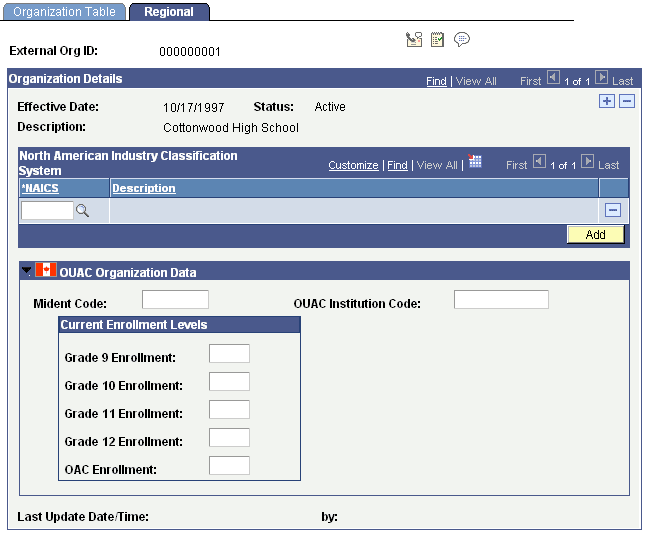
| Field or Control | Description |
|---|---|
|
Mident Code |
Enter the Ontario Ministry of Education six-digit school code. |
|
OUAC Institution Code |
Enter the code that identifies OUAC institutions. When you post OUAC data, the process looks for this code to populate the EXT_ORG_ID field. |
|
Grade 9 (through 12) Enrollment |
Enter the current enrollment levels for the respective grades. |
|
OAC Enrollment |
Enter the total OUAC enrollment. |
Entering School Data
Access the School Data page ().
Use the School Data page to enter school characteristics, school codes, and system default values.
Related Topics
Assigning GPA Types to OUAC Organizations
Access the Organization Affiliation page ().
GPA type must have a value entered to populate a grading scheme on the Courses and Degrees page when OUAC transmissions are processed. This setup is important because grading scheme is a required field and—if it is not populated—the user cannot make any changes to that page without getting an error message. Use the Organization Affiliation page to define a GPA type for an organization.
Defining School Course Classifications for OUAC
Access the School Course Classification page ().
Use the School Course Classification page to define school course classifications for OUAC organizations. The values you enter on this page populate fields on the Courses and Degrees page when you post OUAC transmissions.
Defining the SECSCH Comment Category
Secondary school comments on the A9 transaction appear on the Comments pages. To view them, you must first set up the comment category SECSCH. You must also tie it to at least one 3C group. Use the Comment Category Table page to define the SECSCH comment category. Use the Comment 3C Groups page to tie the SECSCH comment category to a 3C group.
Related Topics