Setting Up Transaction
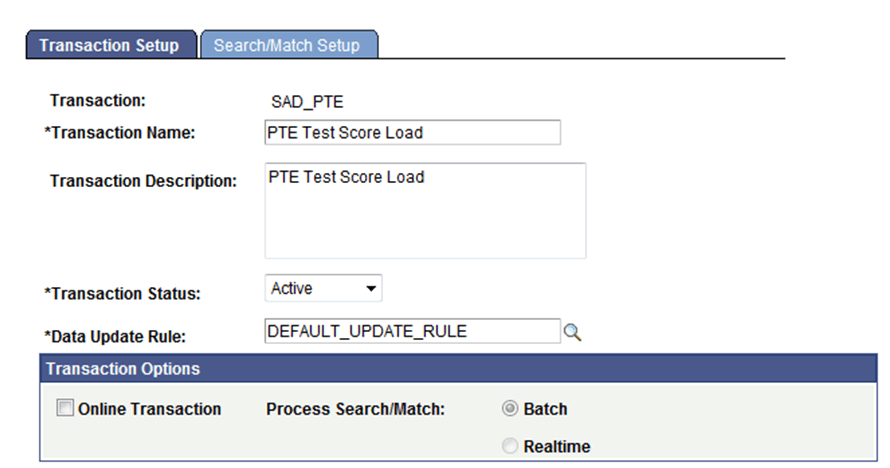
You must define a transaction for each PDL transaction you will be loading. For each prospect or test score template Oracle delivers, transaction codes are also delivered.
This is an example of a delivered transaction code (1 of 2).
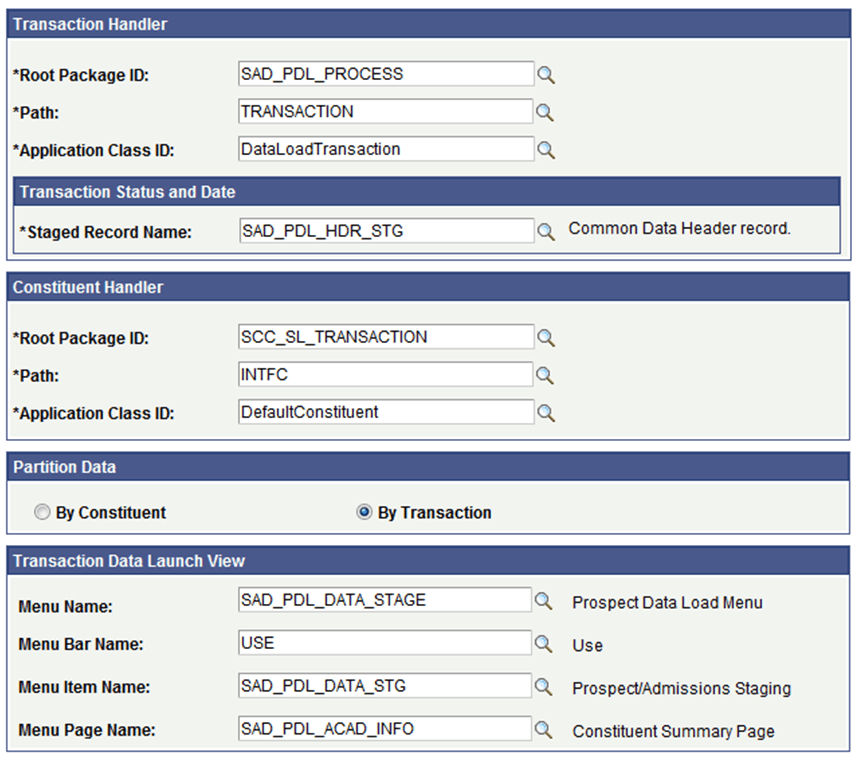
This is an example of a delivered transaction code (2 of 2).
All PDL transactions should be set up with the Online Transaction check box cleared which sets the Process Search/Match option to Batch automatically.
The following table lists the delivered transaction handler values for Prospect/Admissions Data Load transactions. Use these values when defining a transaction handler for any new PDL transaction you may define.
| Root Package ID | Path | Application Class ID |
|---|---|---|
|
SAD_PDL_PROCESS |
TRANSACTION |
DataLoadTransaction |
The staging record name for PDL Transaction Status and Date should be set to SAD_PDL_HDR_STG. This record stores the transaction status and transaction status date value for PDL transactions. You should always use this value when defining any new PDL transaction.
The following table lists the delivered transaction handler values for processing the constituent data that is loaded with your PDL transaction. Use these values when defining a constituent handler for any new PDL transaction you define.
| Root Package ID | Path | Application Class ID |
|---|---|---|
|
SCC_SL_TRANSACTION |
INTFC |
DefaultConstituent |
All PDL transactions should be set to Partition by Transaction which creates one transaction record for each constituent record.
The following table lists the delivered transaction data launch view settings for PDL transactions. You should always use these values when defining the transaction data launch view settings for any new PDL transaction you may create.
| Menu Name | Menu Bar Name | Menu Item Name | Menu Page Name |
|---|---|---|---|
|
SAD_PDL_DATA_STAGE |
USE |
SAD_PDL_DATA_STG |
SAD_PDL_ACAD_INFO |
On the Search/Match Setup tab, define the search parameter, search result code and action to take for each search level that you want to use when processing your PDL transaction.