Viewing Application Evaluation Summaries
Use the Application Evaluation Summary pages to view the status of application evaluations.
This section discusses how to:
-
View overall results of an application evaluation.
-
View committee results of an application evaluation.
-
View evaluator results of an application evaluation.
-
View evaluator detail summary information for an application evaluation.
Pages Used to View Application Evaluation Summaries
| Page Name | Definition Name | Navigation | Usage |
|---|---|---|---|
|
Overall Results |
ADM_EVAL_SUMM |
|
Look up overall results of an application evaluation for an applicant. You must first complete the application evaluation for this person. |
|
Committee Results |
ADM_EVAL_COMM_SUMM |
|
Look up results of committee application evaluations for an applicant. |
|
Evaluator Results |
ADM_EVALUATOR_SUMM |
|
Look up results of evaluators' evaluations of an application. |
|
Evaluator Detail |
ADM_EVAL_DTL_SUM |
|
Look up results of the details of evaluators' evaluations of an application. You must first complete the application evaluation for this person. |
Viewing Overall Results of an Application Evaluation
Access the Overall Results page ().
This example illustrates the fields and controls on the Overall Results page. You can find definitions for the fields and controls later on this page.
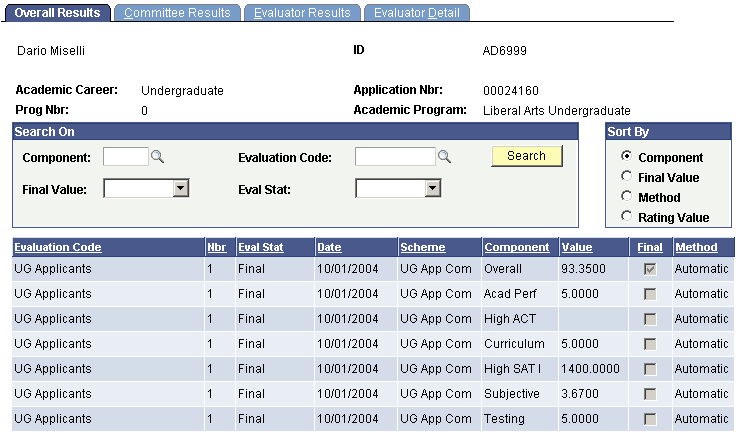
| Field or Control | Description |
|---|---|
|
Component |
Enter a rating component If you want to view summary information by this criterion. When you click the Search button the system retrieves only those components assigned to this application. |
|
Final Value |
Select Yes if you want to view summary information for final value components only. Select No if you do not want to view only final value components. |
|
Evaluation Code |
Enter an evaluation code if you want to view summary information based on this criterion. When you click the Search button the system retrieves only those evaluation codes assigned to this application. |
|
Eval Stat (evaluation status) |
Select an evaluation status if you want to view summary information by this criterion. When you click the Search button the system retrieves overall result information for those evaluations that have matching evaluation statuses that on the Application Evaluation page. |
|
Sort By |
Select whether you want to view the results by Component, Final Value, Evaluation Method, or Rating Value. |
|
Search |
Click this button to bring up the summary information matching your search criteria. If information is found, it displays in the bottom portion of the page. |
Viewing Committee Results of an Application Evaluation
Access the Committee Results page ().
This example illustrates the fields and controls on the Committee Results page. You can find definitions for the fields and controls later on this page.
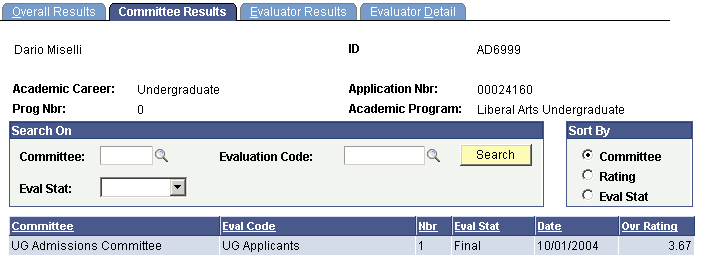
| Field or Control | Description |
|---|---|
|
Committee |
Enter an evaluation committee If you want to view committee information by this criterion. When you click the Search button the system retrieves only those committees assigned to this application. |
|
Evaluation Code |
Enter an evaluation code if you want to view committee information based on this criterion. When you click the Search button the system retrieves only those evaluation codes assigned to this application. |
|
Eval Stat (evaluation status) |
Select an evaluation status if you want to view committee information by this criterion. When you click the Search button the system retrieves overall result information for those evaluations that have matching evaluation statuses that on the Committee Evaluation page. |
|
Committee, Rating, and Eval Stat (evaluation status) |
Select whether you want to view the results of your summary information by committee, rating, or evaluation status. |
|
Search |
Click this button to bring up the summary information matching your search criteria. If information is found, it displays in the bottom portion of the page. |
Viewing Evaluator Results of an Application Evaluation
Access the Evaluator Results page ().
This example illustrates the fields and controls on the Evaluator Results page. You can find definitions for the fields and controls later on this page.
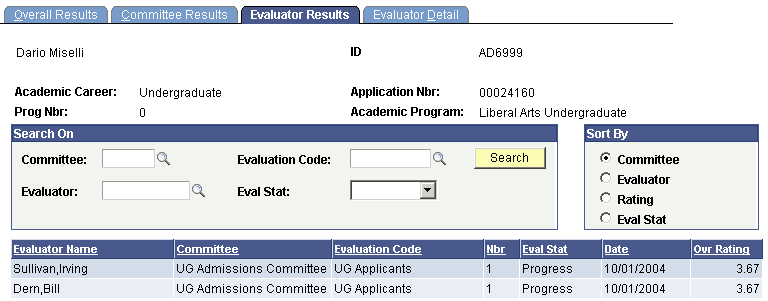
| Field or Control | Description |
|---|---|
|
Committee |
Enter an evaluation committee If you want to view evaluator result information by this criterion. When you click the Search button the system retrieves only those committees assigned to this application. |
|
Evaluation Code |
Enter an evaluation code if you want to view evaluator result information based on this criterion. When you click the Search button the system retrieves only those evaluation codes assigned to this application. |
|
Evaluator |
Enter an evaluator if you want to view evaluator result information for a specific evaluator. |
|
Eval Stat (evaluation status) |
Select an evaluation status if you want to view evaluator result information by this criterion. When you click the Search button the system retrieves evaluator result information for those evaluations that have matching evaluation statuses on the Evaluator Rating page. |
|
Committee, EvaluatorRating, and Eval Stat (evaluation status) |
Select whether you want to view the results of your summary information by committee, evaluator, rating, or evaluation status. |
|
Search |
Click this button to bring up the summary information matching your search criteria. If information is found, it displays in the bottom portion of the page. |
Viewing Evaluator Detail Summary Information for an Application Evaluation
Access the Evaluator Detail page ().
This example illustrates the fields and controls on the Evaluator Detail page. You can find definitions for the fields and controls later on this page.
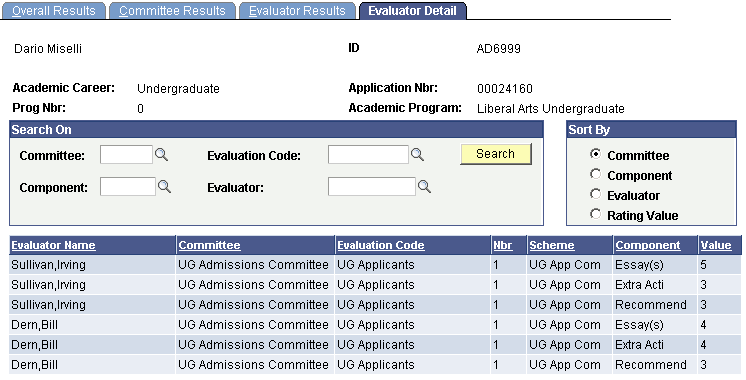
| Field or Control | Description |
|---|---|
|
Committee |
Enter an evaluation committee If you want to view evaluator detail information by this criterion. When you click the Search button the system retrieves only those committees assigned to this application. |
|
Evaluation Code |
Enter an evaluation code if you want to view evaluator detail information based on this criterion. When you click the Search button the system retrieves only those evaluation codes assigned to this application. |
|
Component |
Enter a rating component If you want to view evaluator detail information by this criterion. When you click the Search button the system retrieves only those components assigned to this application. |
|
Eval Stat (evaluation status) |
Enter an evaluation status if you want to view evaluator detail information by this criterion. When you click the Search button the system retrieves evaluator detail information for those evaluations that have matching evaluation statuses on the Application Evaluator Detail page. |
|
Committee, Component, Evaluator, and Rating Value |
Select whether you want to view the results of your summary information by committee, component, evaluator or rating value. |
|
Search |
Click this button to bring up the evaluator detail information matching your search criteria. If information is found, it displays in the bottom portion of the page. |