Viewing EPS Load Results
This section discusses how to view the following data related to the EPS load process:
-
Zip codes
-
Market codes
-
Error messages
-
Suspense messages
-
All messages
Pages Used to View EPS Load Results
| Page Name | Definition Name | Navigation | Usage |
|---|---|---|---|
|
EPS Zip to Market Code |
EPS_ZIP_MRKT_TABLE |
|
View the zip code that is related to the market code. After running the EPS Load External Data process, the EPS data is populated into the EPS Zip to Market Code table. |
|
EPS Market Code Table |
EPS_MRKT_CD_TABLE |
|
View or update the EPS market codes that you loaded through the load process. |
|
EPS Suspense Data |
EPS_SUSP_DATA |
|
View any error messages that may result from the EPS load process. |
|
EPS Suspense Message |
EPS_SUSP_MESSAGE |
|
View the EPS suspense error messages. |
|
EPS Messages |
EPS_MESSAGE_TABLE |
|
View all of the messages generated by the EPS External Load process. |
Viewing EPS Zip Codes Loaded Through the Load Process
Access the EPS Zip to Market Code page ().
This example illustrates the fields and controls on the EPS Zip to Market Code page.
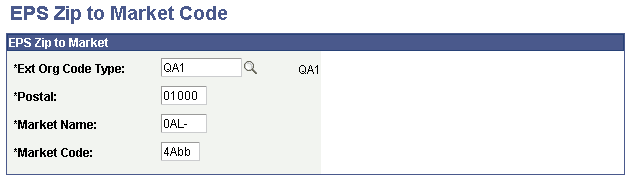
Market codes can be linked to many external organization code types. You can view market code descriptions on the EPS Market Code Table page.
Viewing EPS Load Process Error Messages
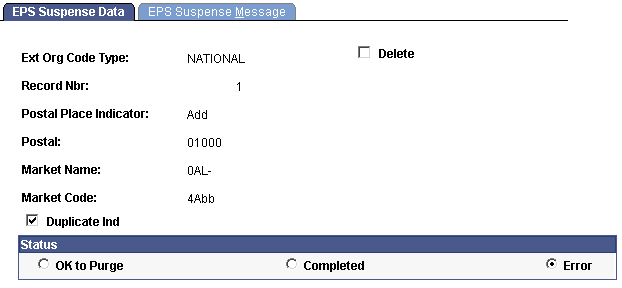
Access the EPS Suspense Data page ().
This example illustrates the fields and controls on the EPS Suspense Data page. You can find definitions for the fields and controls later on this page.
| Field or Control | Description |
|---|---|
|
Delete |
Select to mark this suspense record for deletion. The system deletes the record when you run the EPS Purge Suspense File process. |
|
Duplicate Ind (duplicate indicator) |
The load process selects this check box when it finds a duplicate postal code, market name, and market code within the code type. |
Status
| Field or Control | Description |
|---|---|
|
OK to Purge |
Select to mark the record for purge. When you run the EPS Purge Suspense File process, this record is purged. |
|
Completed |
The load process selects this option when the record has been successfully updated. |
|
Error |
The load process selects this option when it encounters an error, such as a duplicate. The system indicates duplicates by selecting the Duplicate Ind check box. You can decide whether to delete a duplicate record by selecting the Delete check box, or to ignore the duplication by clearing the Duplicate Ind check box. |
Viewing EPS Suspense Messages
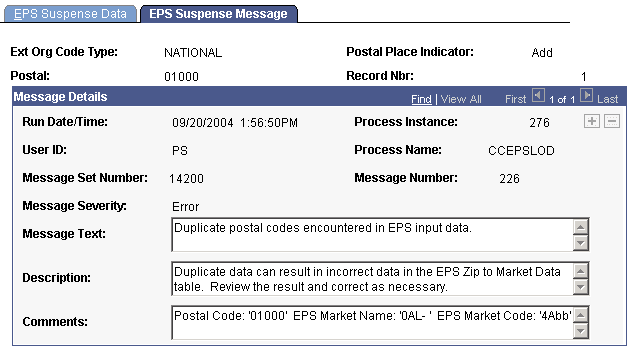
Access the EPS Suspense Message page ().
This example illustrates the fields and controls on the EPS Suspense Message page.
Viewing All Messages Generated from Loading EPS Market Codes
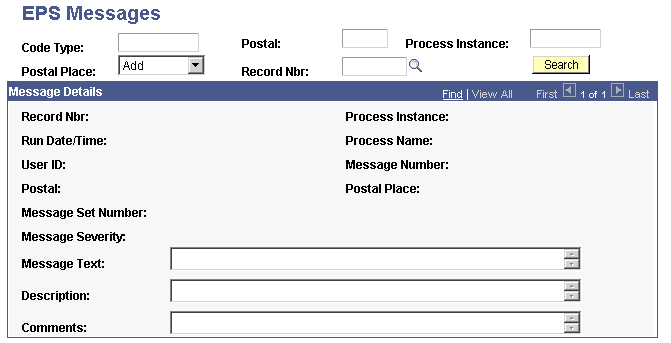
Access the EPS Messages page ().
This example illustrates the fields and controls on the EPS Messages page. You can find definitions for the fields and controls later on this page.
| Field or Control | Description |
|---|---|
|
Code Type, Postal, Process Instance, Postal Place, and Record Nbr (record number) |
Use these fields to narrow the selection of messages that you want to display. |
|
Search |
Click to display the messages based on your search. |