Setting Up Credit Card Types
To set up credit card types, use the Credit Card Type component (CREDIT_CARD_TYPE).
Your institution must have contracts with credit card providers (such as VISA or Master Card) to be able to accept payments using their cards. To prevent users from attempting to record payments using unauthorized cards, you must define the credit card types accepted by your institution.
Page Used to Set Up Credit Card Types
| Page Name | Definition Name | Navigation | Usage |
|---|---|---|---|
|
Credit Card Type |
CREDIT_CARD_TYPE |
|
Define accepted credit card types. |
Defining Accepted Credit Card Types
Access the Credit Card Type page ().
This example illustrates the fields and controls on the Credit Card Type page. You can find definitions for the fields and controls later on this page.
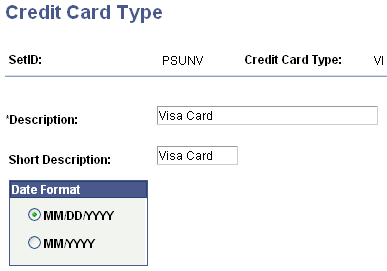
Date Format
Select an expiration date format.
| Field or Control | Description |
|---|---|
|
MM/DD/YYYY |
Select to include the month, day, and year in the expiration date format. |
|
MM/YYYY |
Select to include only the month and year in the expiration date format. |