Setting Up IBAN Information
The International Bank Account Number (IBAN) is an account number that uniquely identifies a bank account and is assigned according to ISO standards so that it can be used across national borders. PeopleSoft applications can include this information at the bank account level.
Page Used to Set Up IBAN Information
| Page Name | Definition Name | Navigation | Usage |
|---|---|---|---|
|
IBAN Country Setup |
SRC_BANK |
|
Enable the IBAN feature for a specific country. |
Enabling IBAN
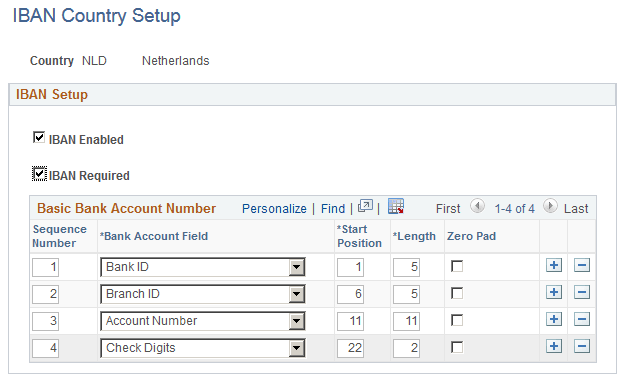
Access the IBAN Country Setup page ().
This example illustrates the fields and controls on the IBAN Country Setup page. You can find definitions for the fields and controls later on this page.
| Field or Control | Description |
|---|---|
|
IBAN Enabled |
Select this check box to enable the IBAN functionality for this country. If you enable IBAN, the IBAN field and the Edit IBAN link appear on pages such as the Bank Accounts - Students page. See: |
|
IBAN Required |
Select this check box to require an IBAN value for accounts in this country. |
Use the Basic Bank Account Number (BBAN) group box to create BBAN validation rules.