Setting Up the Ledger Fields Table
To set up the ledger fields table, use the Ledger Fields Table component (SF_LED_FLDS_TBL).
Note:
This page is not used for integration with Oracle Financials.
If you select Oracle Financials as the financial system, you must manually remove the Ledger Fields Table page from the menu navigation by changing the Permission Lists. You should create a custom permission list to hide the menu navigation to this component.
Understanding the Ledger Fields Table Setup
When you define an item type GL Interface, you specify the ledger to which account information is transferred. The Ledger Fields Table defines the fields that are available. Not all available ChartFields are needed to convey the accounting information. To prevent entering data into an incorrect ChartField, define only the values that you need. The business unit, account, and ledger fields are always required for the GL Interface definition and do not need to be added to the Ledger Fields Table.
Page Used to Set Up the Ledger Fields Table
| Page Name | Definition Name | Navigation | Usage |
|---|---|---|---|
|
Ledger Fields Table |
SF_LED_FLDS_TBL |
|
Define ledger fields. |
Defining Ledger Fields
Access the Ledger Fields Table page ().
This example illustrates the fields and controls on the Ledger Fields Table page. You can find definitions for the fields and controls later on this page.
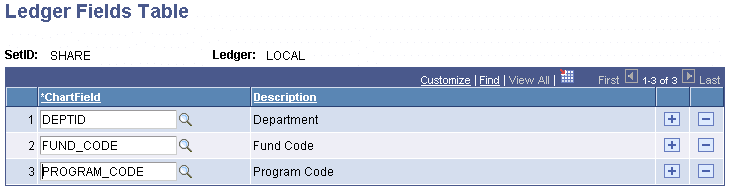
This page is not available if Oracle Financials is selected in the Financial System group box on the SF Installation page.
| Field or Control | Description |
|---|---|
|
ChartField |
Select the database field name that represents a valid ChartField. |