Linking Test Trees to Programs
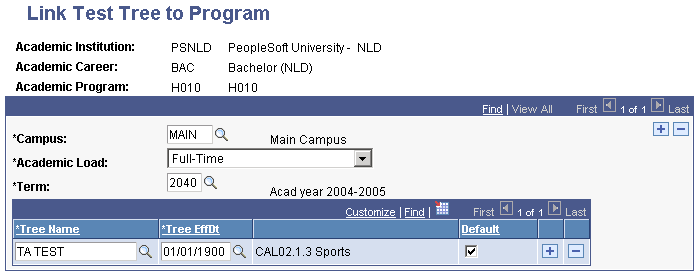
Link test trees to programs to automate the process of linking students to test trees. When an applicant is matriculated, the system looks at the combination of institution, career, program, campus, load, and term for the individual and automatically links the student to the test tree with the same combination.
Page Used to Link Test Trees to Programs
| Page Name | Definition Name | Navigation | Usage |
|---|---|---|---|
|
Link Test Tree to Program |
SSR_PROG_TREE_NLD |
|
Link test trees to academic programs. |
Linking the Test Tree to a Program
Access the Link Test Tree to Program page ().
This example illustrates the fields and controls on the Link Test Tree to Program page. You can find definitions for the fields and controls later on this page.
| Field or Control | Description |
|---|---|
|
Campus |
Enter the campus for this test tree. See Campus Solutions Application Fundamentals: Setting Up Campuses. |
|
Academic Load |
Select the academic load for this test tree. See Campus Solutions Application Fundamentals: Defining Academic Level and Load Rules. |
|
Term |
Enter the term for this test tree. Linking the test to a term enables the system to automatically link students to a test tree when they are matriculated. SeeCampus Solutions Application Fundamentals: Defining Terms, Sessions, and Session Time Periods |
|
Tree Name |
Enter the test tree for this academic program, campus, academic load, and term combination. |
|
Tree EffDt |
Enter the effective date of the tree. Test trees can have multiple effective dates to accommodate several versions of the same tests. |
|
Default |
Select whether this test tree should be used as the default for this academic program. |