Reviewing Transcript Print Areas
To set up transcript print areas, use the Transcript Print Area Table component (TSCRPT_PRT_AREA).
Transcript print areas are associated with codes that define areas of the transcript on which various types of transcript data appear. Print area values are delivered with your system as translate values. Do not modify these values in any way. Any modifications to these values require a substantial programming effort.
Page Used to Review Transcript Print Areas
| Page Name | Definition Name | Navigation | Usage |
|---|---|---|---|
|
Transcript Print Area Table |
PRINT_AREA_TABLE |
|
Review delivered transcript print areas. |
Reviewing the Transcript Print Area Table
Access the Transcript Print Area Table page ().
This example illustrates the fields and controls on the Transcript Print Area Table page. You can find definitions for the fields and controls later on this page.
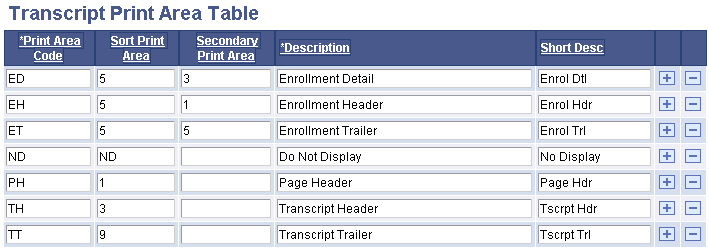
| Field or Control | Description |
|---|---|
|
Print Area Code |
An acronym that defines the transcript print area. |
|
Sort Print Area, Secondary Print Area |
The values in these fields determine how the system sorts the print areas on the transcript. |
|
Description |
Text used on the Define Transcript Type component to determine print detail. |
|
Short Desc (short description) |
Value used internally by system processes. Not visible on any pages. |
Note:
The values on the Transcript Print Area Table page are delivered with your system as translate values. Do not modify these values in any way. Any modifications to these values require a substantial programming effort.